Skip to content
View in the app

A better way to browse. Learn more.

Demonland

A full-screen app on your home screen with push notifications, badges and more.

To install this app on iOS and iPadOS
  1. Tap the Share icon in Safari
  2. Scroll the menu and tap Add to Home Screen.
  3. Tap Add in the top-right corner.
To install this app on Android
  1. Tap the 3-dot menu (⋮) in the top-right corner of the browser.
  2. Tap Add to Home screen or Install app.
  3. Confirm by tapping Install.

NEW LOOK FORUM: Please be patient

Featured Replies

  • Author
Just now, Biffen said:

Often i have to read other peoples replies before giving consideration to my own.

Is there a "monologue" feature where i can just delete answers I dislike and carry on like i know everything there is to know on any given subject?

I would suggest that you just put everyone on ignore and only read your own posts. That's what I do.

 
2 minutes ago, Demonland said:

on a pc.

on a mobile you simply use your finger to click on the text of the quote box and it will create a blue square outline around the text in the quote box as well as the square appear in the top left corner above the quote box. you can then either edit the text within the quote box or click the square in the top left and delete the quote box by hitting back space.

Mobile touchscreen are inherently cumbersome adding extra steps to what you can do with a mouse.

I suppose I'm just a grumpy old bugger...lol

I didn't have to do anything before...and now I do. Yes.  A few steps on a PC.and a few more on the mobiles but tbh...just something I'd rather not have to do...if I don't have to.

It's just feedback guys :)

2 hours ago, Demonland said:

Fixed. Can you please confirm? Unless you are ignoring me and can't see this post.

Ha! Fixed yes, thank-you.

 
5 hours ago, Demonland said:

I would suggest that you just put everyone on ignore and only read your own posts. That's what I do.

Doesn't quite work for me, as I put myself on ignore a while back.

Did something happen to the little toggle switch that allowed you to go to the basic text/HTML editor?


erased

Edited by daisycutter
erased as wrong quote inserted - system bug

5 minutes ago, mauriesy said:

Did something happen to the little toggle switch that allowed you to go to the basic text/HTML editor?


seems so. sometimes it was handy

On 12/11/2015 at 9:59 PM, beelzebub said:

I suppose I'm just a grumpy old bugger...lol

I didn't have to do anything before...and now I do. Yes.  A few steps on a PC.and a few more on the mobiles but tbh...just something I'd rather not have to do...if I don't have to.

It's just feedback guys :)

you had me at me grumpy old bugger...

 
2 hours ago, Demonland said:

There is a button on the Text Editor toolbar called Source. I think that is what you are looking for.

Is there? I'm looking hard.


Andy, I posted a comment in the Web Designer sense of humour thread (or whatever it's called) which has now disappeared. If it was deleted because a Moderator thought it was inappropriate, then fine (I don't agree, but I'm not complaining. That's not the reason for this post). But if it's just "disappeared" for no reason, then I should bring it to your attention here as it might suggest some other glitch. 

6 minutes ago, La Dee-vina Comedia said:

Andy, I posted a comment in the Web Designer sense of humour thread (or whatever it's called) which has now disappeared. If it was deleted because a Moderator thought it was inappropriate, then fine (I don't agree, but I'm not complaining. That's not the reason for this post). But if it's just "disappeared" for no reason, then I should bring it to your attention here as it might suggest some other glitch. 

LDVC it wasn't a glitch mate. Yes a mod did delete it for it's inappropriate content.

1 hour ago, H_T said:

LDVC it wasn't a glitch mate. Yes a mod did delete it for it's inappropriate content.

Ok, thanks. I apologise for posting something inappropriate. I didn't realise that it could have been interpreted that way.

Sorry if this is mentioned but from the video I just posted I think the default youtube video size is too big and I'm not sure if I can self edit it.

Thoughts?


  • Author
10 hours ago, Georgiou R.R. Martin said:

Sorry if this is mentioned but from the video I just posted I think the default youtube video size is too big and I'm not sure if I can self edit it.

Thoughts?

It appears as if the video size adjusts depending on how big your screen.

42 minutes ago, mauriesy said:

I still can't find the "Source" button.

For HTML  the 'code' button - looks like this "<>" . Between Quote and Emoticon buttons.

49 minutes ago, mauriesy said:

I still can't find the "Source" button.

Is it near the any key?

The "<>" key is for inserting code. I am looking for the switch that toggles the editor between HTML text and the normal 'WYSIWYG' editor.

It used to be on the very left top of the editor window and looked like a light switch. There is no 'source' key anywhere on my editor, although if it existed it appears that would do the same job.

I've noticed some other IP Board editors have extra buttons like subscript and superscript. There must be some things that you can globally turn on and off.


8 hours ago, Demonland said:

It appears as if the video size adjusts depending on how big your screen.

Ok. It does fill the screen nicely. it's not huge, just doesn't leave room for anything else so I was thinking in the scheme of being considerate and not having people scroll past big videos it could be smaller but it's fine how it is.

  • Author
5 hours ago, mauriesy said:

The "<>" key is for inserting code. I am looking for the switch that toggles the editor between HTML text and the normal 'WYSIWYG' editor.

It used to be on the very left top of the editor window and looked like a light switch. There is no 'source' key anywhere on my editor, although if it existed it appears that would do the same job.

I've noticed some other IP Board editors have extra buttons like subscript and superscript. There must be some things that you can globally turn on and off.

Are you using a computer or phone to use Demonland?

I'm using a PC, Windows 10, Firefox.

Here's my editor window.

editor-window.jpg.f429cac1733eda1bbe798d

 
41 minutes ago, mauriesy said:

I'm using a PC, Windows 10, Firefox.

Here's my editor window.


brave man, using win10 :)


Archived

This topic is now archived and is closed to further replies.

Featured Content

  • CASEY: Brisbane

    From the outset, the Casey Demons lacked any spring in their steps. They were out-hustled and out-bustled and finally outplayed by the Brisbane Lions by 38 points on their home turf in perfect conditions at Casey Fields.

      • Thanks
    • 0 replies
  • POSTGAME: Brisbane

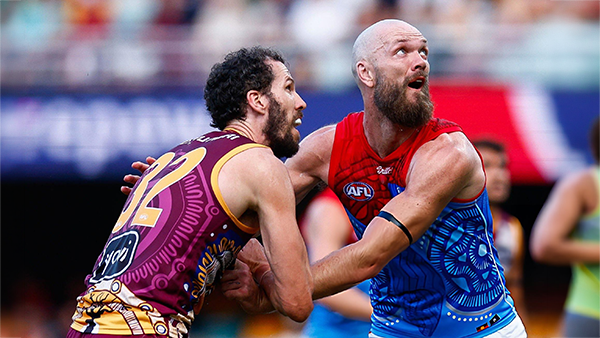
    MCG magic strikes again as the Demons unleash a devastating second-half surge to edge Brisbane in a thrilling two-point statement win. Never in doubt 🍀🔴🔵😈

      • Shocked
      • Haha
      • Love
      • Like
    • 413 replies
  • PODCAST: Brisbane

    Andy is still traveling but the boys will still be bringing you a podcast this week so get your questions and comments in for Binman and George as they dissect the thrilling win over the Lions at the G.

      • Thanks
      • Like
    • 10 replies
  • VOTES: Brisbane

    Reigning Champion and Captain Max Gawn already has a healthly lead just 5 rounds in to the Demonland Player of the Year Award vote count. He leads from Kozzy Pickett, Jack Steele, Tom Sparrow & Jacob van Rooyen. Your votes please. 6, 5, 4, 3, 2 & 1.

      • Thanks
    • 62 replies
  • GAMEDAY: Brisbane

    It's Game Day and the Demons return to the MCG after a dismal performance in Gather Round to face the reigning dual Premiers Brisbane. What do expect to see from the Dees today?

      • Thanks
    • 568 replies
  • PREVIEW: Brisbane

    They really had me fooled when I picked them with great confidence to beat the Bombers at Gather Round last week. I should have recognised that nothing is more quintessentially Melbourne than defeating the undefeated early premiership favourite one week and losing to a winless cellar dweller on its way to establishing a record losing streak the next. 

      • Clap
      • Thanks
      • Like
    • 6 replies

Account

Navigation

Search

Search

Configure browser push notifications

Chrome (Android)
  1. Tap the lock icon next to the address bar.
  2. Tap Permissions → Notifications.
  3. Adjust your preference.
Chrome (Desktop)
  1. Click the padlock icon in the address bar.
  2. Select Site settings.
  3. Find Notifications and adjust your preference.