Demonland
Primary Administrators
-
Joined
-
Last visited
Everything posted by Demonland
-
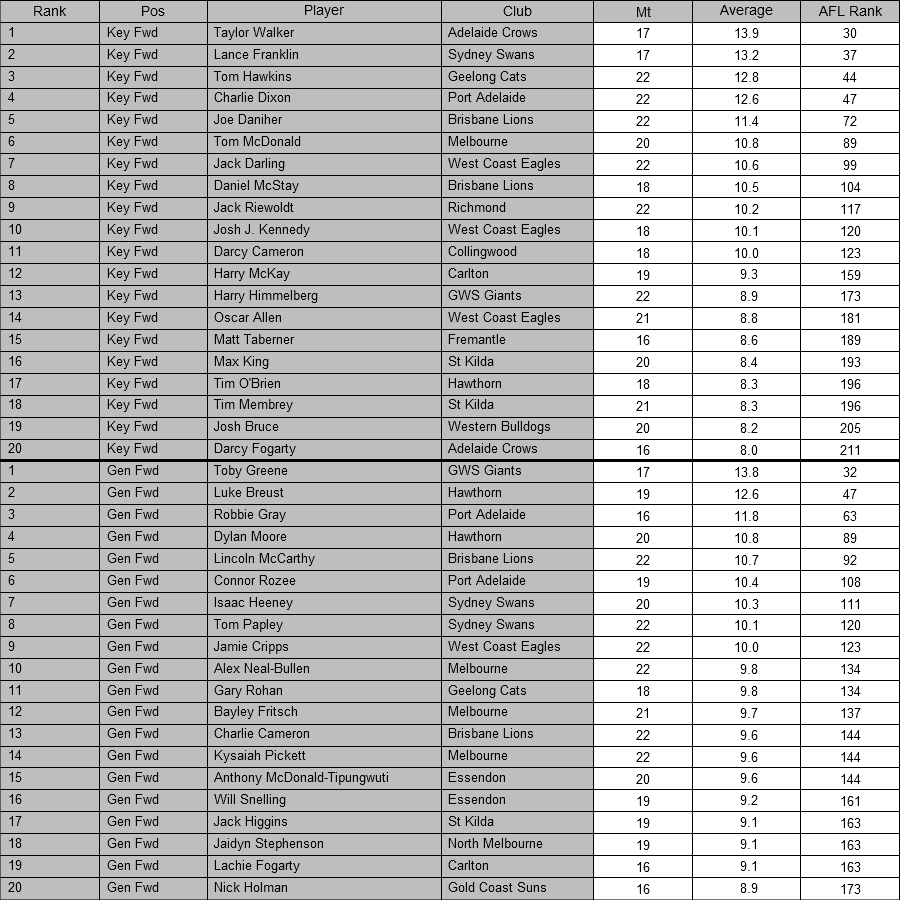
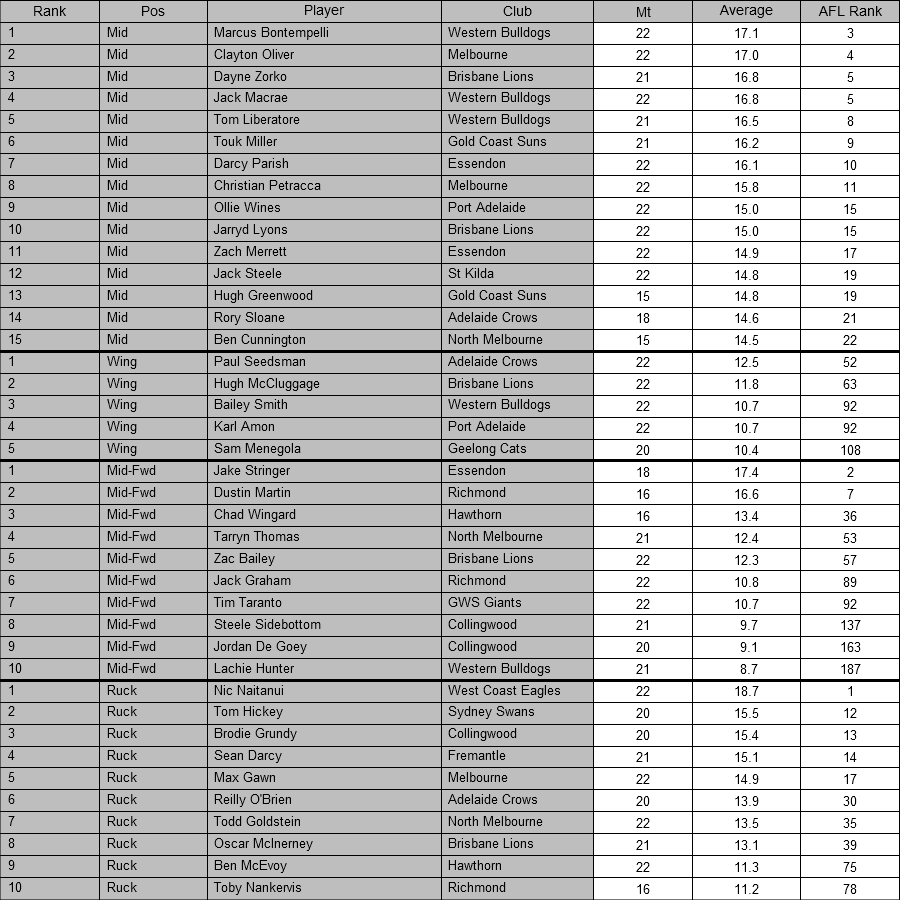
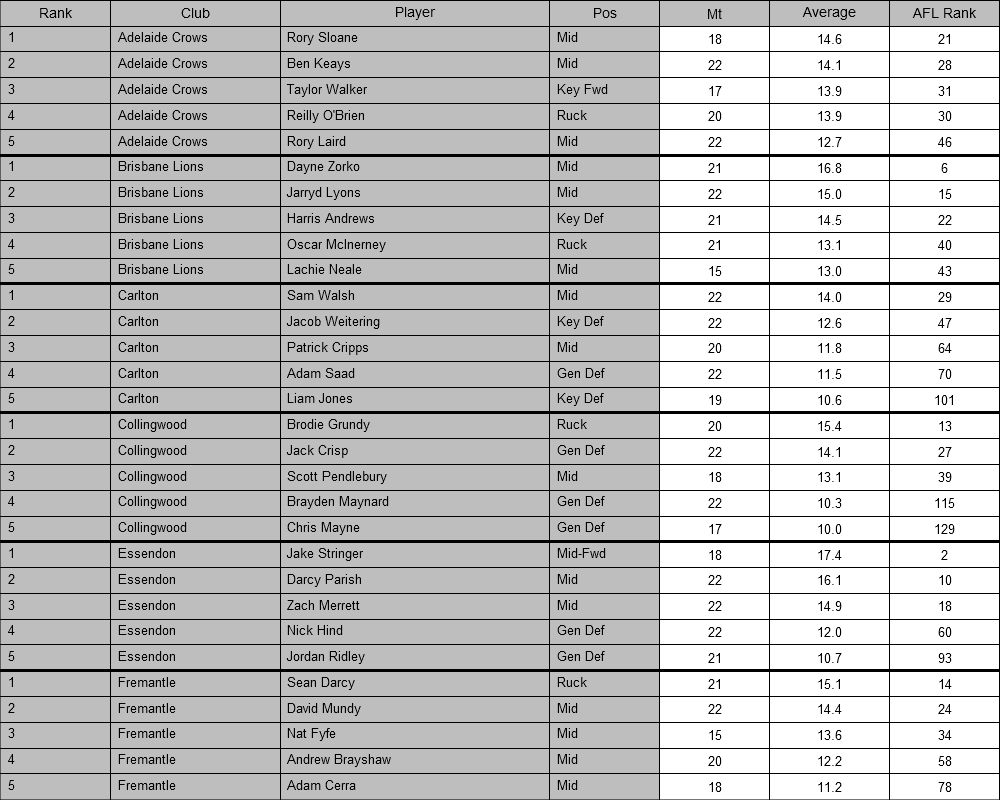
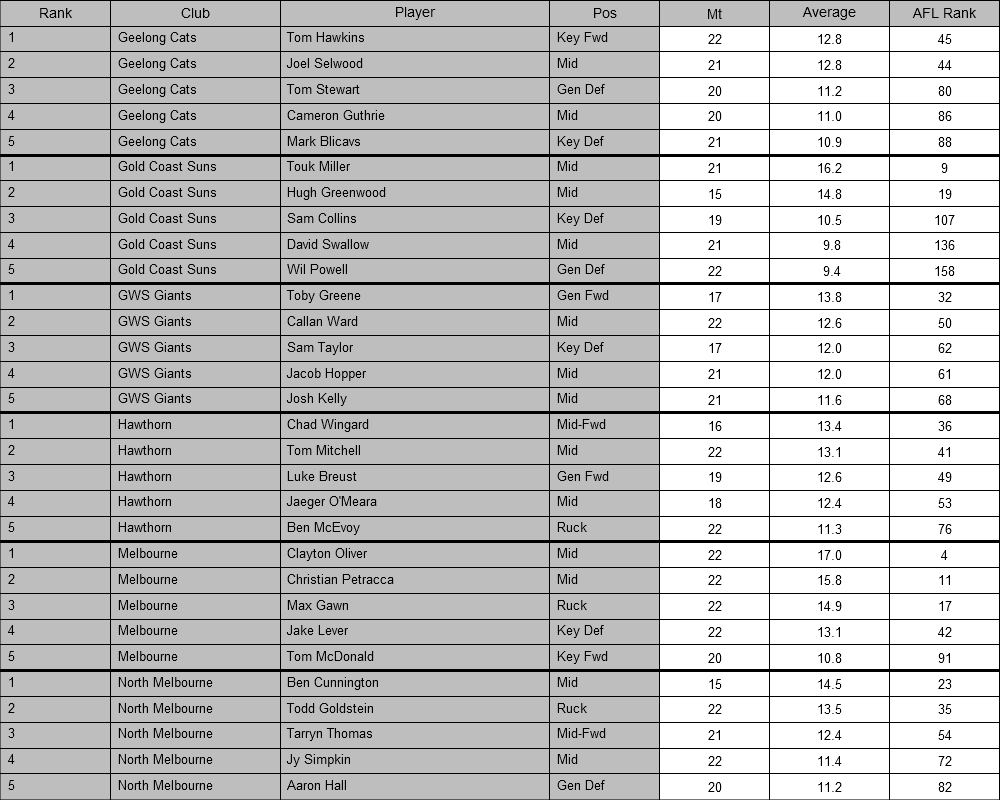
Swamp deleted this incorrect tweet2021 AFL Coaches Association Champion Player of the Year Award 114 – Clayton Oliver (Melbourne) 101 – Marcus Bontempelli (Western Bulldogs) 101 – Ollie Wines (Port Adelaide) 100 – Jack Steele (St Kilda) 97 – Touk Miller (Gold Coast SUNS) 92 – Sam Walsh (Carlton) 91 – Zach Merrett (Essendon) 86 – Christian Petracca (Melbourne) 81 – Darcy Parish (Essendon) 74 – Rory Laird (Adelaide) Clayton Oliver votes: round-by-round Round 1 – Melbourne v Fremantle AFLCA votes: 7 Round 2 – St Kilda v Melbourne AFLCA votes: 9 Round 3 – GWS Giants v Melbourne AFLCA votes: 0 Round 4 – Melbourne v Geelong AFLCA votes: 4 Round 5 – Hawthorn v Melbourne AFLCA votes: 3 Round 6 – Melbourne v Richmond AFLCA votes: 3 Round 7 – North Melbourne v Melbourne AFLCA votes: 0 Round 8 – Melbourne v Sydney AFLCA votes: 6 Round 9 – Melbourne v Carlton AFLCA votes: 10 Round 10 – Adelaide v Melbourne AFLCA votes: 10 Round 11 – Western Bulldogs v Melbourne AFLCA votes: 9 Round 12 – Melbourne v Brisbane AFLCA votes: 7 Round 13 – Melbourne v Collingwood AFLCA votes: 0 Round 14 – BYE Round 15 – Essendon v Melbourne AFLCA votes: 3 Round 16 – Melbourne v GWS Giants AFLCA votes: 0 Round 17 – Port Adelaide v Melbourne AFLCA votes: 8 Round 18 – Melbourne v Hawthorn AFLCA votes: 6 Round 19 – Melbourne v Western Bulldogs AFLCA votes: 7 Round 20 – Gold Coast SUNS v Melbourne AFLCA votes: 9 Round 21 – West Coast Eagles v Melbourne AFLCA votes: 3 Round 22 – Melbourne v Adelaide AFLCA votes: 0 Round 23 – Geelong v Melbourne AFLCA votes: 10Melbourne v Brisbane at Adelaide Oval, 7pm ACST MELBOURNE In: Nil Out: J.Jordon (medi-sub) Last week's sub: J.Jordon (unused) BRISBANE In: H.Andrews, M.Robinson Out: C.Ah Chee (groin), R.Lester (hamstring), R.Mathieson (medi-sub) Last week's sub: R.Mathieson (unused)I imagine we’ll get the same treatment.K-RockRadio commentary … Triple M 3AW ABCOnly 3 players across two teams.

Account
Navigation
Search
Configure browser push notifications
Chrome (Android)
- Tap the lock icon next to the address bar.
- Tap Permissions → Notifications.
- Adjust your preference.
Chrome (Desktop)
- Click the padlock icon in the address bar.
- Select Site settings.
- Find Notifications and adjust your preference.
Safari (iOS 16.4+)
- Ensure the site is installed via Add to Home Screen.
- Open Settings App → Notifications.
- Find your app name and adjust your preference.
Safari (macOS)
- Go to Safari → Preferences.
- Click the Websites tab.
- Select Notifications in the sidebar.
- Find this website and adjust your preference.
Edge (Android)
- Tap the lock icon next to the address bar.
- Tap Permissions.
- Find Notifications and adjust your preference.
Edge (Desktop)
- Click the padlock icon in the address bar.
- Click Permissions for this site.
- Find Notifications and adjust your preference.
Firefox (Android)
- Go to Settings → Site permissions.
- Tap Notifications.
- Find this site in the list and adjust your preference.
Firefox (Desktop)
- Open Firefox Settings.
- Search for Notifications.
- Find this site in the list and adjust your preference.