





Demonland
Primary Administrators
-
Joined
-
Last visited
Everything posted by Demonland
-
What's that sound after a goal is scored? Oh yeah crowds. Real crowd noise.
-
Cat's forwards will be too strong.
-
Adelaide Oval deck looks great.
-
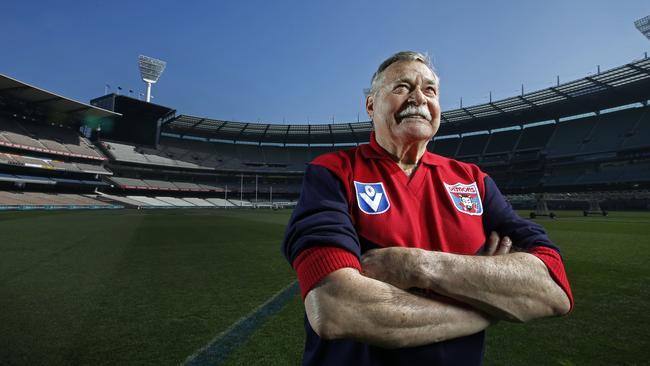
If WA locksdown or gets community cases they can’t contain they’ll likely lose the opportunity so you’d think the next best option will be SA with a crowd.Who fancies a Grand Final against Port in Adelaide?Next question. Why are NSW truck drivers allowed anywhere? I understand goods need to get around the country but surely some kind of COVID safe transfer/handover at the borders can occur for essential goods to mitigate risk from high risk areas.Why would any AFL player go out to a Shopping Centre during lockdown?Hotel quarantine cases or community cases?How are the AFL players not lockeddown? This could end a team's season.How are the AFL players not lockeddown? This could end a team's season.The greatest Demon A HIGHWAY OF DEMONS by Whispering Jack CHAPTER SIXTEEN - RETURN TO NEVERLAND I have a six year old grandson who recently took up the family tradition of following the Demons. He had his first taste of the game a few years ago when he went to the “G” with his parents to watch the 107-point massacre of Carlton and he went to another game in the following season which was also a W for the Dees. But his appetite for the club has grown exponentially this year and when I last saw him before lockdown, he was running up and down our hallway, kicking a football and pretending he was Max Gawn. Still, it wasn’t until our daughter sent us two text messages with separate video clips on Saturday night that I realised how much of a football tragic he had become. He’s much like his grandfather was at the same age back in 1955 but my hallway hero was the great Ronald Dale Barassi. The first piece of SMS vision was from half time when the Demons trailed the Cats by 39 points. He was in mid-tantrum, tears welling in his eyes, bellowing something about waiting for the game since 8 o’clock in the morning and it just wasn’t fair! The second clip was taken an hour later with the television flickering in the background as Max lined up for the fateful goal that led to Melbourne’s first top of the table finish since my hero of old led them there 57 years earlier. It was all happiness and joy. Football does that to you. Always has and always will if you’re a winner, but if you’re a loser then a great amount of stoicism tends to flow under the bridge over time. And you almost become inured to a fate that consigns the dreams of childhood to some unattainable Neverland to which you can never return. The great Ronald Dale Barassi was every boy’s hero back in the day. I became a fan by chance at Christmas 1954 when I went with my mother and cousin to see the Disney movie “Peter Pan”. Afterwards, we took a detour into Myers and I met Santa who gave each of us a shiny blue tie with a picture of a Demon footballer. Soon enough, I was smitten by Ron. Barassi didn’t have the smooth and silky skills of Robbie Flower who came to the fore a generation later but what he had was sheer power backed up by a fierce determination to win. That was what took him and the Melbourne Football Club to six premierships in the decade that was to follow. I even got to meet my hero in the studios of Channel 7 on The Happy Show around 1960 when I won a novelty competition that snared me a pair of Barassi footy boots . I wore them throughout the winter and into the following season until I outgrew them. Not only did I wear the number 31 on the back of my jumper but my sons wore it as well — from their young ages right through to their amateur Under 19s and senior football days. RDB, as he came to be called, was not only our hero and our Mister Football, he was also a great role model for the community. He proved that time and again even well beyond his career in the game. In his mid-seventies, he was assaulted in St Kilda when he went to the aid of a young woman he saw being punched to the ground after a dinner party. As they say in the classics, “all good things come to an end”. In the dying days of 1964, exactly ten years after I became a convert, the announcement came that Barassi, who had led the Demons to the top of the home and away season ladder and held premiership cup aloft that year, was joining Carlton as its captain/coach for 1965. The news hit us like a thunderbolt. Writing in the book "The Coach", John Powers described the move as one that "… shattered many people's beliefs in the traditional concepts of sportsmanship and loyalty. Letters of protest poured into the papers and the Melbourne Football Club. Small boys wept." Needless to say, I was one of the shattered generation of young Demon tragics who woke up on 23 December, 1964 to the bad news. I’ve come across the vision below which accurately sums up how we all felt at the time, although the story teller (whom I call “Peter Pan” because he typifies our experiences of long ago), is a week or so out because he recalls the event as happening in 1965. That’s no big deal. We’ve waited long enough and it will be even less of a big deal if the class of 2021 can emulate the deeds of our hero of bygone days and return us to the Neverland of our dreams. I’m hoping that all of the little kids who, like my grandson, wear the red and blue and the older kids like me can revel in that taste in the month ahead.
 According to the modelling we're the least favourite in Week 01.I agree. They will cruise home. I don't rate Port at all. The crowd will help but if Geelong get on top early they can nullify that.
Account
Navigation
Search
Configure browser push notifications
Chrome (Android)
- Tap the lock icon next to the address bar.
- Tap Permissions → Notifications.
- Adjust your preference.
Chrome (Desktop)
- Click the padlock icon in the address bar.
- Select Site settings.
- Find Notifications and adjust your preference.
Safari (iOS 16.4+)
- Ensure the site is installed via Add to Home Screen.
- Open Settings App → Notifications.
- Find your app name and adjust your preference.
Safari (macOS)
- Go to Safari → Preferences.
- Click the Websites tab.
- Select Notifications in the sidebar.
- Find this website and adjust your preference.
Edge (Android)
- Tap the lock icon next to the address bar.
- Tap Permissions.
- Find Notifications and adjust your preference.
Edge (Desktop)
- Click the padlock icon in the address bar.
- Click Permissions for this site.
- Find Notifications and adjust your preference.
Firefox (Android)
- Go to Settings → Site permissions.
- Tap Notifications.
- Find this site in the list and adjust your preference.
Firefox (Desktop)
- Open Firefox Settings.
- Search for Notifications.
- Find this site in the list and adjust your preference.





