





Demonland
Primary Administrators
-
Joined
-
Last visited
-
test
-
WE'RE LIVE
-
-
afl.com.auCoaches' votes, R7: Two stars level at the top, SIX perfe...The coaches' votes for the round seven games are inRound 7Votes by MatchWestern Bulldogs v Sydney10 Charlie Curnow (SYD) 8 Marcus Bontempelli (WB) 6 Brodie Grundy (SYD) 4 Tom McCartin (SYD) 2 Tom Papley (SYD) Richmond v Melbourne10 Kysaiah Pickett (MELB) 8 Tom Sparrow (MELB) 6 Caleb Windsor (MELB) 2 Bayley Fritsch (MELB) 2 Jack Steele (MELB) 1 Blake Howes (MELB) 1 Max Gawn (MELB) Hawthorn v Gold Coast9 Jai Newcombe (HAW) 7 Jack Gunston (HAW) 5 Jarman Impey (HAW) 4 Josh Battle (HAW) 2 Karl Amon (HAW) 2 Connor MacDonald (HAW) 1 Jack Scrimshaw (HAW) Essendon v Collingwood10 Scott Pendlebury (COLL) 8 Nick Daicos (COLL) 4 Jordan De Goey (COLL) 3 Josh Daicos (COLL) 2 Dan Houston (COLL) 2 Jack Crisp (COLL) 1 Roan Steele (COLL) Port Adelaide v Geelong10 Jason Horne-Francis (PORT) 8 Mitchell Georgiades (PORT) 6 Zak Butters (PORT) 3 Jase Burgoyne (PORT) 2 Jordon Sweet (PORT) 1 Kane Farrell (PORT) Fremantle v Carlton9 Shai Bolton (FRE) 9 Luke Jackson (FRE) 5 Sam Walsh (CARL) 4 Andrew Brayshaw (FRE) 2 Patrick Cripps (CARL) 1 Brodie Kemp (CARL) St Kilda v West Coast7 Nasiah Wanganeen-Milera (STK) 7 Jack Higgins (STK) 7 Hugo Garcia (STK) 7 Callum Wilkie (STK) 1 Bradley Hill (STK) 1 Marcus Windhager (STK) Brisbane v Adelaide10 Lachie Neale (BL) 8 Charlie Cameron (BL) 5 Zac Bailey (BL) 3 Sam Draper (BL) 2 Will Ashcroft (BL) 1 Jordan Dawson (ADEL) 1 Ty Gallop (BL) Greater Western Sydney v North Melbourne10 Toby Greene (GWS) 6 Lachie Ash (GWS) 6 Harry Sheezel (NMFC) 6 Tristan Xerri (NMFC) 1 Brent Daniels (GWS) 1 Lachie Whitfield (GWS) LEADERBOARD48 Zak Butters PORT 48 Nick Daicos COLL 36 Marcus Bontempelli WB 32 Callum Wilkie STK 31 Max Gawn MELB 30 Jason Horne-Francis PORT 29 Lachie Neale BL 29 Jai Newcombe HAW 28 Christian Petracca GCFC 27 Max Holmes GEEL 27 Luke Jackson FRE 27 Kysaiah Pickett MELB 26 Brodie Grundy SYD 26 Isaac Heeney SYD 26 Bailey Smith GEEL
-
We're LIVE in 40 minutes @ 9pm
-
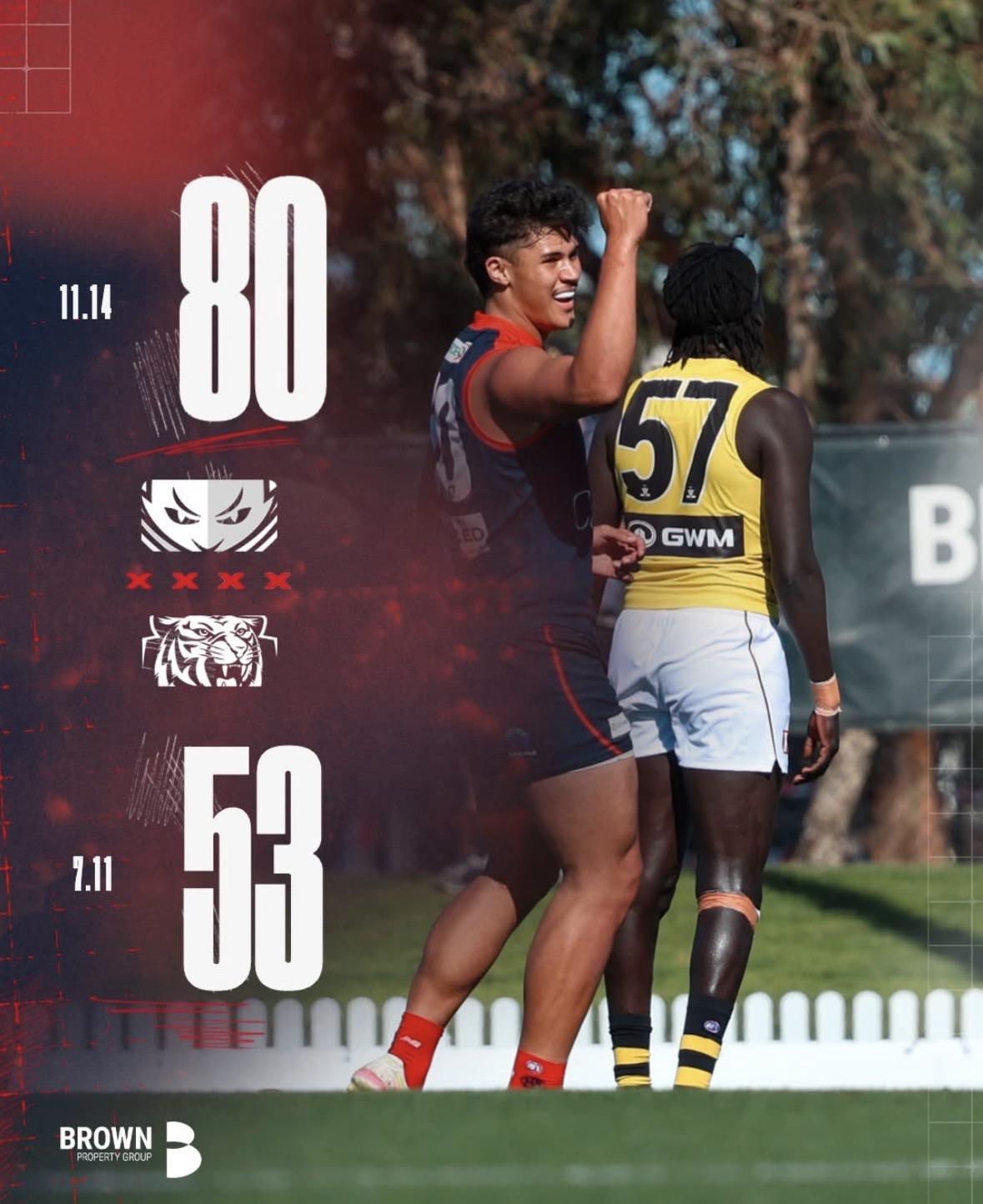
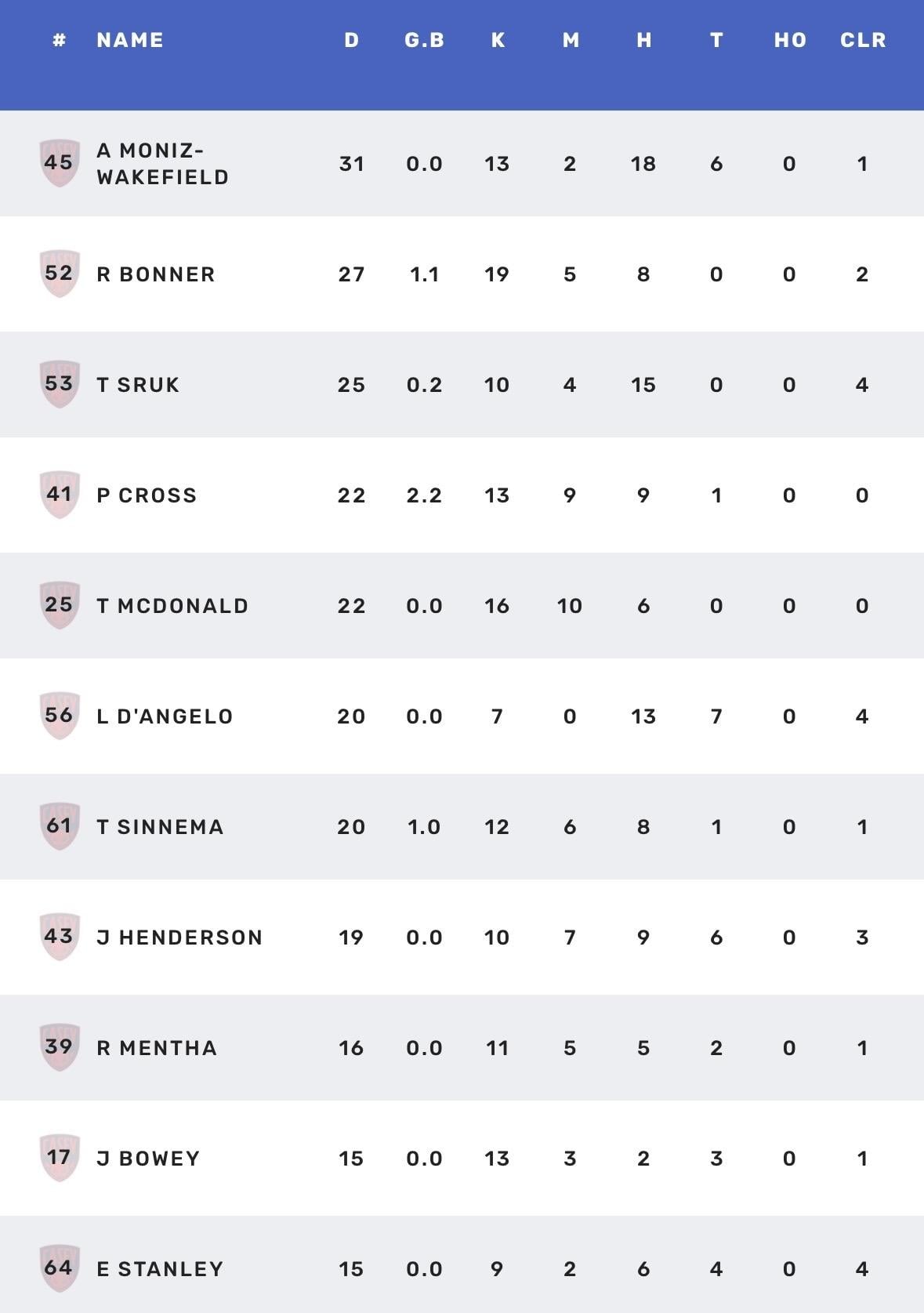
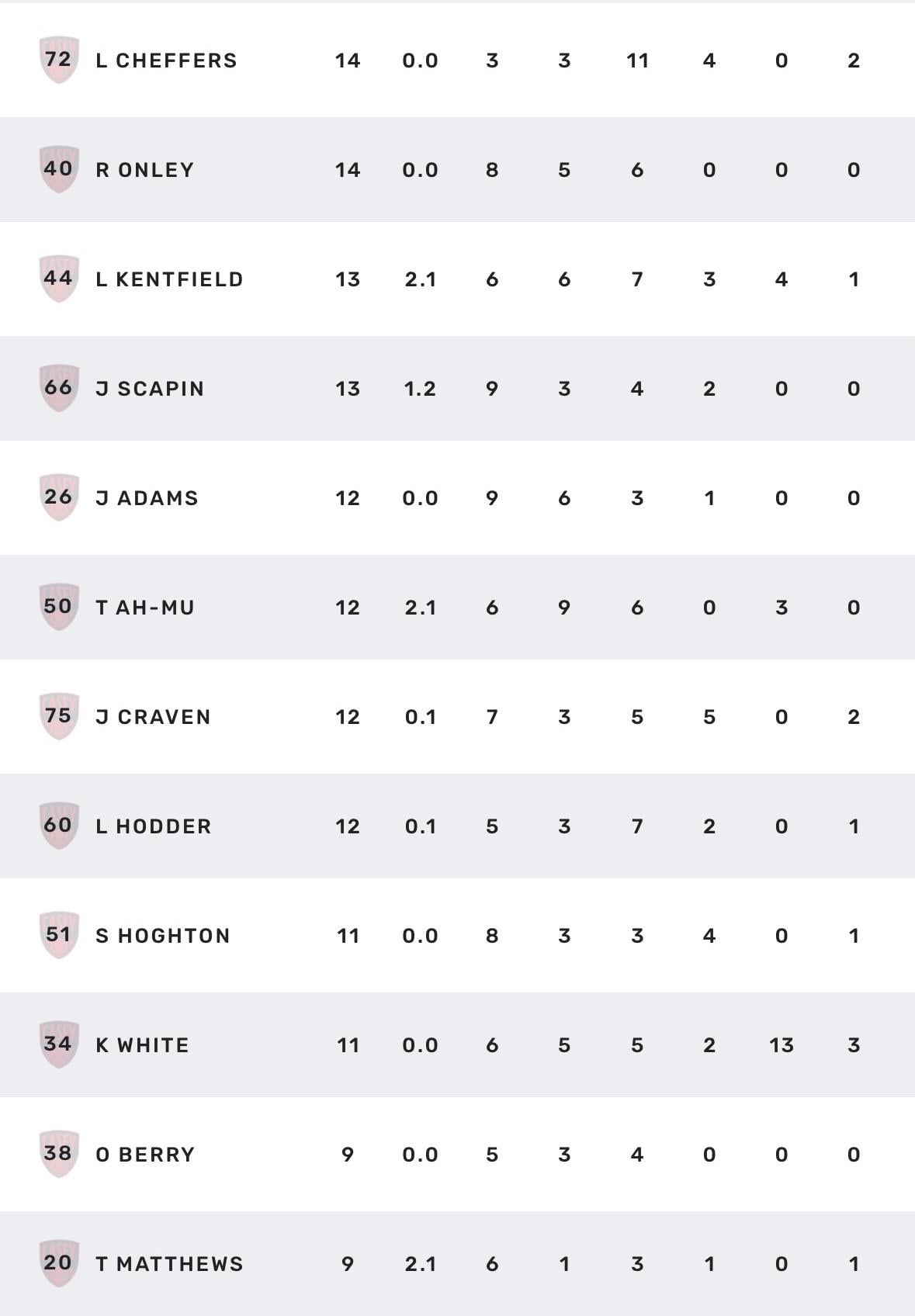
Reminder that the Podcast will air LIVE tonight at the later time of 9pm. LISTEN: https://demonland.com CALL: 0486 387 929I'm going to cut off the questions here. Thank you all for your contributions. Also a big thank you to @binman and @george_on_the_outer for holding down the fort while I was away. We will be LIVE tonight at the later time of 9pm LISTEN: https://demonland.com CALL: 0486 387 929The winds finally returned to Casey Fields for the Demons’ third home game of the VFL season, and its impact was immediate. After two opening rounds played in uncharacteristically fine conditions, the Anzac Day clash brought back the familiar gusty conditions that have been a feature of the region at this time of the year. Forced to kick into the breeze first, the slow-starting Demons faced a tricky opening against an enthusiastic young Tigers outfit. Casey responded by turning the contest into a scramble, pressuring Richmond into errors and missed targets. The tactic proved crucial, keeping the game tight for three and a half quarters before the Demons pulled away with the autumn wind at their backs. Richmond wasted early opportunities, and Casey’s slightly better efficiency in front of goal almost gave them a quarter-time lead. A last-minute Richmond major on the siren, however, saw the Tigers take a narrow advantage. The standard didn’t lift much when Casey had the wind in the second term. Richmond controlled the ruck, but the Demons gradually worked their way on top thanks to key forward Tairon Ah-Mu. His strong marking and presence troubled the Tigers, and he finished the half with two valuable goals. The prime mover for Casey was Jake Bowey. Making a successful return from December foot surgery, Bowey played a scheduled half and showed his trademark composure, finishing with 15 disposals, three marks and three tackles. Casey led by eight points at half-time, a slender margin given Bowey would not return. An early goal to Luker Kentfield pushed the lead to a then game high 14 points, but Richmond again surged with the breeze. Three unanswered goals put the Tigers back in front, before Casey’s pressure acts locked the game down for the final 15 minutes of the third. Richmond’s four-point lead at the last change looked vulnerable kicking into a freshening wind that was swirling a little across the face of goal. The Dees took full control in the final term. After a rushed Richmond behind, Casey piled on 4.8 to run out 27-point winners, evoking memories of the days when Casey Fields was a fortress. Andy Moniz-Wakefield has been outstanding on return from injury, racking up 31 disposals and six tackles in this game. Patrick Cross grew into the game and finished with 22 disposals, nine marks and two important goals. Since his return from his sole AFL appearance against Carlton before injury, Cross has lifted another level and is pressing for a further chance. Luker Kentfield provided a strong target with 13 disposals, six marks and two goals. Tom Matthews had a quiet day statistically with nine disposals, but his two last-quarter goals were invaluable. Co-captain Riley Bonner again led by example, whether in defence or on-ball, collecting 27 disposals and five marks. He was well supported by an improved Tyson Sruk with 25 and four. Luis D’Angelo and Toby Sinnema each had 20 touches and provided great service, while Ah-Mu’s bustling presence in attack was vital. The most experienced Demon on the ground, Tom McDonald, was influential early in defence and a pillar late, finishing with 22 disposals and 10 marks. Jed Adams worked tirelessly to plug holes in defence, tallying 12 touches and six marks and helping keep the ball locked in Casey’s forward half in the final term. Jack Henderson and Ricky Mentha Jr had their moments of strong play, while ruckman Kalani White continues to show steady growth. It was an ugly win but it lifts Casey into the middle of the ladder. They face a stern test next Sunday when they travel to Sydney to meet the in-form Swans. CASEY DEMONS 2.3.15 6.5.41 7.6.48 11.4.80 RICHMOND VFL 2.7.19 4.9.33 7.10.52 7.11.53 GOALS CASEY DEMONS Ah-Mu Cross Kentfield Matthews 2 Bonner Scapin SInnema RICHMOND VFL Philp Yassine 2 Ferguson Roberts-Thomson Trainor BEST CASEY DEMONS Moniz-Wakefield Bonner Cross McDonald Ah-Mu Sruk Bowey RICHMOND VFL Hayes-Brown El Nour Sonsie Trainor Connolly Scott
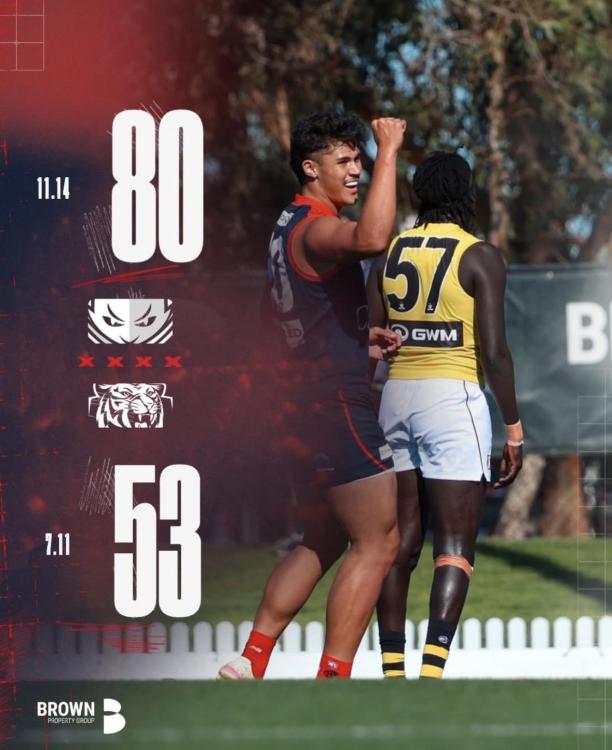
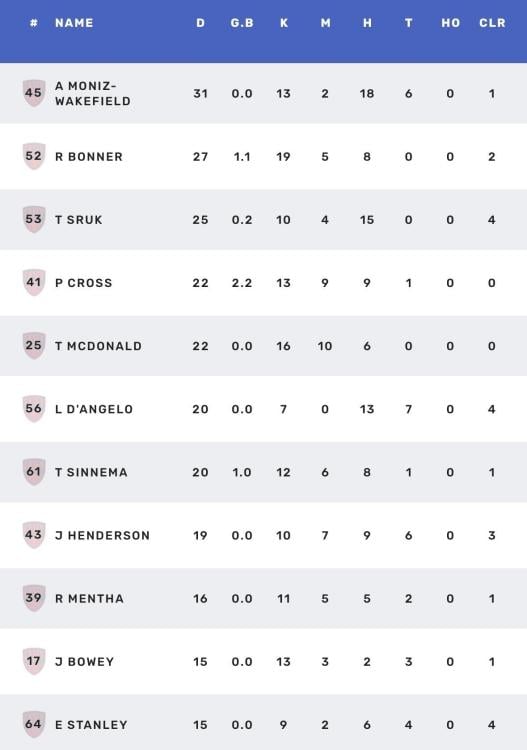
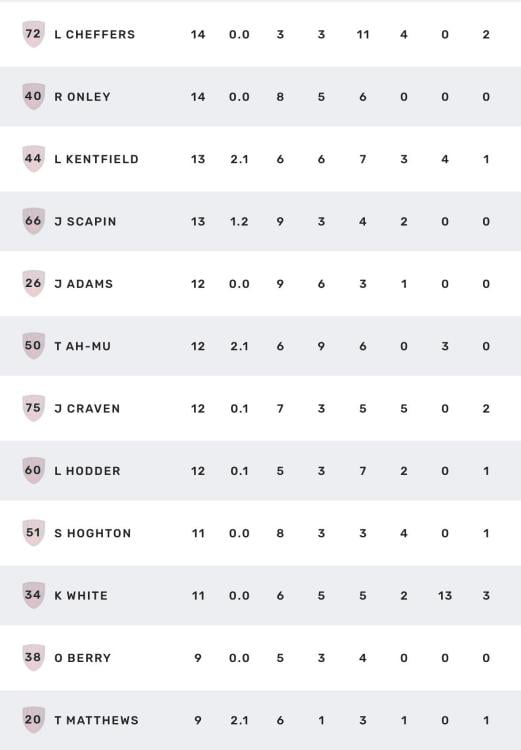 AUTUMN WINDS by KC from Casey The winds finally returned to Casey Fields for the Demons’ third home game of the VFL season, and its impact was immediate. After two opening rounds played in uncharacteristically fine conditions, the Anzac Day clash brought back the familiar gusty conditions that have been a feature of the region at this time of the year. Forced to kick into the breeze first, the slow-starting Demons faced a tricky opening against an enthusiastic young Tigers outfit. Casey responded by turning the contest into a scramble, pressuring Richmond into errors and missed targets. The tactic proved crucial, keeping the game tight for three and a half quarters before the Demons pulled away with the autumn wind at their backs. Richmond wasted early opportunities, and Casey’s slightly better efficiency in front of goal almost gave them a quarter-time lead. A last-minute Richmond major on the siren, however, saw the Tigers take a narrow advantage. The standard didn’t lift much when Casey had the wind in the second term. Richmond controlled the ruck, but the Demons gradually worked their way on top thanks to key forward Tairon Ah-Mu. His strong marking and presence troubled the Tigers, and he finished the half with two valuable goals. The prime mover for Casey was Jake Bowey. Making a successful return from December foot surgery, Bowey played a scheduled half and showed his trademark composure, finishing with 15 disposals, three marks and three tackles. Casey led by eight points at half-time, a slender margin given Bowey would not return. An early goal to Luker Kentfield pushed the lead to a then game high 14 points, but Richmond again surged with the breeze. Three unanswered goals put the Tigers back in front, before Casey’s pressure acts locked the game down for the final 15 minutes of the third. Richmond’s four-point lead at the last change looked vulnerable kicking into a freshening wind that was swirling a little across the face of goal. The Dees took full control in the final term. After a rushed Richmond behind, Casey piled on 4.8 to run out 27-point winners, evoking memories of the days when Casey Fields was a fortress. Andy Moniz-Wakefield has been outstanding on return from injury, racking up 31 disposals and six tackles in this game. Patrick Cross grew into the game and finished with 22 disposals, nine marks and two important goals. Since his return from his sole AFL appearance against Carlton before injury, Cross has lifted another level and is pressing for a further chance. Luker Kentfield provided a strong target with 13 disposals, six marks and two goals. Tom Matthews had a quiet day statistically with nine disposals, but his two last-quarter goals were invaluable. Co-captain Riley Bonner again led by example, whether in defence or on-ball, collecting 27 disposals and five marks. He was well supported by an improved Tyson Sruk with 25 and four. Luis D’Angelo and Toby Sinnema each had 20 touches and provided great service, while Ah-Mu’s bustling presence in attack was vital. The most experienced Demon on the ground, Tom McDonald, was influential early in defence and a pillar late, finishing with 22 disposals and 10 marks. Jed Adams worked tirelessly to plug holes in defence, tallying 12 touches and six marks and helping keep the ball locked in Casey’s forward half in the final term. Jack Henderson and Ricky Mentha Jr had their moments of strong play, while ruckman Kalani White continues to show steady growth. It was an ugly win but it lifts Casey into the middle of the ladder. They face a stern test next Sunday when they travel to Sydney to meet the in-form Swans. CASEY DEMONS 2.3.15 6.5.41 7.6.48 11.4.80 RICHMOND VFL 2.7.19 4.9.33 7.10.52 7.11.53 GOALS CASEY DEMONS Ah-Mu Cross Kentfield Matthews 2 Bonner Scapin SInnema RICHMOND VFL Philp Yassine 2 Ferguson Roberts-Thomson Trainor BEST CASEY DEMONS Moniz-Wakefield Bonner Cross McDonald Ah-Mu Sruk Bowey RICHMOND VFL Hayes-Brown El Nour Sonsie Trainor Connolly Scott






Account
Navigation
Search
Configure browser push notifications
Chrome (Android)
- Tap the lock icon next to the address bar.
- Tap Permissions → Notifications.
- Adjust your preference.
Chrome (Desktop)
- Click the padlock icon in the address bar.
- Select Site settings.
- Find Notifications and adjust your preference.
Safari (iOS 16.4+)
- Ensure the site is installed via Add to Home Screen.
- Open Settings App → Notifications.
- Find your app name and adjust your preference.
Safari (macOS)
- Go to Safari → Preferences.
- Click the Websites tab.
- Select Notifications in the sidebar.
- Find this website and adjust your preference.
Edge (Android)
- Tap the lock icon next to the address bar.
- Tap Permissions.
- Find Notifications and adjust your preference.
Edge (Desktop)
- Click the padlock icon in the address bar.
- Click Permissions for this site.
- Find Notifications and adjust your preference.
Firefox (Android)
- Go to Settings → Site permissions.
- Tap Notifications.
- Find this site in the list and adjust your preference.
Firefox (Desktop)
- Open Firefox Settings.
- Search for Notifications.
- Find this site in the list and adjust your preference.