Demonland
Primary Administrators
-
Joined
-
Last visited
Everything posted by Demonland
-
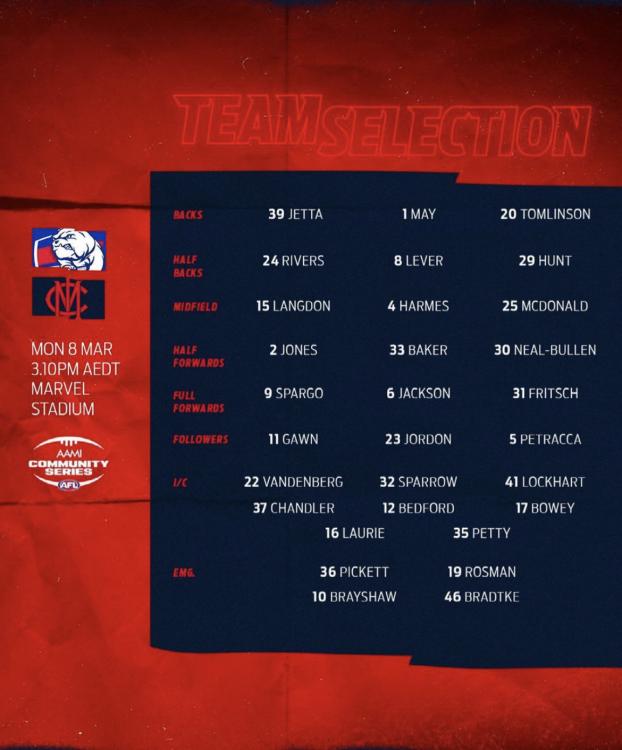
Where did we get this number 30 bloke from?
-
That’s what you need to do Nibbler.
-
Langdon needs to change his boots. Slipping and sliding all over the place.
-
Bulldogs have loose players all over the ground. The always have a loose player around the packs to flick it out to.
-
Absolutely let off the hook in that quarter. we really should be at least 4 goals down.
-
Some things never change. 7 frees to 3.
-
Not to mention being packed in like sardines on a train after the match. I assume given that this is a practice match against another bottom feeding team social distancing on the train won’t be an issue.
-
Yes I am going today. I need to get out of the house and scream at some umpires in the flesh. I too was at the Roos practice match but I'm not counting that because I didn't get to go through my usual match day rituals of riding public transport, eating stadium food and urinating in a trough right next to other people. Given the above rituals ironically this year there is the added bonus of potentially contracting a deadly disease.
-
It’s been 570 days since I’ve seen footy played live.
-
Austin Bradtke, the son of former Boomer Mark Bradtke and former Tennis Player Nicole Provis.Graphic on the footy last night had them at Marvel and the commentators made a point of saying first 3 games at Marvel. looking at the fixture though you are correct.If I recall correctly they rarely traveled from the QLD base last year either.They play their first 3 matches there.So we’re shaking hands again. #RIPTheFistBumpWho are you tipping?
Account
Navigation
Search
Configure browser push notifications
Chrome (Android)
- Tap the lock icon next to the address bar.
- Tap Permissions → Notifications.
- Adjust your preference.
Chrome (Desktop)
- Click the padlock icon in the address bar.
- Select Site settings.
- Find Notifications and adjust your preference.
Safari (iOS 16.4+)
- Ensure the site is installed via Add to Home Screen.
- Open Settings App → Notifications.
- Find your app name and adjust your preference.
Safari (macOS)
- Go to Safari → Preferences.
- Click the Websites tab.
- Select Notifications in the sidebar.
- Find this website and adjust your preference.
Edge (Android)
- Tap the lock icon next to the address bar.
- Tap Permissions.
- Find Notifications and adjust your preference.
Edge (Desktop)
- Click the padlock icon in the address bar.
- Click Permissions for this site.
- Find Notifications and adjust your preference.
Firefox (Android)
- Go to Settings → Site permissions.
- Tap Notifications.
- Find this site in the list and adjust your preference.
Firefox (Desktop)
- Open Firefox Settings.
- Search for Notifications.
- Find this site in the list and adjust your preference.