Demonland
Primary Administrators
-
Joined
-
Last visited
Everything posted by Demonland
-
Jon Ralph on Fox Footy saying that there will most likely be no pre-finals bye so likely teams in Top 6 will play early in the round. Bulldogs vs Port on Friday night. Cats vs Dees on Saturday night.Looks like we’ll be playing the Cats on Saturday night next week.There haven’t been many of them but I’d hate to lose a game or a final because of it.Just turned the sound on as I’d been watching on mute whilst doing other things. I now regret that move.We would never get a free like this. EverThe ladder TEAM (GAMES) %age M/R FOOTSCRAY (10) 169.7 100 SOUTHPORT (10) 180.7 90 BOX HILL (10) 167.7 80 GEELONG (9) 167.3 78 CASEY (9) 166.6 78 W’TOWN (9) 136.4 72 COLLINGWOOD (9) 92.5 67 UWS GIANTS (11) 94.4 64 WERRIBEE (9) 147.5 56 FRANKSTON (11) 103.8 55 RICHMOND (10) 103.4 45 CARLTON (9) 101.3 44 SANDRINGHAM (9) 94.3 44 GOLD COAST (10) 76.9 40 N. MELBOURNE (9) 57.0 40 COBURG (10) 95.1 30 BRISBANE (10) 65.7 30 N BULLANTS (10) 62.6 30 SYDNEY (10) 88.9 20 ESSENDON (10) 64.5 20 P. MELBOURNE (9) 67.3 11 ASPLEY (10) 73.0 10A friend of mine went to a baseball game in Los Angeles last night with 20,000 people. LA had nearly 4,000 COVID cases yesterday. We’re not going to get the chance to watch our team be a genuine chance for a premiership.They are plus 83 as at Round 21. See graphic below. The graphic in my post above was from Round 2 from the original post in this thread.
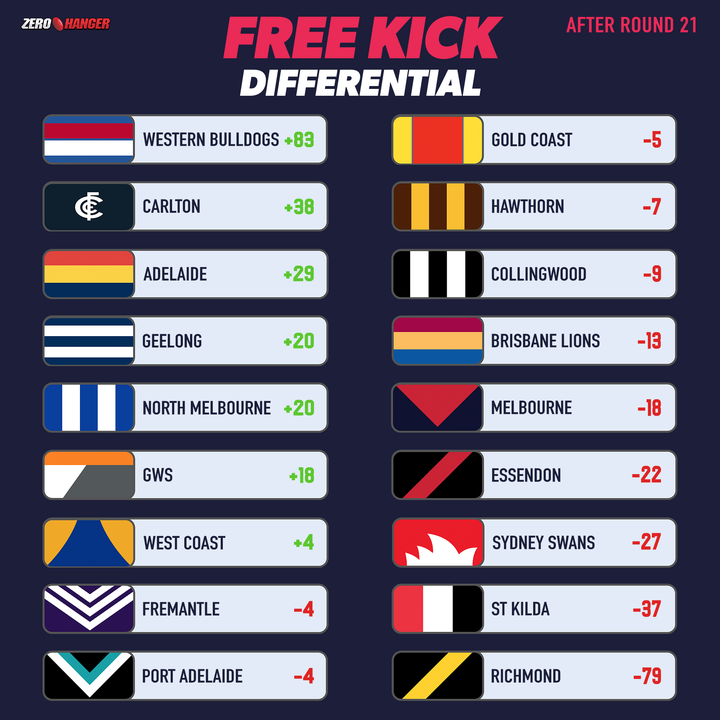 They probably complained to the AFL. Rd 1 vs Collingwood + 4 Rd 2 vs WCE in Melbourne -5 Rd 3 vs Kangaroos + 9 Rd 4 vs Brisbane + 14 Rd 5 vs Suns + 1 Rd 6 vs GWS + 1 Rd 7 vs Richmond - 4 Rd 8 vs Carlton + 3 Rd 9 vs Port - 2 Rd 10 vs St. Kilda + 10 Rd 11 vs Melbourne + 1 Rd 12 vs Freo = 0 Rd 13 Bye Rd 14 vs Geelong + 8 Rd 15 vs WCE + 7 Rd 16 vs Kangaroos + 7 Rd 17 vs Sydney + 13 Rd 18 vs Suns - 1 Rd 19 vs Melbourne + 14 Rd 20 vs Adelaide = 0 Rd 21 vs Essendon + 3It was the free kick differential after Round 2 which was the first round of the season that Zero Hanger release their Free Kick Differential graphic. I'm not sure why it disappeared but here it is again.
Account
Navigation
Search
Configure browser push notifications
Chrome (Android)
- Tap the lock icon next to the address bar.
- Tap Permissions → Notifications.
- Adjust your preference.
Chrome (Desktop)
- Click the padlock icon in the address bar.
- Select Site settings.
- Find Notifications and adjust your preference.
Safari (iOS 16.4+)
- Ensure the site is installed via Add to Home Screen.
- Open Settings App → Notifications.
- Find your app name and adjust your preference.
Safari (macOS)
- Go to Safari → Preferences.
- Click the Websites tab.
- Select Notifications in the sidebar.
- Find this website and adjust your preference.
Edge (Android)
- Tap the lock icon next to the address bar.
- Tap Permissions.
- Find Notifications and adjust your preference.
Edge (Desktop)
- Click the padlock icon in the address bar.
- Click Permissions for this site.
- Find Notifications and adjust your preference.
Firefox (Android)
- Go to Settings → Site permissions.
- Tap Notifications.
- Find this site in the list and adjust your preference.
Firefox (Desktop)
- Open Firefox Settings.
- Search for Notifications.
- Find this site in the list and adjust your preference.