Everything posted by Demonland
-
Preemptively posting this gif
-
Part 2: Watching grass grow by Whispering Jack Critics of test cricket (and I’m not one of them) will often claim the sport is excruciatingly boring: that following a five day match is much like watching grass grow. However, the longest form of that game has nothing on the first week of the AFL trade period when it comes to inducing sleep among those in the football public who follows this process in its somnolent moments. The week gone by has been no exception. Only two player trades have been completed so far and Melbourne was involved in the first when it traded Alex Neal-Bullen who had just finished third in a close finish for the club’s best and fairest, to Adelaide for a second round draft pick which is currently selection 28. By the time the draft comes around in November, this pick will most likely be in the low thirties. The Demons could well have played hard ball and allowed the trade to linger into next week and possibly gained an extra morsel in the bargain but this was a matter of integrity, a reward to a long term warrior for the club who was an integral part in its only premiership for more than half a century. In the other player trade, West Coast’s 32-year-old veteran Jack Darling was exchanged to North Melbourne for their pick 67. The rest of the player on the trade merry go round were left to wait until the last 2½ trading. Meanwhile, one remaining free agent, Richmond’s Jack Graham found a new home with West Coast on Tuesday. The Tigers received band four compensation, currently pick 42. After that, the grass grew for another two days and, on Friday, the focus shifted from trading players to trading draft picks. The Brisbane Lions who have two players in their draft sights, moved to shore up their ability to secure them. The players are father/son midfield star Levi Ashcroft, son of Marcus and brother of the Lions’ premiership player Will and Brisbane NGA Academy member Sam Marshall. To this end, the Lions were involved in two trades. In the first, they acquired picks 34 and 66 and gave Carlton pick 73 and a future second round pick, the significance of which became apparent later in the day. In the second, the Lions received picks 32, 42, 43 and 45 and gave the Tigers pick 20. Hence, Brisbane picked up a swag of additional points to get the two quality youngsters who are both likely first rounders. Richmond’s draft hand is expected to grow with further trades next week. The trade period was then shaken into life when Carlton grabbed pick 14 from Hawthorn in return for their future first and second round picks. The Blues were permitted to trade both picks because they still had a future second rounder from that earlier trade with the Lions. The pick swaps have set up an expected deluge as the tempo of trading lifts next week. Some clubs will be on the lookout for draft selections given that this year's draft pool is very even at the pointy end where there is no standout but up to about ten players who could lay claim to be first choice. Other clubs will be on the lookout for seasoned players with Port Adelaide’s Dan Houston looking to find a new home in Melbourne and clubs scrambling to get Liam Baker, Tom Barrass, Shai Bolton and a number of others seeking to find new homes. THE TRADES SO FAR Monday 7 October Melbourne’s Alex Neal-Bullen to Adelaide for pick 28 West Coast’s Jack Darling to North Melbourne for pick 67 (now 68) Friday 11 October Brisbane Lions’ pick 20 to Richmond for picks 32, 42, 43, 45 Carlton’s picks 34 and 66 to Brisbane Lions for picks 73 and 2025 R2 Carlton’s 2025 R1 and 2025 R2 to Hawthorn for pick 14. FREE AGENT SIGNINGS Josh Battle (St Kilda) to Hawthorn Elliott Himmelberg (Adelaide) to Gold Coast Harry Perryman (GWS Giants) to Collingwood Tom Campbell (St Kilda) to Melbourne Nick Haynes (GWS Giants) to Carlton Isaac Cumming (GWS Giants) to Adelaide Jack Graham (Richmond) to West Coast

 The injury plague which has beset the Demons 2024 campaign is finally starting to dissipate and with consecutive wins over GWS Giants and a 2-point nail-biter in Adelade, a sense of optimism is rising. Some commentators are now asking whether the Dees can make finals? A huge surprise with team selection this week when it was announced that champs Olivia Purcell, Paxy Paxman and Eden Zanker would play. Hallelujah! The cavalry has arrived. St Kilda missed the finals last season on percentage and are currently sitting in eighth position with 4 wins. They defeated the struggling GWS last week but had previously lost three matches in a row, to Adelaide, Fremantle and Hawthorn. Melbourne sits eleventh with 3 wins, but our percentage is a lowly 60.6% largely thanks to shellackings by North and Essendon. Both teams have short breaks between games, with St Kilda 5 days and Melbourne 4 days. The form guide suggests we are a strong chance this week, but Meggs expects it will be a slog. Selection this week Purcell’s return adds her fearsome ball-winning superpowers to the midfield group, Zanker will strengthen the marking and goalscoring options of our forwards and Paxman will hopefully have her foot in fine fettle for this comeback. Paxy’s ball usage and rebounding from defence will be a boost to Chaplin, Goldrick and Gillard. Gaby Colvin suffered concussion last week and misses while D’Arcy and Johnson have been omitted. The Saints bring back experienced midfielder Olivia Vesely and journeywoman Rene Caris. They replace Maddie Boyd (omitted) and Emmelie Fiedler (managed). Meggs’ view Expecting the Saints to make it a tough and physical game. They have plenty of talented experienced and young players who could undo our gameplan if we turn up unprepared. St Kilda has the dangerous Jesse Wardlaw, the ex-Brisbane full forward, hard nut mids Jaimee Lambert and Tyanna Smith and their vice-captain is ex-Dee Bianca Jakobsson. The vibe emanating from our beloved Demons appears to be building and the possibilities for this season likely hinge on having a win this Sunday. Keep winning and go Dees! Melbourne by 12 points THE GAME Round 8: Melbourne v St Kilda Sunday 13 October 2024 at 3:05pm (Melbourne time) Moorabbin Oval, Melbourne – Kulin Nations HEAD TO HEAD Overall Melbourne 4 wins St Kilda 1 win At Moorabbin Oval Melbourne 1 win St Kilda 1 win The Coaches Stinear 2 wins Dal Santo 0 wins MEDIA TV – 7mate, Fox Footy, Kayo. THE LAST TIME THEY MET - 2022 Season 7 Round 3 Melbourne 6.10 (46) defeated St Kilda 3.2 (20) at Moorabbin Oval, 11 September 2022 MELBOURNE 6.1 6.3 6.7 6.10 (46) ST KILDA 0.0 1.1 2.1 3.2 (20) GOALS MELBOURNE Zanker 2, Bannan, Fitzsimon, Hore, Paxman ST KILDA Shierlaw 2, Matin BEST MELBOURNE Purcell, West, Hanks, Mithen ST KILDA Jakobsson, Patrikios, Vesely, McKinnon CROWD 2,758 at Moorabbin Oval The Dees wrapped up this game in the first quarter, smashing the Saints with 6 unanswered goals. Liv Purcell was best on ground with 27 possessions and Eden Zanker lively up forward with 2 goals. Melbourne started with a 3-0 record in what would become its maiden premiership year. THE TEAMS MELBOURNE B D Taylor Gillard HB Chaplin Heath Goldrick C Lampard Hanks McNamara HF Zanker Mithen Pisano F Bannan Campbell FOLL Watt Purcell Hore I/C Fitzsimon Gall Hill Paxman Wotherspoon EMG Johnson Rigoni S Taylor IN Paxman Purcell Zanker OUT Colvin (concussion) D'Arcy (omitted) Johnson (omitted) ST KILDA B Stevens Watson HB Priest Trudgeon Jakobsson C McDonald Lambert Guttridge HF Kelly Wardlaw Anderson F Friend Richards FOLL Nalder Simpson Smith I/C Burke Caris Plane Vesely Whiley EMG Boyd Fiedler Stuart IN Caris Vesely OUT Fiedler (managed) Boyd (omitted) Injury List: Round 8 Melbourne Gaby Colvin Concussion 1 week Lauren Pearce Wrist 1 week Blaithin Mackin Calf 1-2 weeks Grace Beasley ACL Season Tayla Harris Shoulder Season Jacinta Hose ACL Season Aimee Mackin ACL Season St Kilda Nicola Xenos Heel 2 weeks Rebecca Ott Tibia 4-5 weeks Georgia Patrikios Foot 5-6 weeks Caitlin Matthews Knee 6 weeks Steph Chiocci ACL 8 weeks Beth Pinchin Knee Season
 Hopefully Trac gets an internet connection back soon so he can like a Dees social media post.
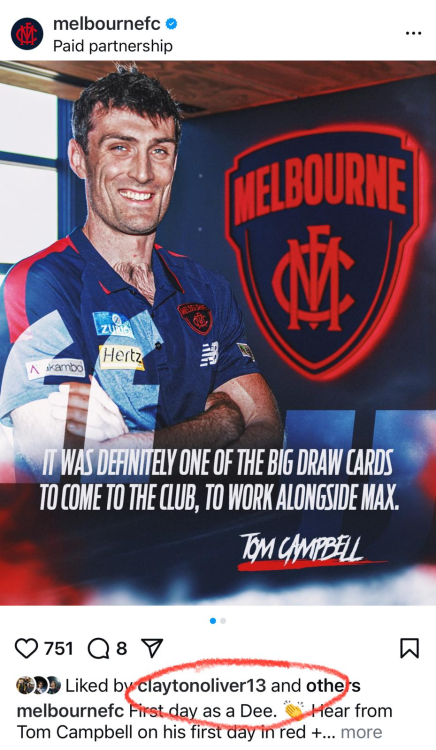 Just thought of it but am working on one for Trac next trade period.Some ClarrificationOn a perfect night for football at the home of the Redlegs, Norwood Oval, it was the visiting underdogs Melbourne who led all night and hung on to prevail in a 2-point nail-biter. In the previous round St Kilda had made it a tough physical game to help restrict Adelaide from scoring and so Mick Stinear set a similar strategy for his team. To win it would require every player to do their bit on the field plus a little bit of luck. Fifty game milestoner Sinead Goldrick epitomised the required effort on the night with her 19 disposals, 6 tackles and 97% game time. Goldie showed her true mettle with her spirit and resilience inspiring. Some commented later that the low scoring made it a boring game, but Meggs does not agree. It was an uncomfortable watch, but this was an engrossing battle all night against a competition heavyweight. Melbourne has the highest AFLW score in history of 107-points and with only 16-points on Wednesday the equal lowest winning score in history (need to fact check this). Afterwards Mick Stinear was so proud of his team. It was reward for effort, snatching the 4-points and celebrating Kate Hore and Sinead Goldrick in their milestone match. It also opens up finals possibilities for the balance of the season but we play three teams are above us on the ladder who will start favourites. Let’s not mozz it, one week at a time. For the Dees A whole team effort. Tyla Hanks and Kate Hore were sensational around the ball and really led the way. Hanksy was BOG with 24 disposals, 7 tackles and 380 metres gained. Eliza McNamara, showing amazing courage to return from her broken nose to continue her brilliant season. Fitzy, Lampy and Heathy were busy all night. Georgia Campbell showed us she can take a great mark and played her best game in the red and blue. Georgia Gall also competed really well in an encouraging display, a confidence builder for her. Adelaide won the disposal count, inside 50’s, hit-outs, clearances, and marks so our defence was under the pump a lot. Tahlia Gillard kept the in-form Caitlin Gould to zero goals and Maeve Chaplin continued her stellar season quelling the dangerous Danielle Ponter. Special mention to Denby Taylor who has found a place in defence with her 14 disposals and 10 tackles and is improving each week. Lastly, Alyssa Bannan has worn criticism for her lack of impact against competition’s heavyweights such as Adelaide. Banno wore one for the team across her face with hardnut Chelsea Randall copping a $400 fine. Alyssa was a strong target all night and this new simplified game plan seems to suit her and the team. Tackle of the Match The Melbourne players landed 82 tackles on Wednesday night and in his team debrief Mick Stinear called out an important one. That was Eliza Mac’s bone-cruncher at the death in the last quarter when Chelsea Randall was threatening to steal the match. Meggs also loved Sinead Goldrick’s chase down tackle of Zoe Prowse where she came out of nowhere in the third. Goldie Heavy Mettle! Coaches and next week Melbourne Coach Mick Stinear reminded everyone how hard it is to win games in Adelaide and was so proud of his team’s 4-quarter team-first effort. He paid pay tribute to milestoners Kate and Sinead. Matthew Clarke credited Melbourne’s pressure. He said Adelaide’s effort was there, but the execution was shabby. The Demons next play St Kilda at Moorabbin on Sunday and then have Richmond at Casey Fields and Hawthorn in Cairns. Three really tough matches coming up against teams currently sitting in the eight. Go Redlegs! MELBOURNE 2.1.13 2.2.14 2.3.15 2.4.16 ADELAIDE 0.1.1 0.5.5 1.5.11 1.8.14 GOALS MELBOURNE Bannan Campbell ADELAIDE Newman BEST MELBOURNE Hanks Hore Goldrick McNamara ADELAIDE Marinoff Randall Hatchard Newman INJURIES MELBOURNE Nil ADELAIDE Nil CROWD 2,586 at Norwood Oval
 We're going to end up getting nothing of value for him. At one time you could have got 3 first rounders as a starting point. Heads have to roll.Hey Siri, Play highlights of Harry Sharp. Ok. Here's what I found on the web. VFL Showreel, R13: Harry Sharp highlights VFL Showreel, R10: Harry Sharp highlights Sharp’s banana brilliance brings Brisbane another Sharp shows plenty of dash before Lohmann adds anotherAfter becoming premiers in 2021, and occupying top four finishes in the last three years, 2024 was a completely different story for the Dees. Melbourne finished 14th in 2024, with significant off-field issues weighing them down. But Cam Luke has nine positives for Melbourne fans, urging them to sit tight and remain optimistic heading into 2025. 1. Max Gawn “I think sometimes we underrate people because the standards they set for themselves are so high, and we take certain things for granted," Cam Luke said on AFL Trade Radio. “AFL fans should not take Max Gawn for granted. “He played pretty much with a broken leg in the last month. “We talk about inspirational leaders and captains in the AFL; if there’s any in front of Max Gawn it is a very small number. “He leads this football club by example. He has had to answer a million questions at the Melbourne Football Club. “He fronts up, he talks about it, he wears his heart on his sleeve. “He is the best ruckman in the league and this is by far the best positive – that Max Gawn is their captain.” 2. Caleb Windsor “He was good this year. He was probably a bit low in the rising star. “It’s never easy to wander into a club that has had success and be good straight away. "To be able to crack into a team like that, Caleb Windsor deserves a pat on the back." 3. Jacob Van Rooyen “He kind of got thrown into it once Luke Jackson left the club. “It is not easy for a young kid to carry a lot of responsibility, they haven’t got their forward line mix right, which we understand. “I think there are ups and downs, and I don’t think we accept the ups and downs of Van Rooyen as we do for other forwards." 4. Easier fixture next year “They’ve had a hard fixture; they’ve had to do it a harder way. “The last three years they’ve been in the top 4, they were a premier, back-to-back top 4 positions. “In 2025 that won’t happen, they finished bottom 5 and next year, away they go.” __5. Christian Petracca and Clayton Oliver are not leaving_ “They are not leaving. If you are a Melbourne fan you should sit there and tell yourself, they are going to go back to their level. “Why would you be pessimistic about Petracca and Oliver at your football club next year? “We’ve seen players want out before and play good footy. “These players are two of the best greatest Demons of all time; Petracca is a Norm Smith medallist and has two best and fairests. He was having a great year before he got hurt. “Clayton Oliver has four best and fairests. “Look on the bright side that these two men are in your colours next year and can bounce back. “Don’t be glass half empty, be glass half full.” 6. Judd McVee 7. Trent Rivers 8. Jake Lever and Steven May “I am touching wood that they can stay fit and healthy and, on the park, because if they do that means defensively, they will rarely ever get beat.” 9. They can make the top eight next year “I think they will make the eight. “I will make a bet with you that they make the eight next year.”
Account
Navigation
Search
Configure browser push notifications
Chrome (Android)
- Tap the lock icon next to the address bar.
- Tap Permissions → Notifications.
- Adjust your preference.
Chrome (Desktop)
- Click the padlock icon in the address bar.
- Select Site settings.
- Find Notifications and adjust your preference.
Safari (iOS 16.4+)
- Ensure the site is installed via Add to Home Screen.
- Open Settings App → Notifications.
- Find your app name and adjust your preference.
Safari (macOS)
- Go to Safari → Preferences.
- Click the Websites tab.
- Select Notifications in the sidebar.
- Find this website and adjust your preference.
Edge (Android)
- Tap the lock icon next to the address bar.
- Tap Permissions.
- Find Notifications and adjust your preference.
Edge (Desktop)
- Click the padlock icon in the address bar.
- Click Permissions for this site.
- Find Notifications and adjust your preference.
Firefox (Android)
- Go to Settings → Site permissions.
- Tap Notifications.
- Find this site in the list and adjust your preference.
Firefox (Desktop)
- Open Firefox Settings.
- Search for Notifications.
- Find this site in the list and adjust your preference.