Demonland
Primary Administrators
-
Joined
-
Last visited
Everything posted by Demonland
-
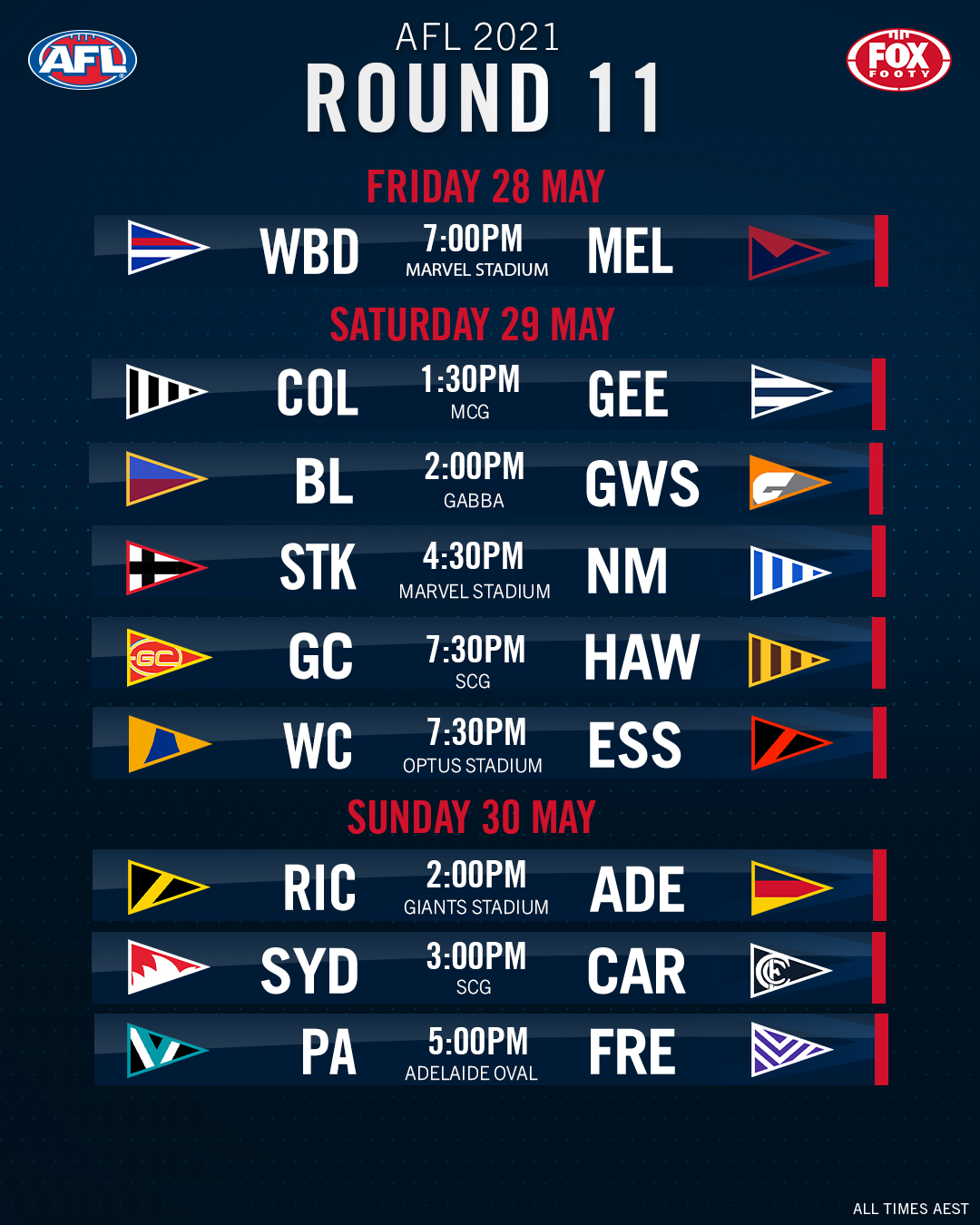
Going early with the NON MFC thread for once. Who are you tipping?Probably a request from the club. Conor McKenna wasn't treated very well last year.Game On!!!OfficialNothing official except for a couple of journos saying Player has produced a negative result.Posted just now. I guess his earlier post was a whisper from a source. This might be more official.You might be thinking of a different Richmond person.I believe it's isolate until negative test for secondary contacts. I believe the player in question has to still isolate for 14 days.SHHHH! Don't tell COVID. ?New fixture and new times and venues for Round 11.
Account
Navigation
Search
Configure browser push notifications
Chrome (Android)
- Tap the lock icon next to the address bar.
- Tap Permissions → Notifications.
- Adjust your preference.
Chrome (Desktop)
- Click the padlock icon in the address bar.
- Select Site settings.
- Find Notifications and adjust your preference.
Safari (iOS 16.4+)
- Ensure the site is installed via Add to Home Screen.
- Open Settings App → Notifications.
- Find your app name and adjust your preference.
Safari (macOS)
- Go to Safari → Preferences.
- Click the Websites tab.
- Select Notifications in the sidebar.
- Find this website and adjust your preference.
Edge (Android)
- Tap the lock icon next to the address bar.
- Tap Permissions.
- Find Notifications and adjust your preference.
Edge (Desktop)
- Click the padlock icon in the address bar.
- Click Permissions for this site.
- Find Notifications and adjust your preference.
Firefox (Android)
- Go to Settings → Site permissions.
- Tap Notifications.
- Find this site in the list and adjust your preference.
Firefox (Desktop)
- Open Firefox Settings.
- Search for Notifications.
- Find this site in the list and adjust your preference.