





Demonland
Primary Administrators
-
Joined
-
Last visited
Everything posted by Demonland
-
Apologies where apologies are due. This time to the club. My pre-order for the book was made through the AFL Store. My father's order was done through the club. MFC 1 AFL 0 Andy -1This is most likely the case. However sometimes a nice email inquiry can get your order moving along. Coincidence?
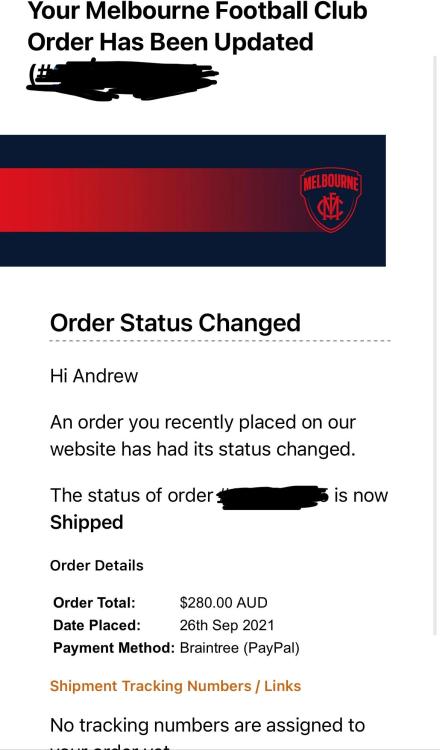 I've received mine which was ordered 26/9. I was actually surprised that that of all items was one that has arrived.Yes. Yes it does.Another rant. Again prefaced with happy to support the club financially and understand that some of these delays are out of their control. I preordered the Pictorial Book of the Grand Final on the 3/10. It was the only item in the order so there are no other items holding it up. As far as I'm aware it has not shipped as I have not received a notification like I have with some other items so it's not stuck in transit with Australia Post. I purchased the same book for my dad on 11/11 over a month after mine and he received it today. He received shipping notification either the same day of the order or the next day. Again not blaming the club. Just venting my frustration.Happy to have given the club the extra dollars as long as I can bitch about not receiving an item I order for full price 2 months ago that I could now walk in and purchase for $9 in the bargain bin. 😛Having said that you just have to be lucky as to where you bump into the cup.I don't think these situations are the same. Whilst I would have loved to have lifted the cup and had a photo holding it aloft I can understand why this is not possible in this scenario.I’ve just sent 6 separate emails for 6 separate unfulfilled orders from The Demon Shop & The AFL Store. I immediately received the No Reply standard COVID delays response. Almost all items are available instore. I know its a first world problem and I know the club will make a fortune and that’s amazing. However it is very frustrating to the early adopters. All my orders were made between 25/9 - 29/9. I’ve only received a cap, jumper and hoodie. No beanie, scarf, caps, T-Shirts, polos, DVDs, tie, drink bottle, towels, books.This with MFC Memberships had to put MFC before the numbers to get it to work. I’m not sure how it works for AFL memberships but give that a try.A couple of weeks ago. End of October.We were scheduled for the 10am morning slot. We got to the G about 9:35 and walked to gate 3. There were about 10 or 15 people already lined up QR coding and showing their vax status. They were already letting people in one group at a time to show your ticket at the box office inside. We then proceeded into the museum and went directly to line up for the cup. We manage to get ahead of a few people as they were checking out some of the Museum exhibits. Only about 10 people in the cup line in front of us. The line progresses fairly quickly. I guess it depends on how many people in your group want an individual photo and then a group one. We had 4 in our group so it will take a little longer than an individual. They don’t hurry you along but it’s not like you get to take the cup out on a date. You take it in, take a snap and move on. When it’s your turn they give you an antiseptic wipe to wipe your hands. I’m not sure if that’s to protect the cup, protect you or protect others. You have to wear a mask in the museum but can take it off for the photo. As mentioned earlier you are told you can touch but not lift the cup. So in summary my best advice is to get there early particularly if you are in the morning group. I think we had had our photo before the actual start time of 10am.You'd have to think that there will be food outlets open.I didn't because I had read that they were not open yet to the public. It would not have had anything the museum gift shop did not have (they had all the Knight merch too) and it would not have mattered because I have pre-ordered everything I wanted on GF night or in the days following and only a handful of my items have arrived. Silver lining is that it is a windfall for the club but it's extremely frustrating that someone can walk into an AFL shop today and walk out with merch I ordered and paid for in September.Very happy with the purchase. Haven't worn a guernsey to the footy in a long time but will be a permanent fixture in 2022.The Museum Gift Shop at the MCG said they received the Beanie and Scarf and a bunch of other merchandise that I ordered on Grand Final night just the other day. It is very frustrating that a lot of the merch I ordered over 2 months ago is already in stores. I could have held out and purchased it all today.






Account
Navigation
Search
Configure browser push notifications
Chrome (Android)
- Tap the lock icon next to the address bar.
- Tap Permissions → Notifications.
- Adjust your preference.
Chrome (Desktop)
- Click the padlock icon in the address bar.
- Select Site settings.
- Find Notifications and adjust your preference.
Safari (iOS 16.4+)
- Ensure the site is installed via Add to Home Screen.
- Open Settings App → Notifications.
- Find your app name and adjust your preference.
Safari (macOS)
- Go to Safari → Preferences.
- Click the Websites tab.
- Select Notifications in the sidebar.
- Find this website and adjust your preference.
Edge (Android)
- Tap the lock icon next to the address bar.
- Tap Permissions.
- Find Notifications and adjust your preference.
Edge (Desktop)
- Click the padlock icon in the address bar.
- Click Permissions for this site.
- Find Notifications and adjust your preference.
Firefox (Android)
- Go to Settings → Site permissions.
- Tap Notifications.
- Find this site in the list and adjust your preference.
Firefox (Desktop)
- Open Firefox Settings.
- Search for Notifications.
- Find this site in the list and adjust your preference.