Demonland
Primary Administrators
-
Joined
-
Last visited
Everything posted by Demonland
-
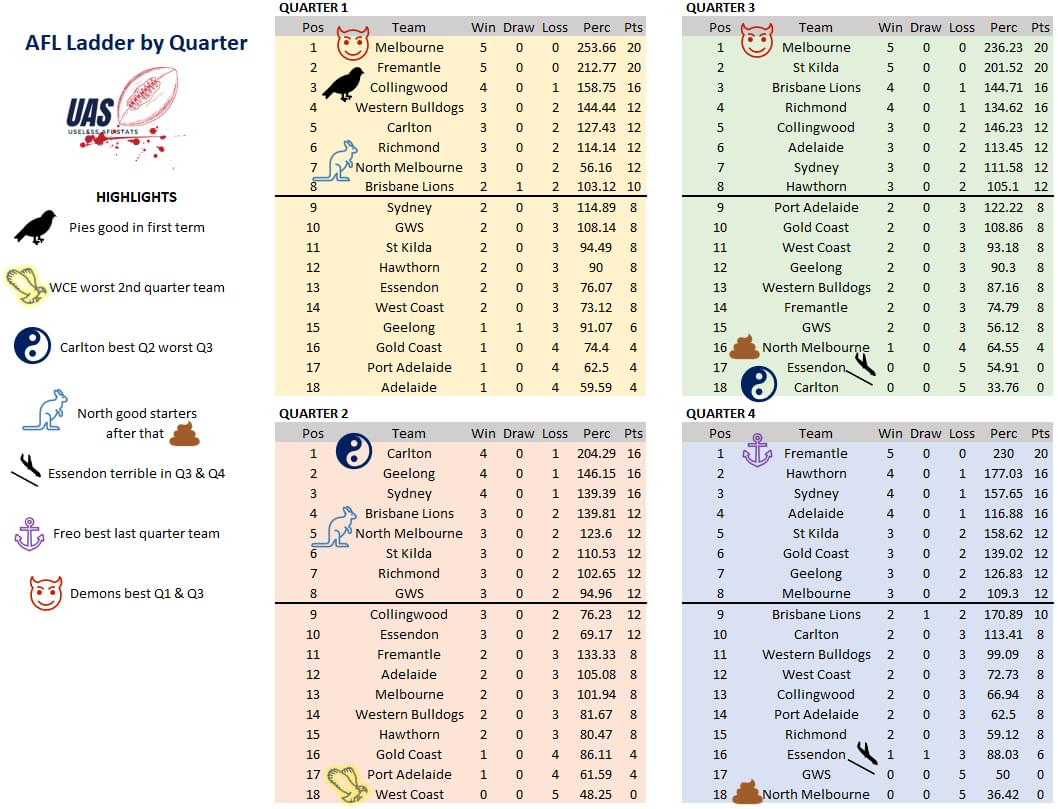
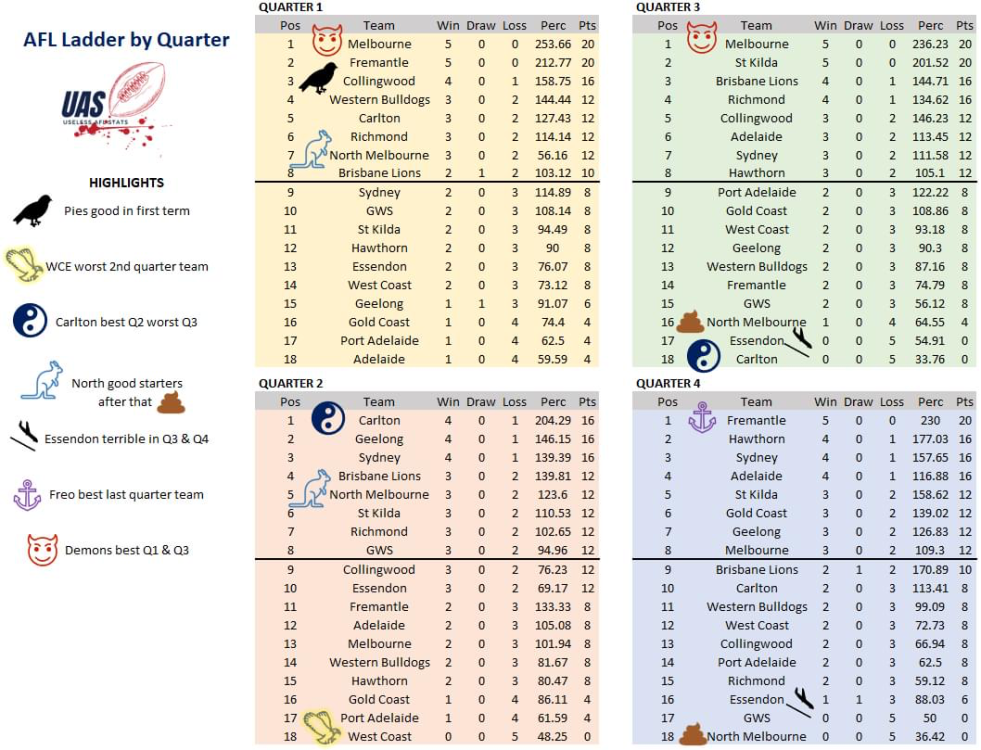
I’m not sure the interpretation on the rules of the game are ever going to be able to be fixed. Different people see an incident in different ways. Some incidents are missed by some and seen by others. You’re never going to be able to get uniform decisions for the same or similar incidents such is the nature of our game. I think the AFL realise this and for that reason are barring any dissent because it’s the umpires call whether right or wrong and if you disagree verbally or non verbally you’ll be penalised.Despite this glaringly bad statistic Vossy & the Blues are the media’s darlings.Got to fix those 2nd Quarters
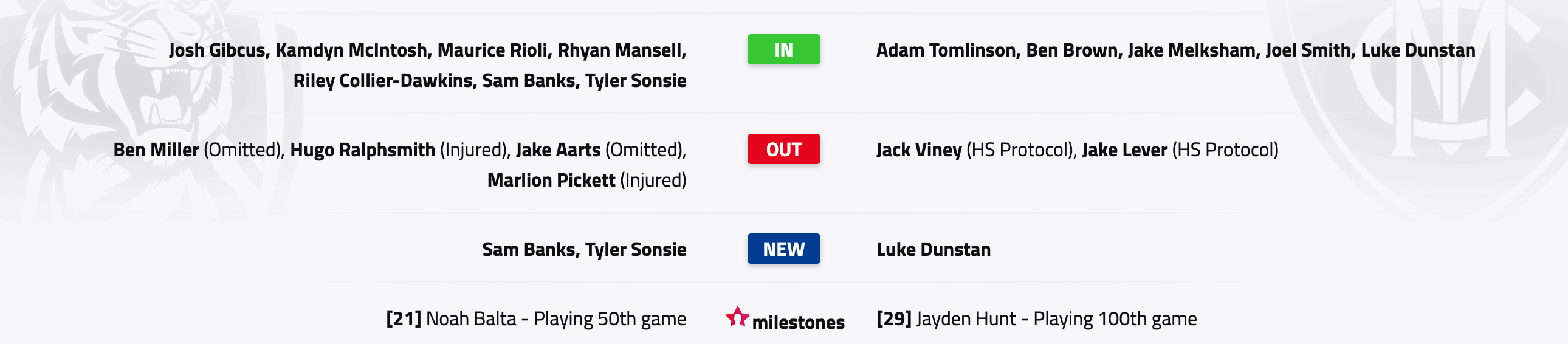
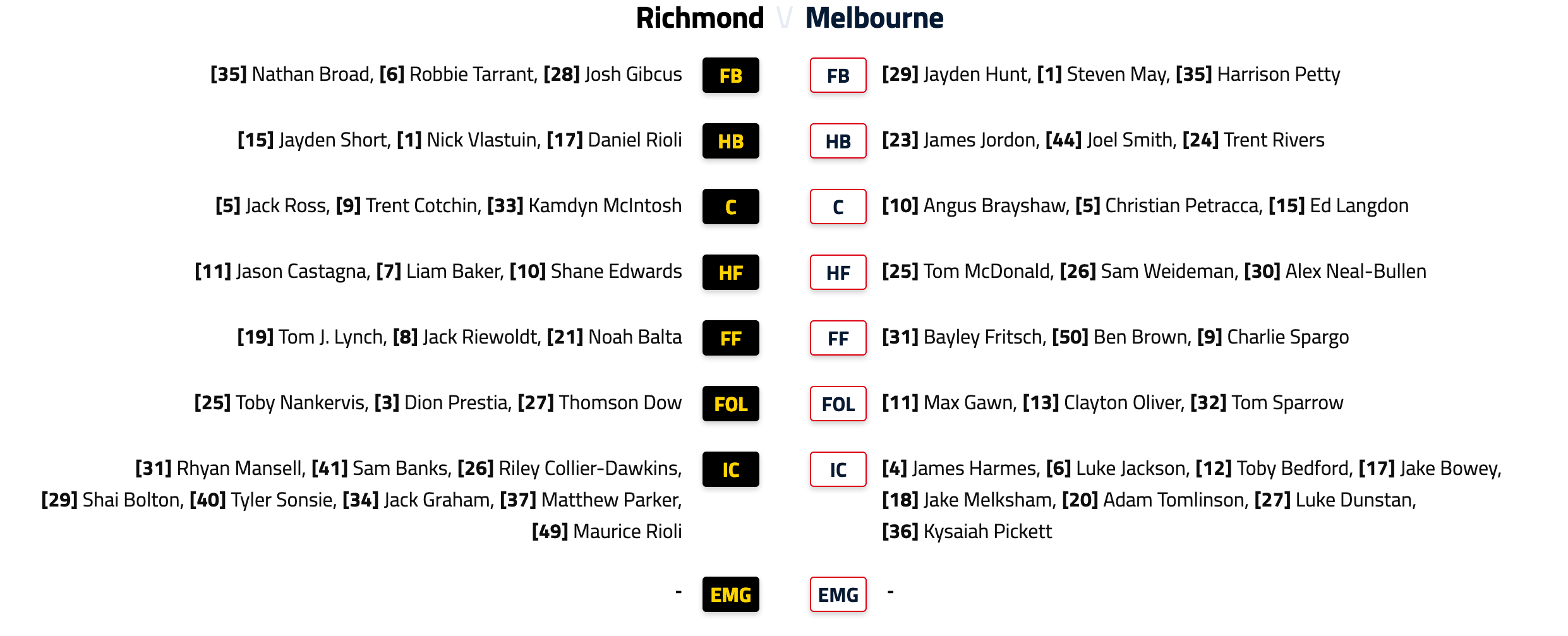
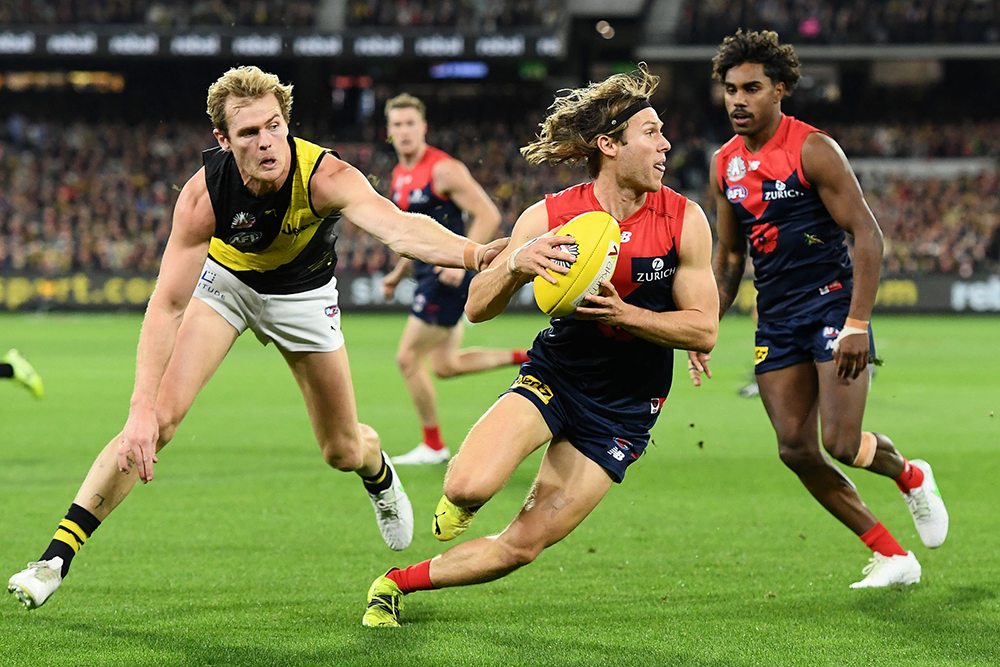
 1. Melbourne Wing Duo: Ed Langdon and James Jordon It was only ever going to be one team at the top spot with Ed Langdon being the premier wingman of the competition. In previous seasons, it was Angus Brayshaw and Langdon who would dominate the wide areas and play their role to perfection, which was crucial to their drought-breaking premiership win last season. However, Brayshaw has found himself slotting into the backline at the Dees, leaving emerging gun James Jordon to take his position on the wing - and what a job he has done in 2022. After making his debut last year, Jordon is averaging 21 disposals and three marks in his second season, with his pressure and hard-running making him an important player in the Melbourne 22. The 21-year-old looks set for big midfield minutes for the reigning premiers and will take his game to a new level. Langdon has started 2022 in typical Ed Langdon fashion, averaging 24.8 disposals and 4.8 marks a game as well as spending 100% time on the ground in the opening three rounds. Langdon's endurance and ability to always be an option for transitional football is the reason he is the best in the competition. Not only individually, but Melbourne's usage of their wings sets them apart from any other team in the competition and is a big reason for their premiership success last season.The ANZAC Eve blockbuster between Melbourne and Richmond has become something of a bellwether event for the two clubs. The winner has gone on to collect the premiership flag on four out of five occasions since the Tigers overran an injury-stricken Demons side late in their 2017 encounter. The outlier was 2018 when Richmond dominated the season but like Melbourne, it stumbled at the final hurdle and failed to make the Grand Final. The 2022 version might turn out be just another game but there’s a fair amount at stake here. The Demons came into last year’s encounter with five wins from five matches but the football experts were as yet unconvinced. It was the win and the ruthless manner in which it was achieved that gave them legitimacy in the eyes of the pundits. It also reversed the roles of the respective teams. Melbourne was not longer the hunter; it became the hunted. Richmond slowly fell away as the season wore on and eventually lost touch with the top eight. Their dynasty was over, our day had come. Twelve months down the track, it’s the Tigers who are still battling for legitimacy in the eyes of their supporters and the football public while the Demons are riding high. Not high enough to develop complacency because fortunes can change quickly and dramatically in this day and age. However, they do seem to have the wood on Richmond who would gladly welcome back superstar Dustin Martin from personal leave and co-captain Dylan Grimes from a hamstring issue. Melbourne have developed a high level of efficiency and proficiency in everything it does. Last week for instance, they broke even statistically with their opposition counterparts in the rucks. The number of hit outs was 34 each but GWS “won” the clearances by 41 to 33. But the quality of the clearances that went in favour of the Demons was by far the greater and this allowed them to break loose in that third quarter and apply maximum damage on their opponents. Once they had control of the football, they ran with vigour and I’m not just talking about the player with the football. So much of that athletic advantage can’t even be quantified in terms of statistics, other than the really important one that we see on the scoreboard. The result was a 10 goal quarter that left their prey shattered and gasping for breath. Vanquished. This is why Melbourne is traveling along so nicely at the moment. The players are fit, focused and invested in a total team effort. Of course it helps to have midfielders like Christian Petracca, Clayton Oliver and Jack Viney playing at the top of their game with the likes of Angus Brayshaw, Ed Langdon, James Jordon, James Harmes and Tom Sparrow as a sparkling support base. By way of contrast, Richmond’s very best is a fading memory of the past. Some of the characters are still there but they’re worn down and weary. A few are past their prime but there isn’t the same attacking spirit that we see from Melbourne and they can’t match the iron clad defence that has left opposition attacks frustrated and in despair. Even so, Nathan Buckley insists the Demons are still not playing the way they want to play. "They're going to ramp that up over the next couple of weeks, I think there's better to come." Heaven help the rest of the competition if he’s right and heaven help the Tigers on Blockbuster Night. Melbourne to win by 45 points. THE GAME Richmond v Melbourne on Sunday 24 April, 2022 at 7.25pm at the MCG HEAD TO HEAD Overall Richmond 107 wins Melbourne 76 wins Drawn 2 At MCG Richmond 72 wins Melbourne 64 wins Drawn 1 Past five meetings Richmond 4 wins Melbourne 1 win The Coaches Hardwick 4 wins Goodwin 1 win MEDIA TV live and on demand on Kayo and live on Foxtel. Check your local guides for free-to-air. Radio - check your local guides. THE LAST TIME THEY MET Melbourne 12.10.82 defeated Richmond 6.12.48 in Round 6, 2021 at the MCG The Tigers were out of the blocks early but when the light drizzle turned to rain, the Demons edged past them and with the Christians (Petracca and Salem) and Clayton Oliver all picking up possessions at will, it was Melbourne all the way after half time. THE TEAMS RICHMOND B: N.Broad 35 R.Tarrant 6 J.Gibcus 28 HB: J.Short 15 N.Vlastuin 1 D.Rioli 17 C: J.Ross 5 T.Cotchin 9 K.McIntosh 33 HF: J.Castagna 11 L.Baker 7 S.Edwards 10 F: T.Lynch 19 J.Riewoldt 8 N.Balta 21 Foll: T.Nankervis 25 D.Prestia 3 T.Dow 27 I/C: S.Bolton 29 R.Collier-Dawkins 26 J.Graham 34 R.Mansell 31 Sub: M.Parker 37 Emerg: S.Banks 41 M.Rioli 49 T.Sonsie 40 In: R.Collier-Dawkins J.Gibcus K.McIntosh R.Mansell Out: J.Aarts (omitted) B.Miller (omitted) M.Pickett (injured) H.Ralphsmith (ribs) MELBOURNE B: J.Hunt 29 S.May 1 H.Petty 35 HB: J.Bowey 17 J.Smith 44 T.Rivers 24 C: A.Brayshaw 10 C.Petracca 5 E.Langdon 15 HF: K.Pickett 36 S.Weideman 26 A.Neal-Bullen 30 F: B.Fritsch 31 B.Brown 50 C.Spargo 9 Foll: M.Gawn 11 C.Oliver 13 T. Sparrow 32 I/C: L.Dunstan 27 J.Harmes 4 L.Jackson 6 J.Jordon 23 Sub: T.Bedford 12 Emerg: J.Melksham 18 A.Tomlinson 20 T.McDonald 25 In: B.Brown L.Dunstan J.Smith Out: J.Lever (H & S Protocols) T.McDonald (omitted) J.Viney (H & S Protocols) Injury List: Round 6 Michael Hibberd - Calf | 1 week Daniel Turner - Foot | 3-4 weeks Christian Salem - Knee | 4-5 weeks Blake Howes - Foot | TBC
 Protected speciesFull frontal
 That would be 200mWe'll be LIVE in 15 minutes. Listen & Chat LIVE: https://demonland.com/podcast Call: 03 9016 3666 Skype: Demonland31
Account
Navigation
Search
Configure browser push notifications
Chrome (Android)
- Tap the lock icon next to the address bar.
- Tap Permissions → Notifications.
- Adjust your preference.
Chrome (Desktop)
- Click the padlock icon in the address bar.
- Select Site settings.
- Find Notifications and adjust your preference.
Safari (iOS 16.4+)
- Ensure the site is installed via Add to Home Screen.
- Open Settings App → Notifications.
- Find your app name and adjust your preference.
Safari (macOS)
- Go to Safari → Preferences.
- Click the Websites tab.
- Select Notifications in the sidebar.
- Find this website and adjust your preference.
Edge (Android)
- Tap the lock icon next to the address bar.
- Tap Permissions.
- Find Notifications and adjust your preference.
Edge (Desktop)
- Click the padlock icon in the address bar.
- Click Permissions for this site.
- Find Notifications and adjust your preference.
Firefox (Android)
- Go to Settings → Site permissions.
- Tap Notifications.
- Find this site in the list and adjust your preference.
Firefox (Desktop)
- Open Firefox Settings.
- Search for Notifications.
- Find this site in the list and adjust your preference.