





Everything posted by Demonland
-
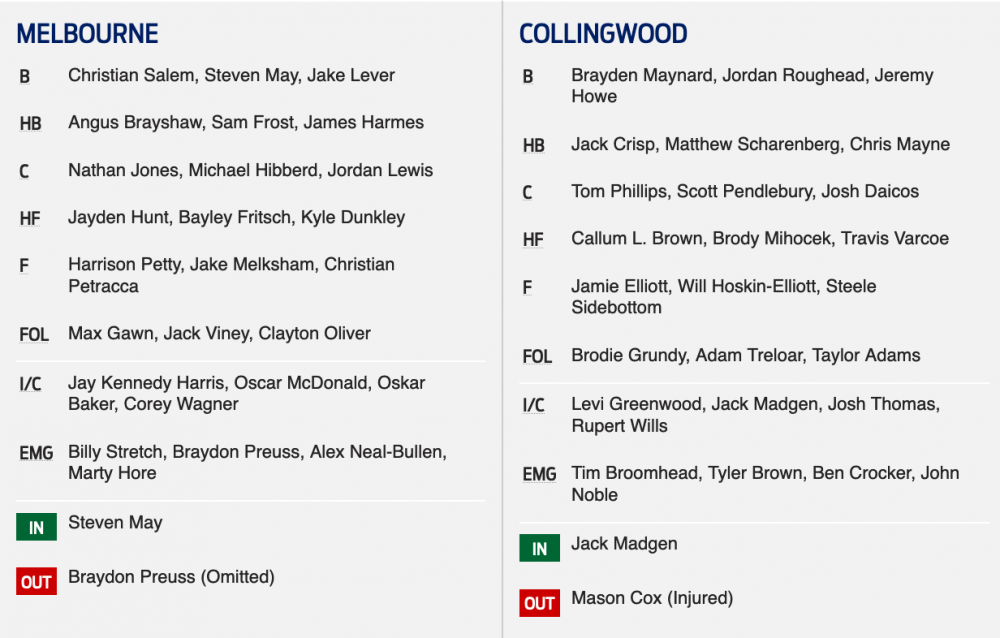
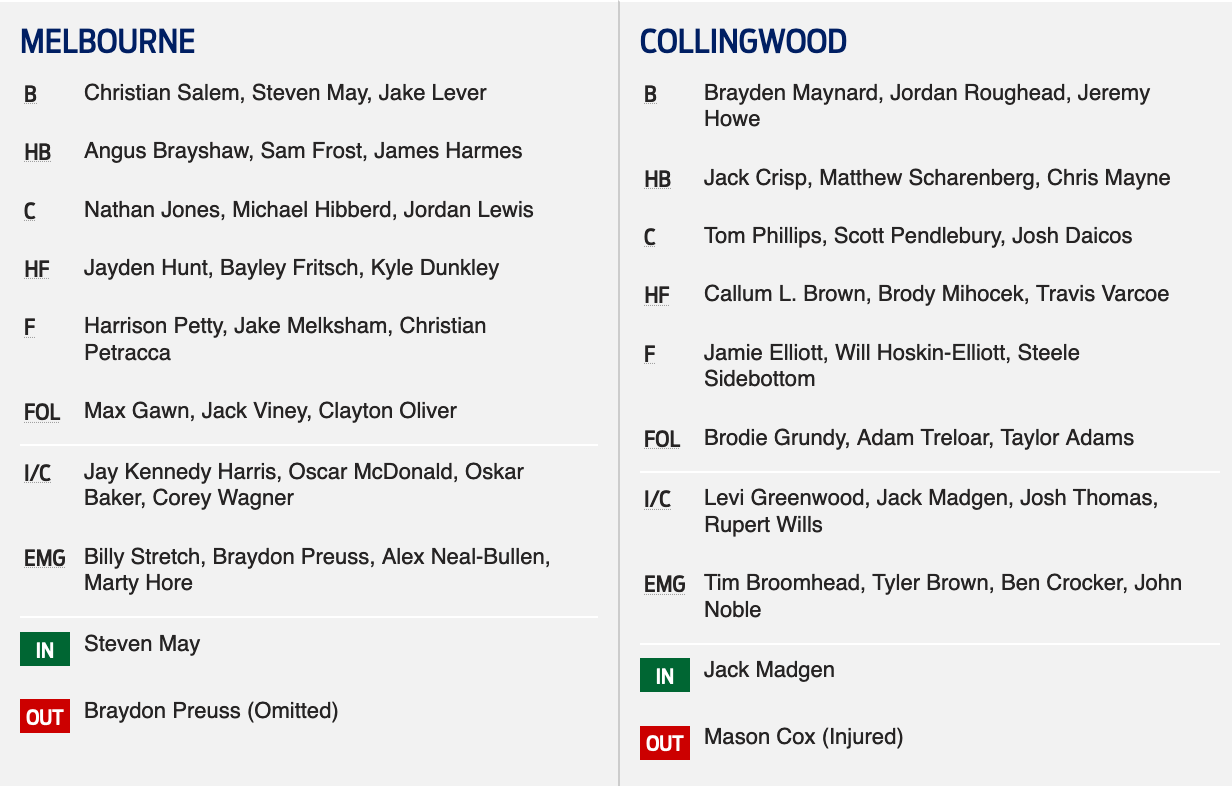
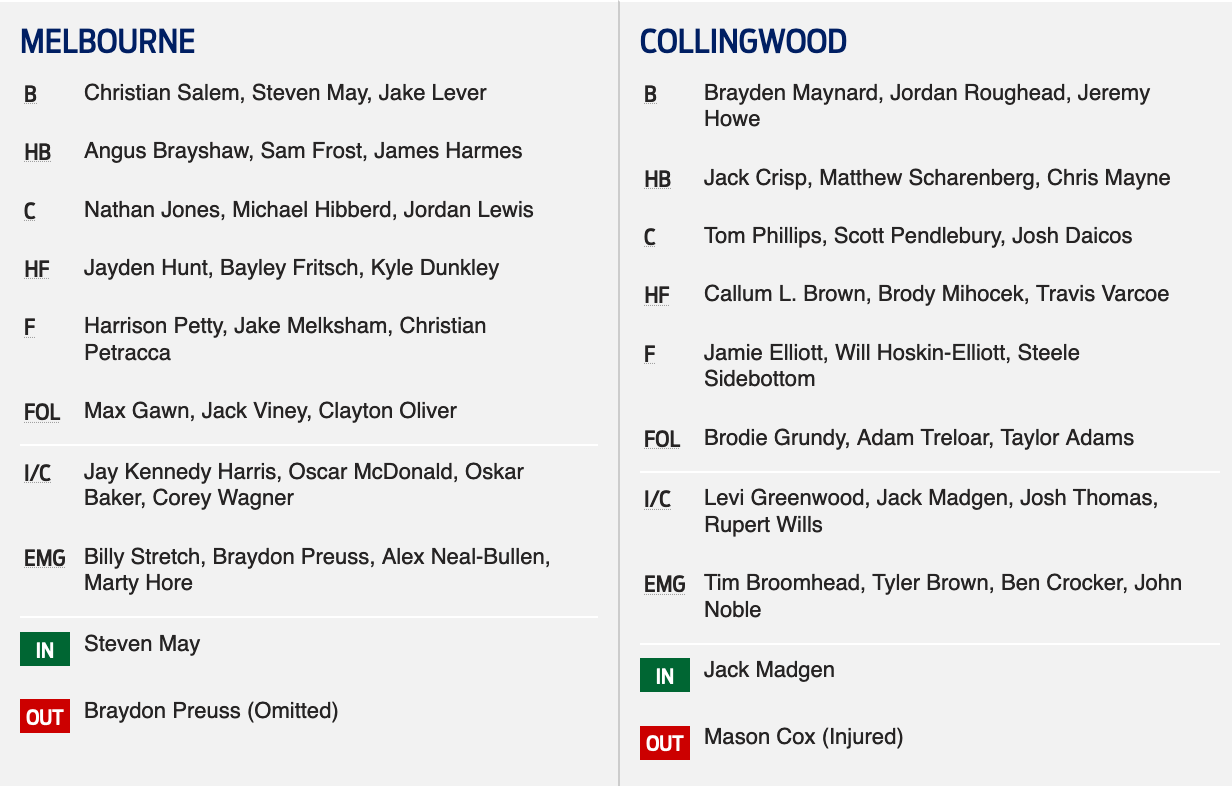
Methinks Hore comes in for Lever as a late out and this was always what was going to happen. If Lever does play then I have no idea why Hore wasn't chosen over OMac.Some Wizard Highlights.Countdown Thought Demonlanders would appreciate a countdown to the end of this years misery. Bring on 2020.Which results will help us secure the best bottom 6 partners for next years draw?Take the Selection discussion to the PREGAME Thread: https://demonland.com/forums/topic/46668-pregame-rd-21-vs-collingwood/This years membership would have been worth it for a song and dance number like this.Goodwin: Steven May is right to go. He was very close last week, but he’s trained strongly so it’ll be good to have him back. Goodwin: Jake Lever trained yesterday away from the main group, but we expect him to be fine. He’ll train again tomorrow + be right to go. Goodwin: Collingwood has some really elite small players who can mark above the head. We will prepare for whatever set-up they go with - tall or small. Goodwin: We’ll take the wet conditions into account at selection. We could go with Harry Petty as the main tall up forward, or we could have a mix. Goodwin: We think Angus Brayshaw has really started to round his game out well in areas other than just his offence. He’s a really important part of our side + we’re happy with how he’s tracking. Goodwin: Macca has made a great contribution to the club over five years. He is a really close mate of mine + has been an unbelievable mentor. The time was right for him to depart, but it’s sad to see a great mate leave + he’s had an enormous impact on our playing group. Goodwin: This is the time of year where you get linked to a whole range of people - players, coaches + staff. There are some great footy people out there, Alan Richardson is one of them, but that’s not something I’m looking at. Goodwin: I thought we challenged Richmond for half the game last week until the conditions changed. Skill level has been a big issue for us, but I think there are positives to take out of the first half of that game. Goodwin: The captaincy next year is the last thing I’m looking at right now. Nathan Jones + Jack Viney have done an incredible job for this football club. Goodwin: The players are looking at the next three weeks as an opportunity. The spirit of our players is high.On the surface I don't like this unless we give up peanuts for him and I don't mean a late draft pick I mean actual peanuts. Trading in injury prone players is our specialty so he'll fit right at home for a year before he is delisted or retires. Of course I'll be tickled pink if I'm wrong but I'm not particularly ticklish.Welcome to Demonland.Thanks to Demonlanders for their input into this week’s preview. Ralphius Maximus is short and bittersweet: We'll crack in at the bounce to create a contest, win our share of the ball, butcher the forward movement and get scored on easily from the intercepts. Not that hard to predict. Big Demon says: Unfortunately Collingwood will win because they have a lot more to play for. We will be good in parts but really the season is well over so we will have to put up with those belligerent black and white mongrels all day yet again. Soidee’s view: Sadly it will be another loss for the MFC. I have watched them closely and a losing culture has set in. Goodwin refuses to change and he will be better served to just let the team free up and play with freedom over next 3 weeks. Collingwood have all to play for, our players are drowning in process and no confidence. There will be players offloaded in the off season and those who remain will have the hardest pre season in recent history. Mahoney and Goodwin on their last chance to get it right. Don’t stuff around, if we have injury prone players then move them on. We need fit players on our list and need to bring in a power forward and speed in the middle. Mental Demons: Collingwood will win. Goodwin's comments about testing players for versatility and to see what they have for the future is an admission that we don't wan't or care to win. We will be better of with the high draft pick. It also hides our future potential for when we can put out a better team next year. The Demons have a bit of a record of not being good two years in a row. It has given a chance to have a look at some players who would not have got a look in but for injuries. It has separated a few of the men from the boys. Hore, Petty, Dunkley and Lockhart look to have something to offer. It has also weeded out some of our problems. If we were out to win we would be playing guys who are playing for their careers because their contracts are up. Of this Spargo and O Mac have very misty futures. It has also highlighted our poor drafting and player management. May is an overpriced crock but is the most secure player on our list, more secure than Max, Oliver, Salem, Harmes, Melksham, in fact everybody. May needs to show some value because his return this year has been terrible. May turns up unfit and struggles to stay on the field. Lever is not as much of a problem as he reads play well and has rebounding skills, he just needs a good run at it and his potential will be shown. Our other management problem players are Weideman (is only really a third tall); Vandenberg (has he played a game since we signed him for 3 years so the Swans would not get him?); Kolodjashnij (has not show any value at Casey); Pruess (immobile and overpriced). Pruess was a liability last week and so has not shown we can play him and Max in the same team.To be competitive against the Pies, we need our quickest team out there. If May is out again we probably need Oscar Mac in, no other tall options. JHK did not do enough last week to be kept on the list next year so another small can have a go in the big league. If Leaver is out, bring in Hore. If Tim Smith is fit we should bring him in. Would be good to have a look at Jordon, and/or Bedford. What have we got to lose except pick 2? robbiefrom13 opines: Collingwood appear to be physically far stronger than Melbourne, and faster, and unlike us they are playing with confidence - so it's hard to see us getting anywhere near them. On the other hand, if Goodwin hasn't lost the players, they - all of them, coaching staff and players - must be highly motivated to prove it and silence the growing rumblings about coach/players "connection". And Collingwood are presumably at real risk of going into this game overly confident. Like a team running out for the first time under a new coach, we could surprise the world. Terribly undermanned, we surprised West Coast a few years ago. Upsets happen - it's not impossible. But unless the stories about a breakdown between players and their coaches are wrong, it's not going to happen this week. So there's the interest - to see if the game departs from the obvious script, even a little bit. The game itself hardly matters for us, as far as this season is concerned - but the bigger narrative of the state of our club - that does. We must be getting closer to knowing for sure - so Melbourne supporters may go to the footy focused on a completely different drama to the one Collingwood fans will be there drooling for The Third Eye concludes: The Demons are struggling. Of this there is no doubt because our expectations were so high as we went into the preseason before things fell away so badly. But I wonder if we’re really that bad. We know the club is running at about ⅔ rat power due to our disastrous injury and fitness injuries but I was bemused by an article in the Herald Sun which waxed eloquent about Carlton’s future after its 24 point loss against the West Coast Eagles who took their feet off the accelerator from at least as early as the start of the final quarter on Sunday. The critics were nowhere near as friendly to Melbourne which lost by 13 points two weeks earlier in a game that could have gone either way. “Off with Goodwin’s head!” they wail. As for the Magpies, they’ve been up and down in the past month or so while suffering from an injury list that compares with that of the Demons if you believe their supporters. But according to a stat that came up on my Twitter feed that said, “Collingwood averaging 3.7 first 22 players missing per game, Dees 6.9.” Never let it be said that Collingwood folk understand the word “perspective”. Their team looked pathetic a fortnight ago against the Tigers and they were gorn by half time before their opponents virtually hung up their boots midway through the final term and allowed them to get to within 32 points of their tormentors. Melbourne, on the other hand, stayed up with Richmond for a half and fell away with the coming of the rain in third quarter to lose by 33 points. On that basis, the teams are pretty evenly matched and if the Demons can kick straight for goal, they win. I think they will do it this week - they have absolutely nothing to lose. * and that’s the retro round preview. Apologies to those who missed out. THE GAME Melbourne v Collingwood at the MCG Saturday 10 August, 2019 at 1.45pm HEAD TO HEAD Overall Melbourne 83 wins, Collingwood 149 wins, 5 drawn At the MCG Melbourne 63 wins, Collingwood 82 wins, 3 drawn Last Five Meetings Melbourne 2 wins, Collingwood 3 wins The Coaches Goodwin 1 win, Buckley 3 wins MEDIA TV - Fox Footy Live at 1.30pm Radio - Triple M 3AW ABC LAST TIME THEY MET Collingwood 15.8.98 defeated Melbourne 7.15.57 at the MCG in Round 13, 2019 It was a comprehensive victory to the Magpies who simplify could not miss their shots from any angle or distance after half time while the Demons’ disposal was horrible. THE TEAMS MELBOURNE B Christian Salem Steven May Jake Lever HB Angus Brayshaw Sam Frost James Harmes C Nathan Jones Michael Hibberd Jordan Lewis HF Jayden Hunt Bayley Fritsch Kyle Dunkley F Harrison Petty Jake Melksham Christian Petracca FOLL Max Gawn Jack Viney Clayton Oliver I/C Oskar Baker Jay Kennedy Harris Oscar McDonald Corey Wagner EMG Marty Hore Alex Neal-Bullen Braydon Preuss Billy Stretch IN Steven May OUT Braydon Preuss (omitted) COLLINGWOOD B Brayden Maynard Jordan Roughead Jeremy Howe HB Jack Crisp Matthew Scharenberg Chris Mayne C Tom Phillips Scott Pendlebury Josh Daicos HF Callum Brown Brody Mihocek Travis Varcoe F Jamie Elliott Will Hoskin-Elliott Steele Sidebottom FOLL Brodie Grundy Adam Treloar Taylor Adams I/C Levi Greenwood Jack Madgen Josh Thomas Rupert Wills EMG Tim Broomhead Tyler Brown Ben Crocker John Noble IN Jack Madgen OUT Mason Cox (detached retina) Injury List: Round 21 Steven May (hamstring) – test Jake Lever (ankle) – test Charlie Spargo (calf) – test Mitch Hannan (groin) – 1-2 weeks Tom Sparrow (knee) – 2-3 weeks Aaron vandenBerg (foot) – season Neville Jetta (knee) - season Jeff Garlett (shoulder) – season Kade Kolodjashnij (head) – season Tom McDonald (knee) – season Aaron Nietschke (knee) – season Joel Smith (groin) – season Sam Weideman (jaw) – season Guy Walker (shoulder) – indefinite
 The chat software was 4 small updates behind but I doubt that was the cause. See if you can access it now: https://demonland.com/podcastI really wish we could get revenge on them for Round 23 2017 but alas even if we could somehow beat them they'll still make the finals.Retro Rival Round Round 21 - Melbourne v Collingwood Saturday 10 August, 1.45pm AEST MCG Melbourne hosts Retro Rival Round this weekend against old adversaries Collingwood in a traditional Saturday timeslot. The game will be a throwback to celebrate the club's rich history and fans are invited to get involved in the retro theme of the game. Keep your eyes out during the week for more. Game day timings 11.30am: MCC gates open 12.00pm: AFL and public reserve opens 1.45pm: First bounce Members As a home game, Melbourne members can scan into the game for general admission access. However with a large crowd expected, we recommend you upgrade to a reserved seat via Ticketek. 3XL Membership Get your 3XL Membership for $99 today to experience every moment of the Big 3 at the 'G, which includes access to Saturday's game and Round 22 against the Swans. Not only does this membership give fans access to the three games, it also includes three complimentary tickets to bring a friend. Get your 3XL Membership now > General public Get your tickets to the match via Ticketek > Public transport The MCG is located a short walk from Jolimont and Richmond train stations. The ground is also serviced by the 48, 75 (stopping at Wellington Parade) and 70 (stopping at Hisense Arena) tram routes. Plan your train journey to the ground using the PTV Journey Planner > Car parking Yarra Park will be closed for parking across all Round 21 MCG games. This extends to parking for disability permit and accredited pass holders. Patrons with mobility issues can be dropped off near the MCG on the corner of Jolimont Terrace and Jolimont St. The Travellers Aid shuttle service has also been extended to begin two hours before gates open, with pick up points near Jolimont Station and Richmond Station. Find out more here. All broadcast info in local times. Melbourne: Foxtel – 1.30pm Sydney: Foxtel – 1.30pm Brisbane: Foxtel – 1.30pm Adelaide: Foxtel – 1.00pm Perth: Foxtel – 11.30am Tasmania: Foxtel – 1.30pm ACT: Foxtel – 1.30pm NT: Foxtel – 1.00pm For all other regions and radio info, refer to the AFL Broadcast Guide. Mobile app Live scores, stats and match highlights are available at the tap of a finger in the club's mobile app. Download it for iOS or Android. Social media Match hashtag: #AFLDeesPies Follow the club on Facebook, Twitter and Instagram for live match coverage and a behind-the-scenes insight into match day. VFLW Round 14 In the VFLW, Casey will travel to Box Hill City Oval for a Saturday afternoon clash with the Hawks. Match details Hawthorn v Casey Saturday August 10, 1.00pm Box Hill City Oval Admission Melbourne/Casey Demons members: $5 upon presentation of your membership card Adults: $10 Concession/pensioner: $5 Juniors under 15: FREE VFL Round 19 In the second match-up between the sides in 2019, Casey will travel to Victoria Park to take on Collingwood on Sunday. Match details Collingwood v Casey Sunday August 11, 12.00pm Victoria Park, Abbotsford Tickets Melbourne/Casey Demons members: $5 upon presentation of your membership card Adults: $10 Concession/pensioner: $5 Juniors under 15: FREE Coverage Social media Follow the Casey Demons on Facebook, Instagram and Twitter for behind-the-scenes + live coverage of both matches. THE PEOPLE SPEAK by The Demonland Crew Thanks to Demonlanders for their input into this week’s preview. Ralphius Maximus is short and bittersweet: We'll crack in at the bounce to create a contest, win our share of the ball, butcher the forward movement and get scored on easily from the intercepts. Not that hard to predict. Big Demon says: Unfortunately Collingwood will win because they have a lot more to play for. We will be good in parts but really the season is well over so we will have to put up with those belligerent black and white mongrels all day yet again. Soidee’s view: Sadly it will be another loss for the MFC. I have watched them closely and a losing culture has set in. Goodwin refuses to change and he will be better served to just let the team free up and play with freedom over next 3 weeks. Collingwood have all to play for, our players are drowning in process and no confidence. There will be players offloaded in the off season and those who remain will have the hardest pre season in recent history. Mahoney and Goodwin on their last chance to get it right. Don’t stuff around, if we have injury prone players then move them on. We need fit players on our list and need to bring in a power forward and speed in the middle. Mental Demons: Collingwood will win. Goodwin's comments about testing players for versatility and to see what they have for the future is an admission that we don't wan't or care to win. We will be better of with the high draft pick. It also hides our future potential for when we can put out a better team next year. The Demons have a bit of a record of not being good two years in a row. It has given a chance to have a look at some players who would not have got a look in but for injuries. It has separated a few of the men from the boys. Hore, Petty, Dunkley and Lockhart look to have something to offer. It has also weeded out some of our problems. If we were out to win we would be playing guys who are playing for their careers because their contracts are up. Of this Spargo and O Mac have very misty futures. It has also highlighted our poor drafting and player management. May is an overpriced crock but is the most secure player on our list, more secure than Max, Oliver, Salem, Harmes, Melksham, in fact everybody. May needs to show some value because his return this year has been terrible. May turns up unfit and struggles to stay on the field. Lever is not as much of a problem as he reads play well and has rebounding skills, he just needs a good run at it and his potential will be shown. Our other management problem players are Weideman (is only really a third tall); Vandenberg (has he played a game since we signed him for 3 years so the Swans would not get him?); Kolodjashnij (has not show any value at Casey); Pruess (immobile and overpriced). Pruess was a liability last week and so has not shown we can play him and Max in the same team.To be competitive against the Pies, we need our quickest team out there. If May is out again we probably need Oscar Mac in, no other tall options. JHK did not do enough last week to be kept on the list next year so another small can have a go in the big league. If Leaver is out, bring in Hore. If Tim Smith is fit we should bring him in. Would be good to have a look at Jordon, and/or Bedford. What have we got to lose except pick 2? robbiefrom13 opines: Collingwood appear to be physically far stronger than Melbourne, and faster, and unlike us they are playing with confidence - so it's hard to see us getting anywhere near them. On the other hand, if Goodwin hasn't lost the players, they - all of them, coaching staff and players - must be highly motivated to prove it and silence the growing rumblings about coach/players "connection". And Collingwood are presumably at real risk of going into this game overly confident. Like a team running out for the first time under a new coach, we could surprise the world. Terribly undermanned, we surprised West Coast a few years ago. Upsets happen - it's not impossible. But unless the stories about a breakdown between players and their coaches are wrong, it's not going to happen this week. So there's the interest - to see if the game departs from the obvious script, even a little bit. The game itself hardly matters for us, as far as this season is concerned - but the bigger narrative of the state of our club - that does. We must be getting closer to knowing for sure - so Melbourne supporters may go to the footy focused on a completely different drama to the one Collingwood fans will be there drooling for The Third Eye concludes: The Demons are struggling. Of this there is no doubt because our expectations were so high as we went into the preseason before things fell away so badly. But I wonder if we’re really that bad. We know the club is running at about ⅔ rat power due to our disastrous injury and fitness injuries but I was bemused by an article in the Herald Sun which waxed eloquent about Carlton’s future after its 24 point loss against the West Coast Eagles who took their feet off the accelerator from at least as early as the start of the final quarter on Sunday. The critics were nowhere near as friendly to Melbourne which lost by 13 points two weeks earlier in a game that could have gone either way. “Off with Goodwin’s head!” they wail. As for the Magpies, they’ve been up and down in the past month or so while suffering from an injury list that compares with that of the Demons if you believe their supporters. But according to a stat that came up on my Twitter feed that said, “Collingwood averaging 3.7 first 22 players missing per game, Dees 6.9.” Never let it be said that Collingwood folk understand the word “perspective”. Their team looked pathetic a fortnight ago against the Tigers and they were gorn by half time before their opponents virtually hung up their boots midway through the final term and allowed them to get to within 32 points of their tormentors. Melbourne, on the other hand, stayed up with Richmond for a half and fell away with the coming of the rain in third quarter to lose by 33 points. On that basis, the teams are pretty evenly matched and if the Demons can kick straight for goal, they win. I think they will do it this week - they have absolutely nothing to lose. * and that’s the retro round preview. Apologies to those who missed out. THE GAME Melbourne v Collingwood at the MCG Saturday 10 August, 2019 at 1.45pm HEAD TO HEAD Overall Melbourne 83 wins, Collingwood 149 wins, 5 drawn At the MCG Melbourne 63 wins, Collingwood 82 wins, 3 drawn Last Five Meetings Melbourne 2 wins, Collingwood 3 wins The Coaches Goodwin 1 win, Buckley 3 wins MEDIA TV - Fox Footy Live at 1.30pm Radio - Triple M 3AW ABC LAST TIME THEY MET Collingwood 15.8.98 defeated Melbourne 7.15.57 at the MCG in Round 13, 2019 It was a comprehensive victory to the Magpies who simplify could not miss their shots from any angle or distance after half time while the Demons’ disposal was horrible. THE TEAMS Injury List: Round 21 Steven May (hamstring) – test Jake Lever (ankle) – test Charlie Spargo (calf) – test Mitch Hannan (groin) – 1-2 weeks Tom Sparrow (knee) – 2-3 weeks Aaron vandenBerg (foot) – season Neville Jetta (knee) - season Jeff Garlett (shoulder) – season Kade Kolodjashnij (head) – season Tom McDonald (knee) – season Aaron Nietschke (knee) – season Joel Smith (groin) – season Sam Weideman (jaw) – season Guy Walker (shoulder) – indefinite
 Here is the squad. Only 2 Demons and Bayley in as a Defender. VOTE for the final team here: VOTE FOR 22UNDER22Interesting. Thanks for letting me know. It might be that the software for the chatroom needs an update/clean install. What operating system are you using for the laptop? Windows or Mac?Subscribe iTunes Subscribe RSS Subscribe Android Subscribe SpotifyPerhaps it is an issue on mobiles. The chatroom software might need an update. I'll look into it tomorrow and let you know. Was definitely working on my Mac. @Wadda We Sing what device were you using? phone or computer?Sorry guys. I didn't see this thread during the podcast. There were some other posters in the chat so I didn't realise that there might have been an issue.Podcast is LIVE in a few minutes. Listen & Chat LIVE: https://demonland.com/podcast Call: 03 9016 3666 Skype: Demonland31





Account
Navigation
Search
Configure browser push notifications
Chrome (Android)
- Tap the lock icon next to the address bar.
- Tap Permissions → Notifications.
- Adjust your preference.
Chrome (Desktop)
- Click the padlock icon in the address bar.
- Select Site settings.
- Find Notifications and adjust your preference.
Safari (iOS 16.4+)
- Ensure the site is installed via Add to Home Screen.
- Open Settings App → Notifications.
- Find your app name and adjust your preference.
Safari (macOS)
- Go to Safari → Preferences.
- Click the Websites tab.
- Select Notifications in the sidebar.
- Find this website and adjust your preference.
Edge (Android)
- Tap the lock icon next to the address bar.
- Tap Permissions.
- Find Notifications and adjust your preference.
Edge (Desktop)
- Click the padlock icon in the address bar.
- Click Permissions for this site.
- Find Notifications and adjust your preference.
Firefox (Android)
- Go to Settings → Site permissions.
- Tap Notifications.
- Find this site in the list and adjust your preference.
Firefox (Desktop)
- Open Firefox Settings.
- Search for Notifications.
- Find this site in the list and adjust your preference.