
red and blue forever
Members
-
Joined
-
Last visited
Everything posted by red and blue forever
-
6 - K.Pickett 5 - M.Gawn 4 - Lever 3 - Sparrow 2 - Steele 1 - Windsor
-
Ok, so that was exciting after all
-
Crossy First Goal!!
-
that tap forward by pickett was sublime!
-
grumble
-
just got home, excited to be able to watch the game on tv..... the excitement did not last very long. What the hell happened? at least I saw out first goal.
-
MFC proudly sponsors James Hardie edit* funnily enough the did support Fitzroy back in the day..
-
I wonder if players in the near future will have to sign wavers for concussion based injuries before they are allowed to play
-
☹️
-
Hand injury
-
Rough start.
-
In terms of the Waverley deal, All i care about is whether the players would prefer to train there or at Casey
-
Roo kicks 6 and cant get a vote? a tad harsh
-
I'll Start it off 6 - Gawn 5 -Van Rooyen 4 - Steele 3 - K.Pickett 2 - Cully 1 - Mihocek
-
how about now?
-
commentators always go for the team behind, trying to make it exciting
-
Lever is rusty, but will improve. he has not played much in the last year
-
I Like Cully
-
this Van Rooyen fella seems good
-
Steel Solid!
-
back line is a tad wobbly
-
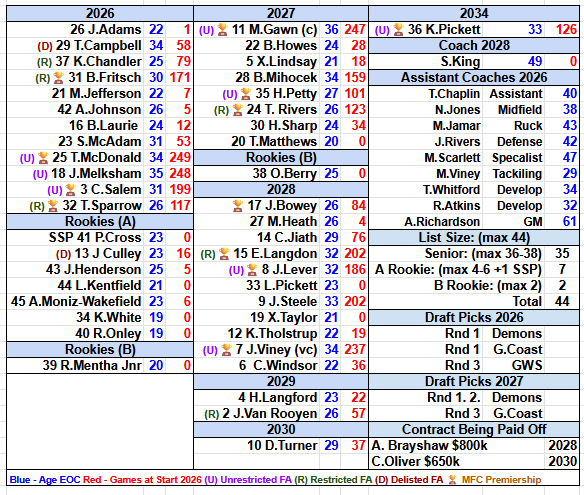
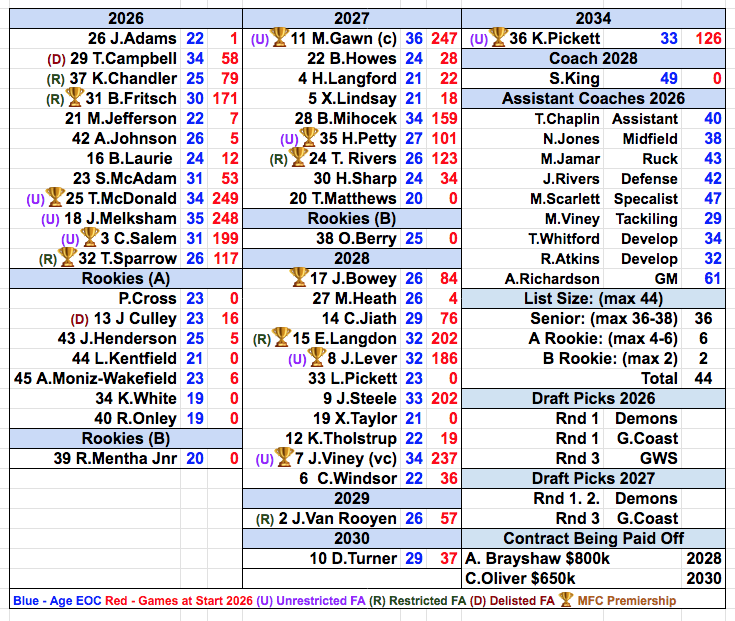
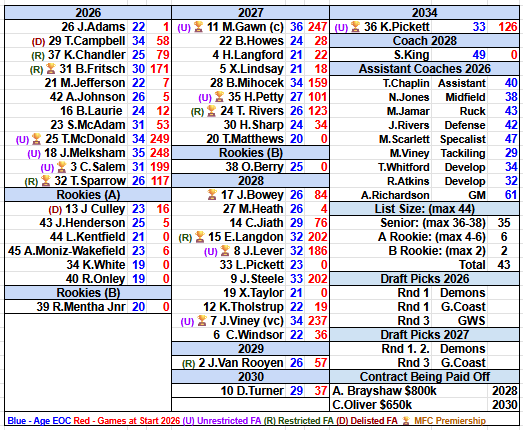
Update for Langford signing until 2029
-
Update for the Addition Of Paddy Cross Welcome to the Club!!!! Uploading Attachment...
-
Update for the retirement of Steven May A Great player for the club, Thank you for your time and all the best.
-
A Mix for the Higher Times🍄