





Demonland
Primary Administrators
-
Joined
-
Last visited
Everything posted by Demonland
-
Gave Windsor a big wrap the other day but he has missed a number of targets today. Hopefully an aberration.
-
Trac absolutely tearing it up on the track.
-
Disco and Fullarton also forwards
-
Petty and TMac are defenders in this drill.
-
Trac is looking superb. Fit and strong. Just did a little shimmy and sold some candy and delivered a pinpoint pass.
-
Salem not participating in this drill and now doing sprints along the boundary.
-
Full length end to end drill with the outnumbered team defending in white bibs.
-
New recruit Aidan Johnson is here too.
-
Windsor has a laser pass.
-
Clarry back out on the track.
-
Langford has a pinpoint pass.
-
Lindsay and Spargo jogging slowly around the boundary now.
-
Clarry has come off the track and taken his boot off and is applying something to what appears to be a blister.
-
Langford is warming up with the main group. Lindsay is doing some drills/exercises with Spargo. Not sure if that is because he is in rehab or not.
-
REHAB: Spargo, Campbell, Howes, Sestan Fritsch and Salem were training separately but have now joined the main group.
-
Viney was leaving the track as I arrived after running/sprinting on the boundary.
-
Spargo in rehab. Doing knee raisers on the spot.
-
TRAINING: PETRACCA, Harvey Langford, Xavier Lindsay, Clarry, Kolt, Brown, Jefferson, Sestan, Howes, Rivers, JVR, Turner, Kentfield, Hore, TMac, Laurie, Petty, Verral, Adams, Sharp, Fullarton, Windsor, AMW, Woey, Bowey, Chandler
-
Trac is BACK!!
-
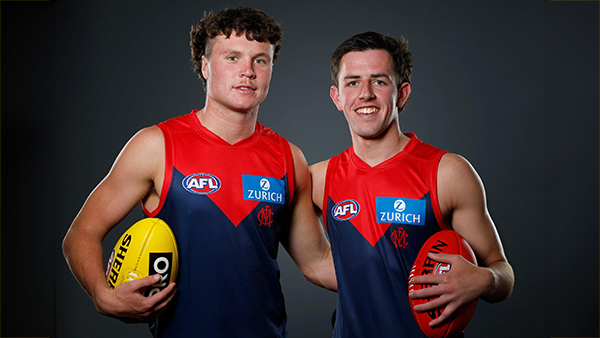
The 2 new boys Harvey Langford and Xavier Lindsay are here. As is Harry Sharp.
-
Salem, Fritsch & Campbell are already on the track. Still no number on Campbell’s guernsey.
-
It’s going to be a scorcher today but I’m in the shade at Gosch’s Paddock ready to bring you some observations from the final session before the Preseason Training Camp next week.
-
LOL. Do you have a link?
-
Those who watched the 2024 Marsh AFL National Championships closely this year would not be particularly surprised that Melbourne selected Victoria Country pair Harvey Langford and Xavier Lindsay on the first night of the AFL National Draft. The two left-footed midfielders are as different as chalk and cheese but they had similar impacts in their Coates Talent League teams and in the National Championships in 2024. Their interstate side was edged out at the very end of the tournament for team honours by Victoria Metro but the duo reached the pinnacle of individual success by being named in the starting midfield of this year’s All Australian team. Naturally, both also made the CTL Team of the Year. The 191cm tall Langford is an inside midfield star who can also hit the scoreboard. He was selected for this year’s AFL Academy and co-captained the Dandenong Stingrays where he was a consistent high performer. Langford rose to even greater heights with Vic Country where he averaged 25.5 disposals, and 6.3 marks, was named in the team’s best two players across all four games, sharing the Larke Medal for best and fairest in the Carnival. This earned him a single game for Richmond in the VFL where he managed 12 disposals and three marks in his sole appearance, playing a half on-ball before moving up forward. Lindsay is 183cm and a well rounded outside runner who according to Demons’ recruiting boss Jason Taylor is an expert reader of the game. This year he captained Gippsland Power Under 18s and was the Morrish Medal winner as CTL’s best and fairest player. He was best on the ground in that National Championship decider against Vic Metro with 30 disposals, 11 marks, and eight tackles, just shading his teammate Langford. I recommend that you get a hold of the vision from this game. "His IQ is high as well and he has unbelievable spatial awareness. He just knows what is around him," Taylor said of Lindsay yesterday. "He really carries the footy and he is an elite kick and he has got good speed and he has got an ability to play in a lot of different positions. "He plays them all well." And play well they did, consistently and throughout the national championships. It was the same thing every time they put on a Country guernsey. From the get go, Langford especially looked the quintessential Jason Taylor/Simon Goodwin recruiting target, as hard and as strong as they come. The club’s recruiters worked hard to secure pick 9 from the Bombers and it all paid off when Lindsay’s name was called out to play for the Demons. My first thoughts about securing two classy players with such deadly left foot delivery were of the great Hawthorn dynasty a decade ago. While the football world’s eyes were on the troubled Demons who languished through a difficult last half of the season riddled with injuries and player issues, Taylor and his team were working hard to restore the club to the point where it recently stood on the brink of such an elusive dynasty. We saw the early result of their endeavours last night - two midfielders with bright futures in the game and with names that one day soon will be up in lights.
-
Did they train the day this photo was taken? It was right after the draft last year.






