dice
Life Member
-
Joined
-
Last visited
-
And only 1 of them has gone on to win a premiership at another club - Howe
-
Little bit unrelated but some nasty stuff happening at Carlton's 130 year old facility: 7NEWSCarlton engage medical experts amid infection ‘concerns’‘They tried to turn the place upside down to get to the bottom of this.’
-
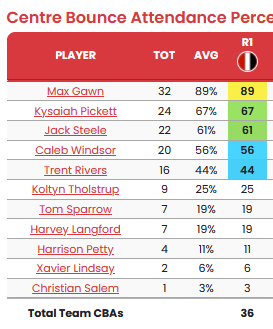
Ditto above. Great questions. I don't think I have ever seen us use so many different CBA combinations (from 11 different players) in a game. Would love to hear any further thoughts on our CBAs - whether it might have been pre-planned or if it was just circumstance as Saints also used 12 different players in the guts. https://dfsaustralia.com/afl-cbas/?team=MEL&season=2026
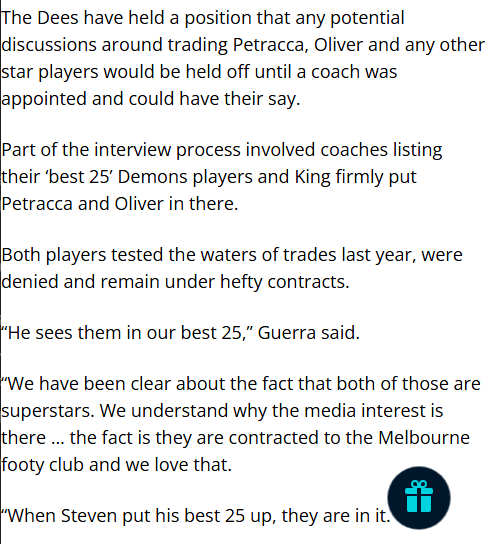
 https://www.theage.com.au/sport/afl/nba-style-how-the-demons-plan-to-amp-up-their-home-games-to-get-crowds-back-at-the-g-20260313-p5oa86.html Melbourne supporters are used to a certain match-day aesthetic: cheeseboards on the balcony, a glass of Tasmanian pinot in hand, a polite golf clap when the Demons slot a goal. But things are changing at Demon land. Not just on the field, where new coach Steven King has promised to deliver a more direct, high-octane brand of football. But off it as well. This season, the club wants its home games to feel less like a wine bar and more like an NBA arena. Sounds ominous for Demonland....There was no "selling" involved. By the sounds of it, Trac and the Club had already made the decision to part ways before King was even interviewed. And Oliver was "sold" for nothing anyway. The point is Guerra has been giving us mixed messages from Day 1 on a few topics. Not a straight shooter, unlike Peter JacksonExactly.
 "Working hard to make a living..."Got a link?Plenty more good than bad there. Unlike Arctic ParkMaybe the Club doesn't care but I reckon a lot of fans do, especially those who were there at the prelim in '87. Not many good memories there. Bad voodooWithout traffichttps://youtu.be/TzMSfaNXYZg?si=uBXmUcCoi7YJ1V38&t=37@Ghostwriter When you next see Greeny, please ask him if this head high round arm by Hardwick OR the subsequent punch by Wallis broke his larynx