





Demonland
Primary Administrators
-
Joined
-
Last visited
Everything posted by Demonland
-
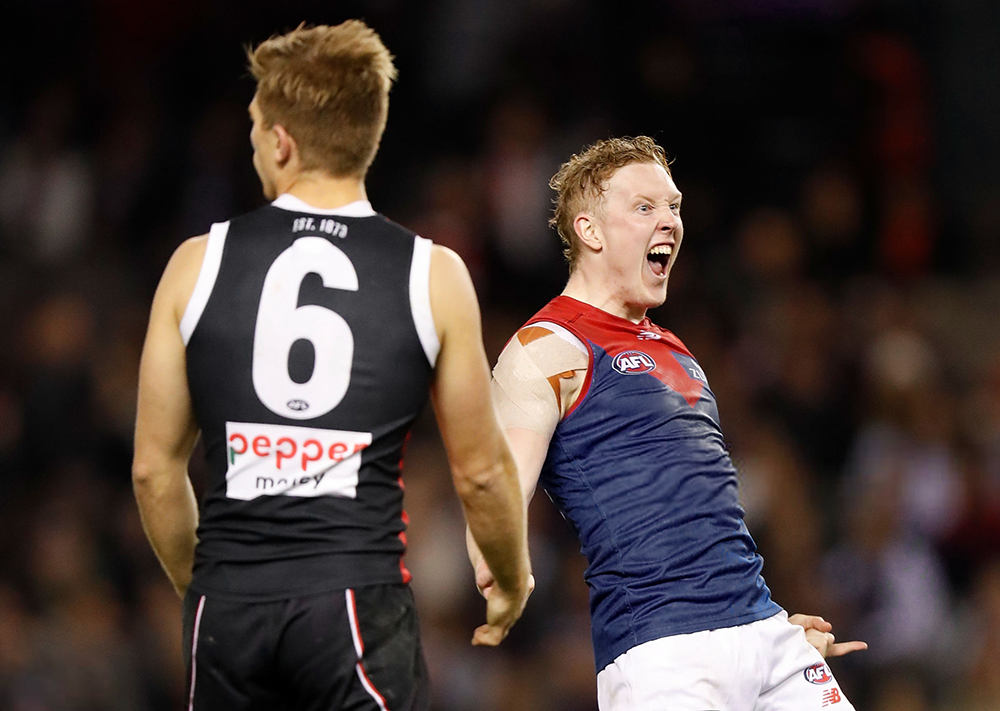
Throughout the off season, St Kilda was touted as an improver and a possible challenger for a top four position mainly off the back of another good trade and draft period at the end of last year. Then in Round 1, the undermanned Saints made a shaky start and almost succumbed to the Giants but they managed to come home from a wet and woolly Sydney with the four points intact. For Round 2, they have a couple of handy players returning so they come into the the game at Marvel Stadium chock full of confidence about reversing the result of their encounter in Alice Springs last year when they fell tantalisingly short of beating the Demons. That game was in Covid19 time with all manner of asterisks around it and now, they’ll be literally back in town in the comfort of their home ground where they’ve generally given their opponent a hard time in recent years. For its part, Melbourne is also coming off a win but it was a victory against a somewhat flawed opposition that had some difficulty adapting to the conditions a long way from home and with little support behind the team. The Dockers did manage a victory of sorts in that they won the clearances despite playing to a dominant ruck headed by Max Gawn. Their problem was that they failed to convert this on the scoreboard, particularly early in the game when they were well on top in the midfield. The old adage about it being “all about the midfield stupid!” seems to have gone out of the window lately when it comes to the Demons. They make up for it these days - at least they did last week - with an impressive defence headed by interception wizards Steven May and Jake Lever. Christian Salem, Adam Tomlinson, Nev Jetta, Trent Rivers and, from time to time when he went back, Big Max, were all major contributors to a strong defensive effort last week and will have a tougher assignment this week against the Saints who will benefit from the return of Max King from a week on the sidelines after he was headbutted by a golf ball. Along with match winner Tim Membrey and a bevy of clever small forwards including former Tigers Dan Butler and Jack Higgins, it’s going to be a much tougher ask for the Demon defence to contain this group than it was last week against Freo. This puts the onus on Melbourne’s attack to click when kicking for goal. There were too many gimme shots from within close range that were squandered last week and they won’t be able to blame tricky winds at Marvel Stadium or out of shape footballs for that matter. A couple of years ago, the Demons were overwhelmed by the outside run of the Saints and while this issue has still not been fully addressed, the gap in this division has narrowed while on the inside, Melbourne should take the honours. They certainly won’t be stuck in the middle this time. Melbourne by 17 points THE GAME St Kilda v Melbourne at Marvel Stadium on Saturday 27 March 2021 at 7.25pm HEAD TO HEAD Overall St Kilda 94 wins Melbourne 122 wins 1 drawn At Marvel Stadium St Kilda 9 wins Melbourne 5 wins Past five meetings Melbourne 3 wins St Kilda 2 wins The Coaches Ratten 1 win Goodwin 1 win MEDIA TV live and on demand on Kayo and live on Foxtel. Check your local guides. Radio - check your local guides. THE LAST TIME THEY MET Melbourne 8.4.52 defeated St Kilda 7.7.49 at TIO Traeger Park, Round 14, 2020 The Demons jumped to an early lead with three goals in the second half of the first term but were pegged back in the third quarter. They held their narrow lead at the final break and prevailed in a tense finish with a controversial goal from Christian Petracca seeing them home. THE TEAMS ST KILDA B: J. Webster 29 D. Howard 20 C. Wilkie 44 HB: B. Long 21 T. Highmore 34 J. Sinclair 35 C: J. Billings 15 S. Ross 6 H Clark 11 HF D. Butler 16 B. Hill J. Lonie 13 F: T. Membrey 28 S McKernan 27 M King 12 Foll: P. Hunter 41 J. Steele 9 J. Gresham 4 I/C: J. Battle 26 N. Coffield 1 J. Higgins 22 Z. Jones 3 Sub: J. Bytel 23 Emerg: J. Carlisle 2 D. McKenzie 36 M. Wood 32 In: Z. Jones M. King Out: D. McKenzie M. Wood MELBOURNE B: N. Jetta 39 S. May 1 A. Tomlinson 20 HB: J. Hunt 29 J. Lever 8 C. Salem 3 C: A. Brayshaw 10 C. Petracca 5 E. Langdon 15 HF: T. Sparrow 32 T. McDonald 25 K. Pickett 36 F: A. Neal-Bullen 30 L. Jackson 6 B. Fritsch 31 Foll: M. Gawn - C 11 C. Oliver 13 J. Viney 7 I/C: N. Jones 2 J. Jordon 23 T. Rivers 24 C. Spargo 9 Sub: O. Baker 33 Emerg: M Hibberd 14 J. Melksham 18 H. Petty 35 In: O. Baker J. Viney Out: K. Chandler J. Harmes (wrist) Injury List: Round 2 Michael Hibberd (ankle) — Available Jake Melksham (hamstring) — Available Jack Viney (foot) — Available Mitch Brown (calf) — 1 Week Joel Smith (finger) — 1 Week Jay Lockhart (testicles) — 1 to 2 Weeks Sam Weideman (leg) — 2 to 4 Weeks Ben Brown (knee) — 4 to 6 Weeks James Harmes (wrist) — 6 Weeks Marty Hore (knee) — Season Aaron Nietschke (knee) — Season
-
-
As of 2 minutes ago it's finally official; Harmes is set for a stint on the sidelines.https://en.wikipedia.org/wiki/Daisy_Pearcehttps://en.wikipedia.org/wiki/Karen_Paxmanhttps://www.melbournefc.com.au/players/3133/jake-boweyhttps://www.melbournefc.com.au/players/2811/bailey-laurieAverages out to the good ole classic 426.Unfortunately NO.Where did you see/hear this? PLAYER INJURY ESTIMATED RETURN Ben Brown Knee 3-5 weeks Michael Hibberd Ankle Test Marty Hore Knee Season Jay Lockhart Testicle Indefinite Jake Melksham Hamstring Test Aaron Nietschke Knee Season Jack Viney Foot Test Sam Weideman Leg 3-5 weeks Updated: Tuesday, March 23 Early prognosis It was a good week on the injury front for the Demons, with Hibberd (ankle), Melksham (hamstring) and Viney (foot) all making it through a VFL practice match unscathed. Their impending availability adds to the clean bill of health that the side enjoyed following Saturday's win over the Dockers. - Riley BeveridgeIn case you were wondering. Since 2010. MOST MATCHES MISSED THROUGH SUSPENSION SINCE 2010 62 Geelong 57 Richmond 56 Hawthorn 53 West Coast 52 St Kilda 51 Essendon 50 Melbourne 46 Fremantle 43 North Melbourne 40 Brisbane, Port Adelaide 36 Carlton 35 Gold Coast 29 Greater Western Sydney 28 Collingwood 26 Western Bulldogs 22 Adelaide 18 SydneySurely he appeals and it gets downgraded to 2.The Demonland Podcast is LIVE tonight at 8:30pm. Join @Grapeviney, @george_on_the_outer, @binman & I as we dissect Round 1 win over the Dockers, our Finals sealing win over the Dockers in the AFLW before previewing our Round 2 match against the Saints. Listen & Chat LIVE: https://demonland.com/podcast Call: 03 9016 3666 Skype: Demonland31
Account
Navigation
Search
Configure browser push notifications
Chrome (Android)
- Tap the lock icon next to the address bar.
- Tap Permissions → Notifications.
- Adjust your preference.
Chrome (Desktop)
- Click the padlock icon in the address bar.
- Select Site settings.
- Find Notifications and adjust your preference.
Safari (iOS 16.4+)
- Ensure the site is installed via Add to Home Screen.
- Open Settings App → Notifications.
- Find your app name and adjust your preference.
Safari (macOS)
- Go to Safari → Preferences.
- Click the Websites tab.
- Select Notifications in the sidebar.
- Find this website and adjust your preference.
Edge (Android)
- Tap the lock icon next to the address bar.
- Tap Permissions.
- Find Notifications and adjust your preference.
Edge (Desktop)
- Click the padlock icon in the address bar.
- Click Permissions for this site.
- Find Notifications and adjust your preference.
Firefox (Android)
- Go to Settings → Site permissions.
- Tap Notifications.
- Find this site in the list and adjust your preference.
Firefox (Desktop)
- Open Firefox Settings.
- Search for Notifications.
- Find this site in the list and adjust your preference.







Facebook.png.607977043bbc7e82a65005cc882fa795.png)