





Demonland
Primary Administrators
-
Joined
-
Last visited
Everything posted by Demonland
-
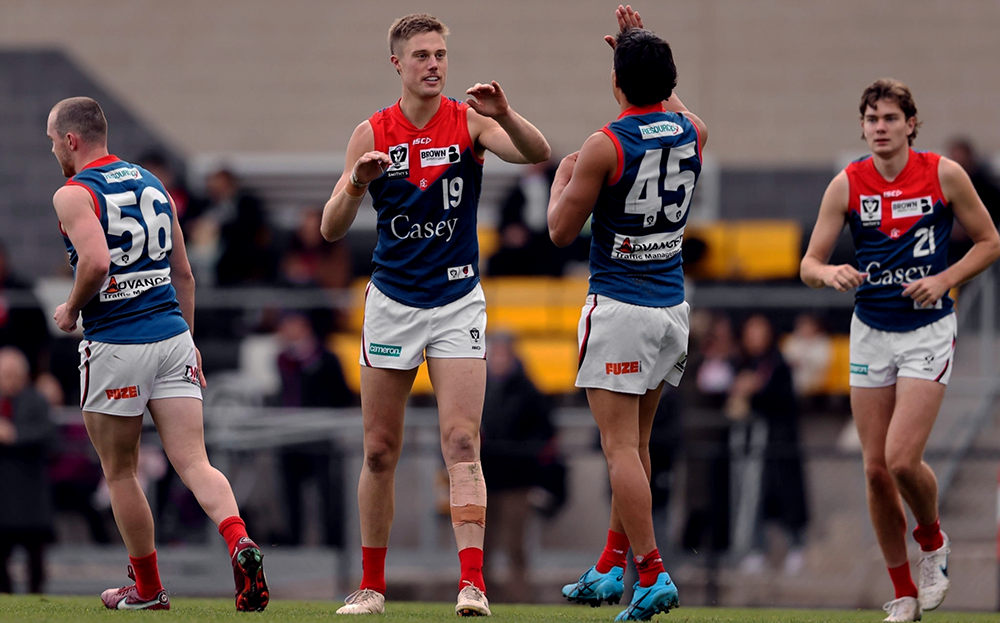
Loving all the questions and comments but I'll have to draw the line here. My notes are already almost 6 pages longer than normal. It's already going to be a massive show. If you must ask something now make it a question re: the collingwood game keeping in mind any other questions already asked. Think we'll have the Blues game covered already.Still no sign of Oliver? Hopefully it's just smoke and mirrors for the benefit of the sticky beaks from the Lexus centre.DEMONLAND:Just a reminder to all of our listeners that the Demonland Podcast will air LIVE Tomorrow (Tuesday) night and not Tonight (Monday). Next week's show will also be on Tuesday night as a result of our King's Birthday clash being on the Monday. Hopefully we will return to our regularly scheduled programming night after the Bye.Definitely a disadvantage come finals.FMD Razor Ray waiting for noise affirmation to award a deliberate out of bounds. Umpiring is putrid this season.Bad timing. This year he would be playing senior footy at the Dees with our plethora of small forwards in the side.No need for a 19th team. Send North to Tassie.The Casey Demons had a number of points to make to themselves, their opponents and the VFL football world when they traveled up to the Gold Coast to take on the Southport Sharks in the 2022 Grand Final rematch at Fankhauser Reserve. After living off the glory of an almost perfect premiership, the Demons stumbled after winning the opening four games of the season and have struggled in their recent northern state sojourns - their only loss in 2022 came at the hands of the Lions in Brisbane and they were given a touch up by Gold Coast in Round 7. Last week, a team of 14 Melbourne listed players folded like a rickety card table in the final term of their match at Werribee. Suddenly, they were in fifth place with a few competitors breathing down their necks. Add some injuries and a suspension and Casey’s season was on the line. As it was a week earlier against Werribee, the Demons were pitted against a committed team with some experienced mature bodies, desperate for a victory to keep them finals contention. This time however, the Demons maintained their composure for most of the game and they were able to do so through the agency of their mix of AFL and VFL listers. Of the former, two in particular stood out. Josh Schache started proceedings for the visitors with the opening goal of the game in its opening minutes. He kicked his second before half time and then booted his team’s only two goals in the last including the final score late in the match that put Casey in front by a solitary point. Apart from his accuracy when up forward, Schache fought valiantly in the ruck against Southport’s man mountain, Brayden Crossley who was called in to the task after the injury to Jake Bell. Crossley was dominant in the ruck duels but Schache's contribution around the ground as well as up forward which included 15 possessions, seven marks, four tackles, and five hitouts on top of the four straight goals was crucial. James Jordon has spent much of 2023 on the cusp at Melbourne with a number of appearances as a substitute. He was back in the midfield at Casey this week but his prolific 30 disposal display was sublime, on top of which his five clearances, and four tackles and a goal were timely given Clayton Oliver’s injury and suspension ahead of the Kings Birthday blockbuster. This spectacular goal has all of the hallmarks of goal of the year. Casey was well led by Mitch White and the experienced Matt Buntine and fueled by outstanding performances from Roan Steele (23 touches, 10 marks) and George Grey (3 goals, 16 disposals, 5 marks and 6 tackles). Two of Grey’s goals came late in the third term after the Sharks had wrested the lead for the first time in almost an hour of play, a contribution that gave the visitors an 8 point lead at the final break. A few young Demons who are pushing hard for AFL promotion in Blake Howes (23 touches, 8 marks), Taj Woewodin (23 disposals, six tackles and three clearances) and Bailey Laurie (22 touches, six tackles) were all busy. Deakyn Smith played a strong game as the small defender while Daniel Turner, Andy Moniz-Wakefield and Ollie Sestan all had their moments. Together, they put together a fine team effort and made their points well in the Queensland sun. With the upcoming Kings Birthday weekend, the Demons return to their home fortress for a match up against Collingwood VFL next Sunday. CASEY DEMONS 1.2.8 6.6.42 9.9.63 11.10.76 SOUTHPORT SHARKS 3.0.18 4.5.29 8.7.55 11.9.75 GOALS CASEY DEMONS Schache 4 Grey 3 Brown 2 Jordon Sestan SOUTHPORT SHARKS Crossley Foggo Lockett Lockhart 2 Fields Heron Thurlow BEST CASEY DEMONS Jordon Grey Schache Laurie Steele Howes SOUTHPORT SHARKS Woodcock Crossley Joyce Dawson Thurlow Spencer Statistics Jed Adams 3 kicks 2 handballs 5 disposals 1 mark 13 dream team points Riley Baldi 4 kicks 4 handballs 8 disposals 3 marks 2 tackles 38 dream team points Jack Bell 2 handballs 2 disposals 1 tackle 6 hit outs 14 dream team points [injured] Ben Brown 2 goals 1 behind 8 kicks 2 handballs 10 disposals 4 marks 1 tackle 56 dream team points Matt Buntine 7 kicks 9 handballs 16 disposals 1 mark 2 tackles 47 dream team points Tom Freeman 12 kicks 2 handballs 14 disposals 4 marks 50 dream team points Rhys Galvin 2 kicks 2 handballs 4 disposals 1 mark 1 tackle 17 dream team points George Grey 3 goals 1 behind 11 kicks 5 handballs 16 disposals 5 marks 6 tackles 102 dream team points Blake Howes 14 kicks 9 handballs 23 disposals 8 marks 81 dream team points Matt Jefferson 1 behind 4 kicks 2 handballs 6 disposals 3 marks 1 tackle 27 dream team points James Jordon 1 goal 15 kicks 15 handballs 30 disposals 3 marks 4 tackles 104 dream team points Bailey Laurie 1 behind 16 kicks 6 handballs 22 disposals 3 marks 6 tackles 97 dream team points Andy Moniz-Wakefield 1 behind 8 kicks 5 handballs 13 disposals 4 marks 4 tackles 63 dream team points Harvey Neocleous 10 kicks 4 handballs 14 disposals 4 marks 2 tackles 58 dream team points Josh Schache 4 goals 8 kicks 5 handballs 13 disposals 7 marks 4 tackles 105 dream team points Oliver Sestan 1 goal 1 behind 7 kicks 1 handball 8 disposals 1 mark 4 tackles 51 dream team points Miles Shepherd 6 kicks 2 handballs 8 disposals 4 marks 2 tackles 40 dream team points Deaykin Smith 14 kicks 4 handballs 18 disposals 5 marks 2 tackles 76 dream team points Roan Steele 16 kicks 7 handballs 23 disposals 10 marks 1 tackle 93 dream team points Daniel Turner 11 kicks 4 handballs 15 disposals 5 marks 56 dream team points Ryan Valentine 1 behind 2 kicks 5 handballs 7 disposals 1 mark 1 hit out 18 dream team points Mitch White 1 behind 11 kicks 8 handballs 19 disposals 2 marks 6 tackles 75 dream team points Taj Woewodin 1 behind 10 kicks 13 handballs 23 disposals 2 marks 6 tackles 76 dream team points
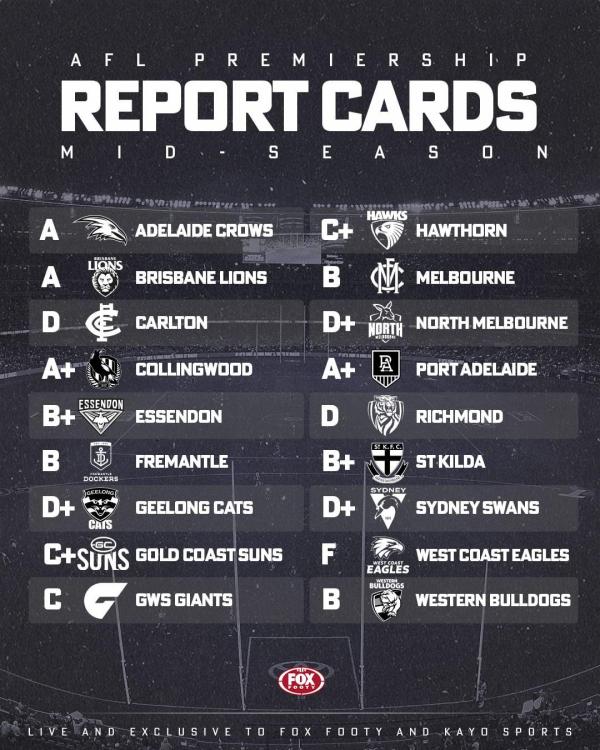
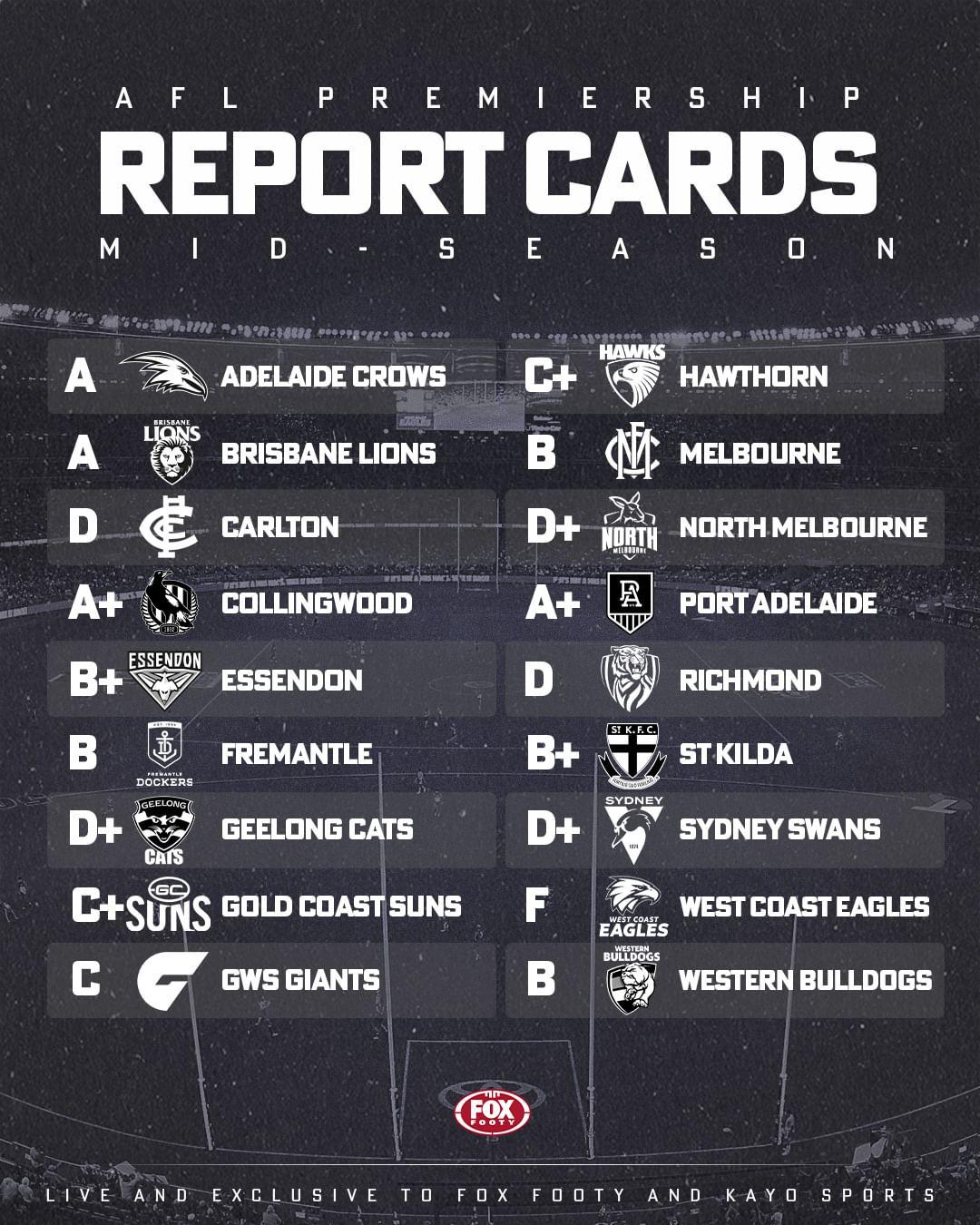
 Ticks, crosses and top trade priorities: Every AFL club graded in mid-season report card MELBOURNE (7-4, 133.9%) Three word analysis Hasn’t quite clicked What’s gone right The Dees after 11 rounds are the No. 1 ranked offensive team in the AFL, averaging nearly 101 points per match. They banked wins and percentage early, with big victories over the three bottom teams. Bayley Fritsch and Kysaiah Pickett have been constant threats forward of centre, Kade Chandler is having a career-best season and Jacob van Rooyen, who finally debuted in Round 3, is making the most of his opportunities, kicking at least one goal in all of his nine games to date. The Dees also remain one of the league’s best contested possession teams, headlined by Clayton Oliver, who’ll surely be right up in Brownlow contention again after a colossal start to the season. There were lots of questions pre-season around whether Max Gawn and Brodie Grundy would click, but it’s worked out well to date. What’s gone wrong Despite their decent win-loss record, questions still linger over the Demons and whether they’re an elite top-four team. They almost lost to Gold Coast and have dropped close games to fellow finals contenders Port Adelaide and Fremantle in the past fortnight. Perhaps of most concern is the fact a few teams this season have exposed and disarmed Simon Goodwin‘s side by not playing into the hands of Steven May and Jake Lever moving the ball forward. The Demons are conceding a respectable 75.4 points per game this season (ranked fourth in the AFL), but that’s eight more points than last year (67.4) and nearly 10 more than 2021 (65.6) when they were the league’s best defensive side. There’s been a few injury concerns too, with Max Gawn missing three games and Christian Salem only just returning to the side. It also seems like they haven’t found their ideal forward mix, with Tom McDonald and Ben Brown languishing in the VFL and Harry Petty being thrown around the ground a little. Now what doesn’t help is the Demons have arguably the toughest run home draw of any side, including a six-week run where they play Collingwood, Geelong, the Giants, St Kilda, Brisbane and Adelaide. Contract and trade priorities While there’s some doubts on the field, the Dees are brilliantly placed off the field from a list management perspective, with most of their big names locked away until at least 2025 or longer. If they can re-sign Jake Lever — out-of-contract at the end of 2024 — ahead of schedule, that’d be a big relief. One player unsigned beyond this season is Kade Chandler, who the club would like to lock away considering the small forward’s excellent start to the season, which has seen him play all 11 games and 15.4. All reports suggest a new deal is imminent for Chandler, who’s kickstarted talks on a contract that will reward his breakout season. But free agent James Jordon might be harder to secure, with the midfielder attracting interest from several rival clubs — including Essendon and Gold Coast — while James Harmes has also been linked to the Bombers, despite being contracted to Melbourne until the end of 2024. The Demons in recent years have unsuccessfully tried to move up the draft order. Armed this year with two first-round picks — its natural selection and the one attached to Fremantle’s finishing position — perhaps this is the year the Demons push up into the real pointy end of the draft. Grade B – Ben Waterworth
 POINT WELL MADE by KC from Casey The Casey Demons had a number of points to make to themselves, their opponents and the VFL football world when they traveled up to the Gold Coast to take on the Southport Sharks in the 2022 Grand Final rematch at Fankhauser Reserve. After living the glory of an almost perfect premiership, the Demons stumbled after winning the opening four games of the season and have struggled in their recent northern state sojourns - their only loss in 2022 came at the hands of the Lions in Brisbane and they were given a touch up by Gold Coast in Round 7. Last week, a team of 14 Melbourne listed players folded like a rickety card table in the final term of their match at Werribee. Suddenly, they were in fifth place with a few competitors breathing down their necks. Add some injuries and a suspension and Casey’s season was on the line. As it was a week earlier against Werribee, the Demons were pitted against a committed team with some experienced mature bodies, desperate for a victory to keep them finals contention. This time however, the Demons maintained their composure for most of the game and they were able to do so through the agency of their mix of AFL and VFL listers. Of the former, two in particular stood out. Josh Schache started proceedings for the visitors with the opening goal of the game in its opening minutes. He kicked his second before half time and then booted his team’s only two goals in the last including the final score late in the match that put Casey in front by a solitary point. Apart from his accuracy when up forward, Schache fought valiantly in the ruck against Southport’s man mountain, Brayden Crossley who was called in to the task after the injury to Jake Bell. Crossley was dominant in the ruck duels but Schache's contribution around the ground as well as up forward which included 15 possessions, seven marks, four tackles, and five hitouts on top of the four straight goals was crucial. James Jordon has spent much of 2023 on the cusp at Melbourne with a number of appearances as a substitute. He was back in the midfield at Casey this week but his prolific 30 disposal display was sublime, on top of which his five clearances, and four tackles and a goal were timely given Clayton Oliver’s injury and James Harmes’ suspension ahead of the Kings Birthday blockbuster. This spectacular goal has all of the hallmarks of goal of the year. lG3uw9GsrjbXvxyO 2.mp4 Casey was well led by Mitch White and the experienced Matt Buntine and fueled by outstanding performances from Roan Steele (23 touches, 10 marks) and George Grey (3 goals, 16 disposals, 5 marks and 6 tackles). Two of Grey’s goals came late in the third term after the Sharks had wrested the lead for the first time in almost an hour of play, a contribution that gave the visitors an 8 point lead at the final break. A few young Demons who are pushing hard for AFL promotion in Blake Howes (23 touches, 8 marks), Taj Woewodin (23 disposals, six tackles and three clearances) and Bailey Laurie (22 touches, six tackles) were all busy. Deakyn Smith played a strong game as the small defender while Daniel Turner, Andy Moniz-Wakefield and Ollie Sestan all had their moments. Together, they put together a fine team effort and made their points well in the Queensland sun. With the upcoming Kings Birthday weekend, the Demons return to their home fortress for a match up against Collingwood VFL next Sunday. CASEY DEMONS 1.2.8 6.6.42 9.9.63 11.10.76 SOUTHPORT SHARKS 3.0.18 4.5.29 8.7.55 11.9.75 GOALS CASEY DEMONS Schache 4 Grey 3 Brown 2 Jordon Sestan SOUTHPORT SHARKS Crossley Foggo Lockett Lockhart 2 Fields Heron Thurlow BEST CASEY DEMONS Jordon Grey Schache Laurie Steele Howes SOUTHPORT SHARKS Woodcock Crossley Joyce Dawson Thurlow Spencer Statistics Jed Adams 3 kicks 2 handballs 5 disposals 1 mark 13 dream team points Riley Baldi 4 kicks 4 handballs 8 disposals 3 marks 2 tackles 38 dream team points Jack Bell 2 handballs 2 disposals 1 tackle 6 hit outs 14 dream team points [injured] Ben Brown 2 goals 1 behind 8 kicks 2 handballs 10 disposals 4 marks 1 tackle 56 dream team points Matt Buntine 7 kicks 9 handballs 16 disposals 1 mark 2 tackles 47 dream team points Tom Freeman 12 kicks 2 handballs 14 disposals 4 marks 50 dream team points Rhys Galvin 2 kicks 2 handballs 4 disposals 1 mark 1 tackle 17 dream team points George Grey 3 goals 1 behind 11 kicks 5 handballs 16 disposals 5 marks 6 tackles 102 dream team points Blake Howes 14 kicks 9 handballs 23 disposals 8 marks 81 dream team points Matt Jefferson 1 behind 4 kicks 2 handballs 6 disposals 3 marks 1 tackle 27 dream team points James Jordon 1 goal 15 kicks 15 handballs 30 disposals 3 marks 4 tackles 104 dream team points Bailey Laurie 1 behind 16 kicks 6 handballs 22 disposals 3 marks 6 tackles 97 dream team points Andy Moniz-Wakefield 1 behind 8 kicks 5 handballs 13 disposals 4 marks 4 tackles 63 dream team points Harvey Neocleous 10 kicks 4 handballs 14 disposals 4 marks 2 tackles 58 dream team points Josh Schache 4 goals 8 kicks 5 handballs 13 disposals 7 marks 4 tackles 105 dream team points Oliver Sestan 1 goal 1 behind 7 kicks 1 handball 8 disposals 1 mark 4 tackles 51 dream team points Miles Shepherd 6 kicks 2 handballs 8 disposals 4 marks 2 tackles 40 dream team points Deaykin Smith 14 kicks 4 handballs 18 disposals 5 marks 2 tackles 76 dream team points Roan Steele 16 kicks 7 handballs 23 disposals 10 marks 1 tackle 93 dream team points Daniel Turner 11 kicks 4 handballs 15 disposals 5 marks 56 dream team points Ryan Valentine 1 behind 2 kicks 5 handballs 7 disposals 1 mark 1 hit out 18 dream team points Mitch White 1 behind 11 kicks 8 handballs 19 disposals 2 marks 6 tackles 75 dream team points Taj Woewodin 1 behind 10 kicks 13 handballs 23 disposals 2 marks 6 tackles 76 dream team pointsTwo weeks in a row the Suns have helped us.I’d love to get a chopping the arms free kicks for our forwards. Every other game I watch it happens.There were a couple of calls last night from the furthest away umpire that was actually the incorrect decision.Gold Coast have got the rub of the Green this quarter. Adelaide fans at home can’t understand why their opposition are getting free kicks.Ump didn’t even call him back.That’s a shocking 50m penalty against the Crows but I’ll take it.








Account
Navigation
Search
Configure browser push notifications
Chrome (Android)
- Tap the lock icon next to the address bar.
- Tap Permissions → Notifications.
- Adjust your preference.
Chrome (Desktop)
- Click the padlock icon in the address bar.
- Select Site settings.
- Find Notifications and adjust your preference.
Safari (iOS 16.4+)
- Ensure the site is installed via Add to Home Screen.
- Open Settings App → Notifications.
- Find your app name and adjust your preference.
Safari (macOS)
- Go to Safari → Preferences.
- Click the Websites tab.
- Select Notifications in the sidebar.
- Find this website and adjust your preference.
Edge (Android)
- Tap the lock icon next to the address bar.
- Tap Permissions.
- Find Notifications and adjust your preference.
Edge (Desktop)
- Click the padlock icon in the address bar.
- Click Permissions for this site.
- Find Notifications and adjust your preference.
Firefox (Android)
- Go to Settings → Site permissions.
- Tap Notifications.
- Find this site in the list and adjust your preference.
Firefox (Desktop)
- Open Firefox Settings.
- Search for Notifications.
- Find this site in the list and adjust your preference.