Bleasey as that
Members
-
Joined
-
Last visited
Everything posted by Bleasey as that
-
If you listen to the interview, you will hear the discussion on the Caulfield racetrack proposal……
-
https://www.sen.com.au/news/2023/08/24/demons-confirm-approach-from-richmond-to-assistant-for-senior-coach-search/ interview at the bottom of the page ……
-
Alan Richardson flagged yesterday on SEN that things were progressing well in regards to Caulfield…..
-
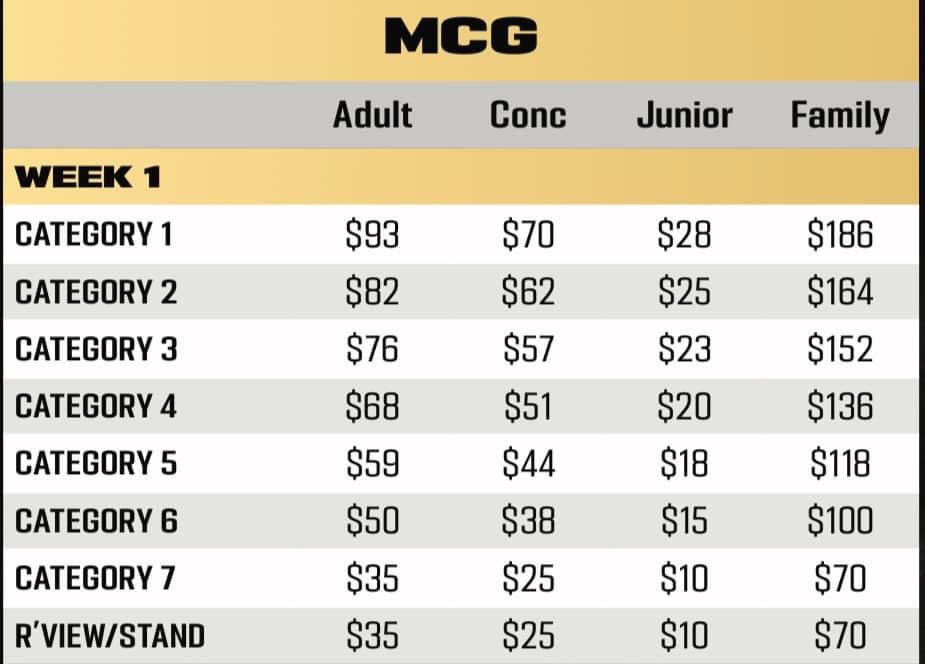
Hi AD, In the past, 1 member would only be allowed to buy 1 ticket. However this year, it appears 1 member can buy up to 10 tickets. I would log in to Ticketek at 10AM with your membership barcodes and see how you go. If not, you will have to wait til General Public tickets go on sale…..I posted the pic above but all details are on Ticketek website…… (not Ticketmaster haha don’t get confused at 10AM tomorrow!)In previous years, I remember there being a 3 tiered priority access system for Melbourne members. Something along the lines of: Priority 1 - Premium Memberships and those with GF Guarantee Priority 2 - 11 Game Memberships Priority 3 - 3 Game and Interstate Memberships I believe ticket sales were staggered accordingly. Does anyone know if this will happen again this year i.e in a Semi Final or Prelim? Thanks