DoubleH
Members
-
Joined
-
Last visited
Everything posted by DoubleH
-
Is Chris in Dland?
-
Never play May again ffs
-
May is so overdone
-
This would just be to of a good scenario for the Dees, doesn’t fit the script 😂
-
GOODY GONE
-
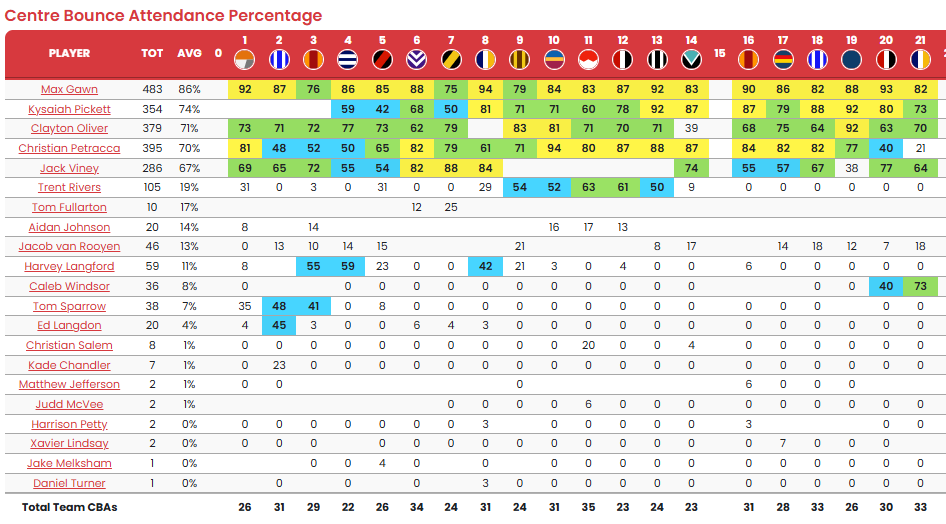
Clearly see that when we're no longer in the mix for finals, Goody swings Windsor in the middle and concurrently Trac spends far less time in the CBA's can see a big drop off from Round 19 v Carlton. If Trac's end goal is a premium mid then I see him departing the Dees, not so sure he want's to play the role that Dangerfield plays just yet. Windsor needs to clean up his disposal efficiency which will come, but his speed and burst through packs is something Trac hasn't provided much this year, which we've been missing.
-
Honestly this made me feel sick. How can you take any positives out of that last few mins? This man is completely delusional. It’s so embarrassing. What’s so hard to come out and say hey yeah we cooked it and we’re not up to that standard…going on about being competitive is just a complete lie.
-
Yeah fair enough
-
Gee whiz you'd be fun to have at a party....
-
I don't get the hate. These guys do the pod voluntary every week, they're pumping out 2-3 pieces of content on average just purely for our enjoyment and love of the Dees.
-
It's really disheartening to be honest. It feel's very fake. All season they've been saying we're loving the process, it's about the process yadda yadda yaddda...what's the process guys? Also goes to say oh don't like the word omitted and we're not focusing on the outcome...it's a bloody win/loss game. It's outcome focused. McCrae said last week in his post game media interview, he was asked about what next for the Pies, he said we had a goal was to win 14 games in the regular season...what goal's are being cooked out of the Dees then? Not much to be excited about. Love the club, but I'm struggling to enjoy the Dees this year.