Demonland
Primary Administrators
-
Joined
-
Last visited
Everything posted by Demonland
-
Christian Petracca (Melbourne)On Hawthorn links “And if it’s not Zach Merrett I think we might be discussing Christian Petracca and Hawthorn. “I think Christian is open to a fresh start. Clearly he went through a lot this time last year and it was a really difficult time for him. “With so many changes coming at Melbourne across the board, it might be the right time. I don’t believe he’s met with Hawthorn yet but I do believe that they have registered an element of interest. “Clearly they’re in the market for another midfielder. They expect James Worpel to move to Geelong as a free agent. It’s been a need, especially with the Will Day (injury) situation and the unknown around him going forward.”
-
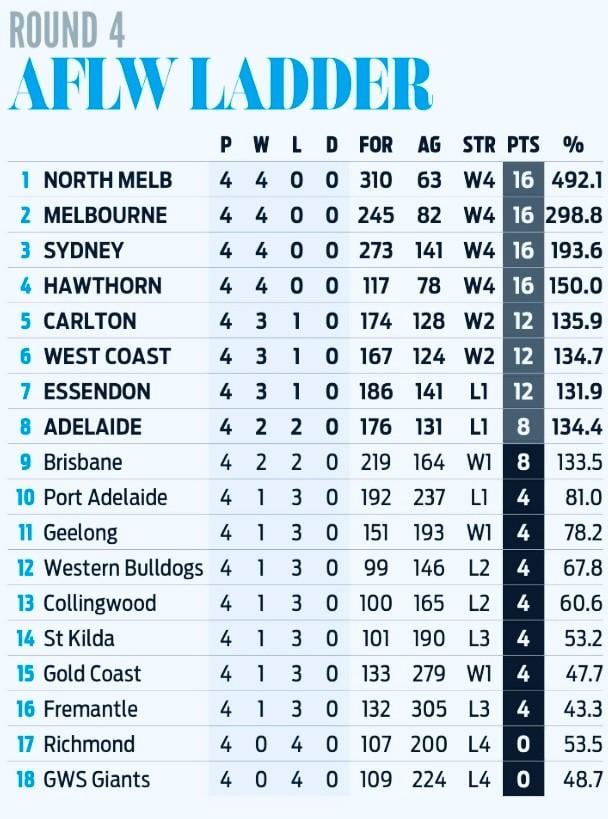
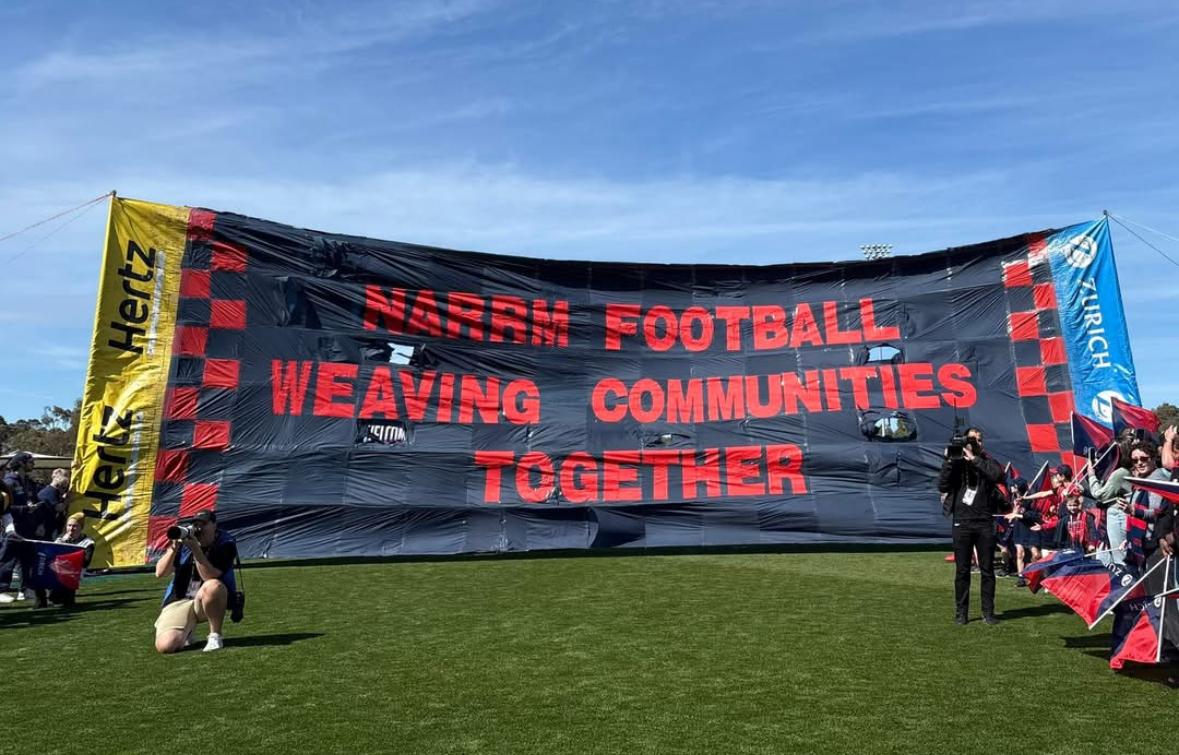
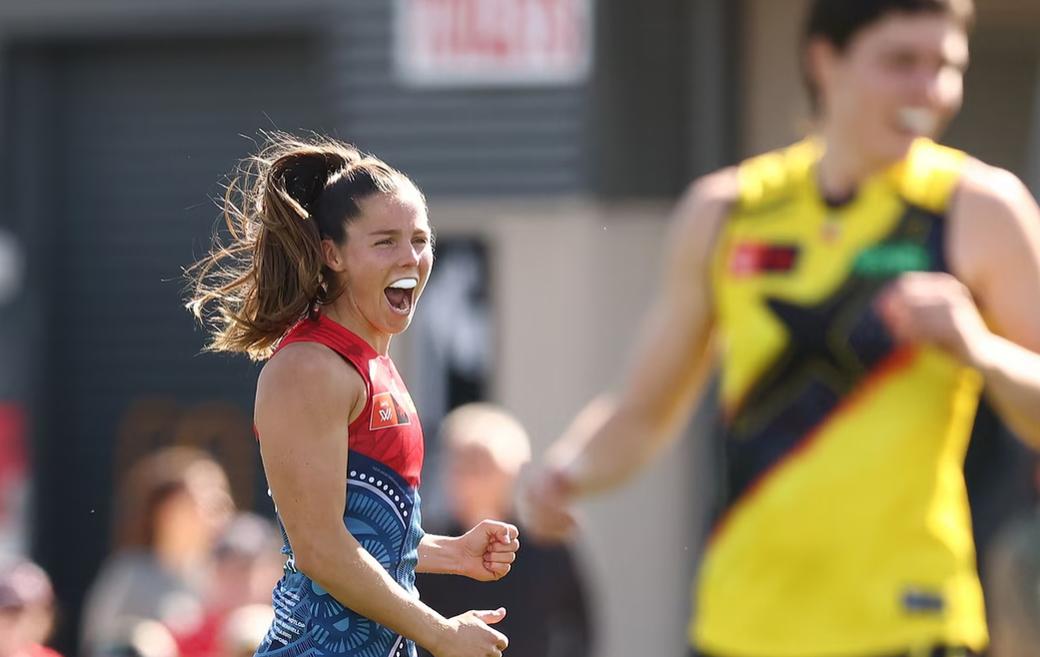
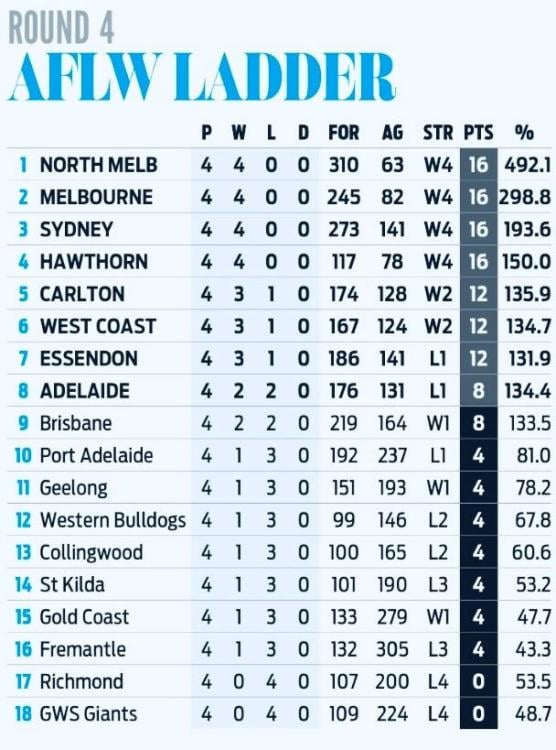
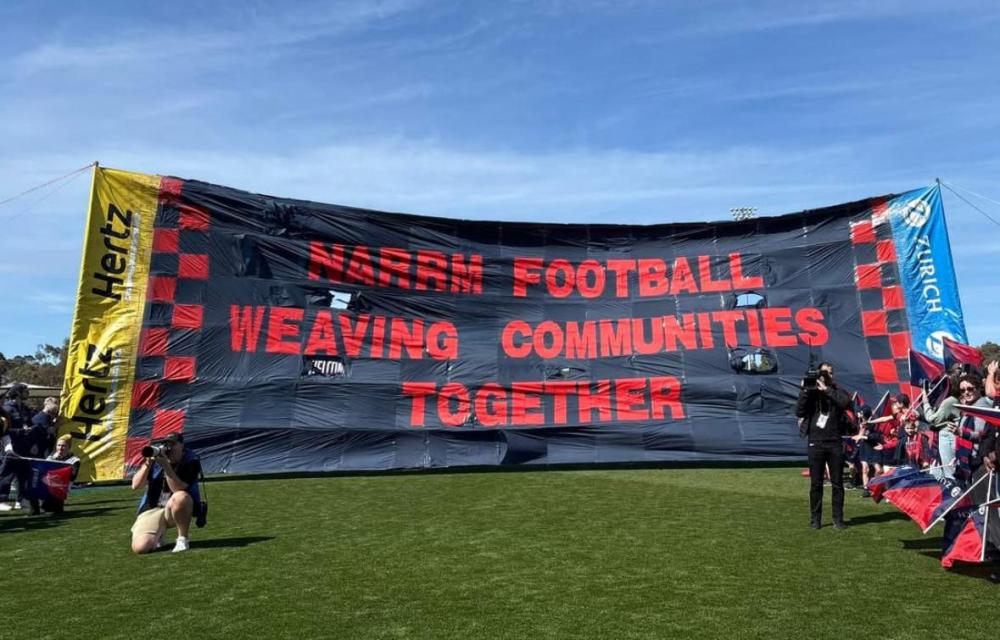
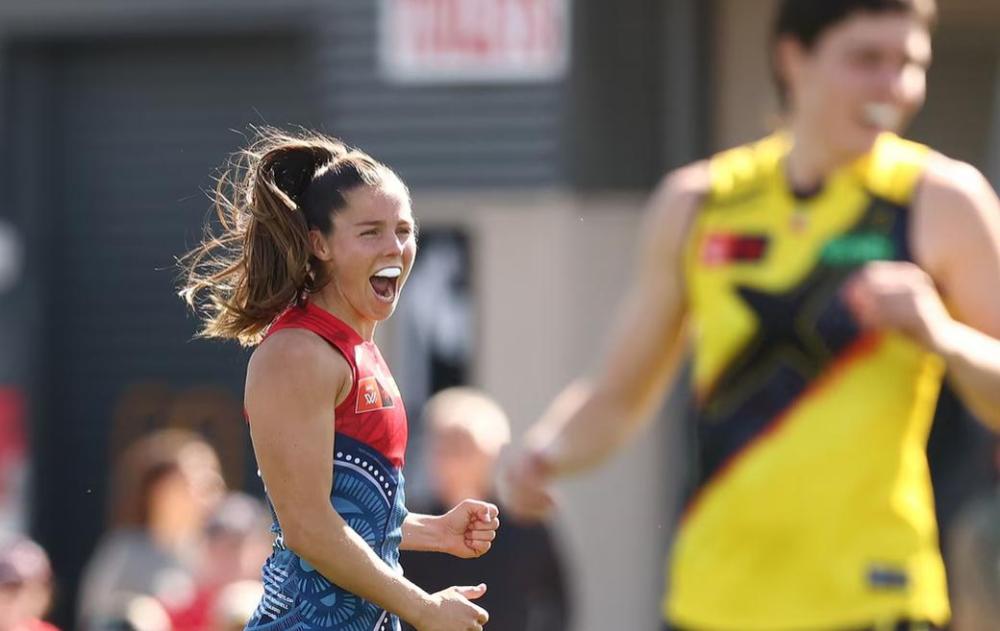
From 6 mins Reiterate that it's not a boat race. 6 candidates shortlisted. Nathan Buckley, Hayden Skipworth, Steven King, Brendan Lade, James Kelly, Daniel Giansiracusa. Appointment ideally by Preliminary Final Week heading into Trade Week. Have been catching up with people over the last 3 weeks. So nothing new.A glorious sunny afternoon with a typically strong Casey Fields breeze favouring the city end greeted this round four clash of the undefeated Narrm against the winless Tigers. Pre-match, the teams entered the ground through the@deearmy’s inclusive banner—"Narrm Football Weaving Communities Together and then Warumungu/Yawuru woman and Fox Boundary Rider, Megan Waters, gave the official acknowledgement of country. Any concerns that Collingwood’s strategy of last week to discombobulate the Dees would be replicated by Ryan Ferguson and his Tigers evaporated in the second quarter when Richmond failed to use the wind advantage and Narrm scored three unanswered goals. Led by the determined dynamic duo of Tyla Hanks (32 disposals, 434 metres gained) and Kate Hore (19 disposals, 13 tackles, 2 goals), Narrm demonstrated superior ball movement and efficient forward-fifty craft. A more polished defensive effort by the emerging young defensive tyros was observed, aided by the return of Gaby Colvin. The match Alyssa Bannan was on fire early for the second week in a row with a clever snap and goal. The Tigers unveiled a new ruck, Montana McKinnon, recruited from Adelaide who was paired with Poppy King. The Tiger team won the hitouts (22 to 19) but the Narrm rucks were more influential around the ground. Tayla Harris excelled behind the footy while Lauren Pearce and Georgia Campbell snagged a goal each. For nigh on 80 minutes, Richmond maintained endeavour, but it was ultimately ineffective. Mon Conti (33 disposals, 7 tackles and 5 clearances, 476 metres gained), Ellie McKenzie (23, 7, 1, 375) and Maddie Shevlin (22, 3, 2, 354) were the Tigers best. Other Narrm notable contributors were defensive majestrix Maeve Chaplin (23 disposals, 518 metres gained), the indefatigable Liz McNamara (21 disposals, 354 metres gained) and Megan Fitzsimon (21 disposals, 7 tackles, 1 goal). Goal line technology was used for the first time this season disallowing a Fitzy set shot which was ruled ‘touched’. Narrm has four wins from four matches, a healthy percentage of 298.8% and is looking like a genuine premiership contender at this early stage of season 2025. The 8-player injury list is some cause for concern but the emergence of so many talented younger players is really exciting. Match moment This is more a vibe than a moment, but in 14 games Georgia Gall has grown quickly into an important player. She kicked her tenth career goal against the Tigers this week but her crashing a marking contest at the start of the third quarter to spill the ball leading to a Kate Hore goal was impressive. More of this Gally. Meggs’ musings We have banked an important four points and not added to our injury list. It was pleasing to see a healthy Heathy back out there after missing three quarters last week. Heater played well but rolled her ankle in the last quarter. She’ll be right. Much excitement is being generated by the talented new kids on the block. Molly O’Hehir showed us her poise and dash, Maggie Mahony her forward pressure, and Jemma Rigoni her ability to mark and sprint. Half back Leala Ebert had 20 disposals,and her eleven kicks all hit their targets. The coaches must be pleased with the rapid progress of this group. Coaches and Next Week Mick Stinear agreed that Kate Hore was unbelievable, outstanding really, she couldn’t have done any more for her team. It was pleasing to see a much better team performance this week. He highlighted the young defensive group did better having an experienced voice behind the play with Gaby Colvin’s return. He said we worked harder than last week, were clean at critical times around contests and moved the ball well. Unhappy though with the number of intercept marks. Ryan Ferguson felt his team became frustrated by their inability to take advantage of the breeze in the second quarterfrom which they did not recover. Next week: Port Adelaide at Alberton Oval, Saturday 3:05pm. Everyone loves a weekend getaway. Let’s make it five from five. C’mon Dees! NARRM 1.3.9 4.7.31 6.8.44 8.9.57 RICHMOND 0.0.0 0.2.2 0.5.5 2.8.20 GOALS NARRM Hore 2 Bannan Campbell Fitzsimon Gall, Pearce Zanker RICHMOND Bacon Ford BEST NARRM Hanks Hore Chaplin Pearce Gall Paxman RICHMOND Conti Bacon McKenzie Scott Seymour INJURIES NARRM Nil RICHMOND Nil CROWD 2001 at Casey Fields
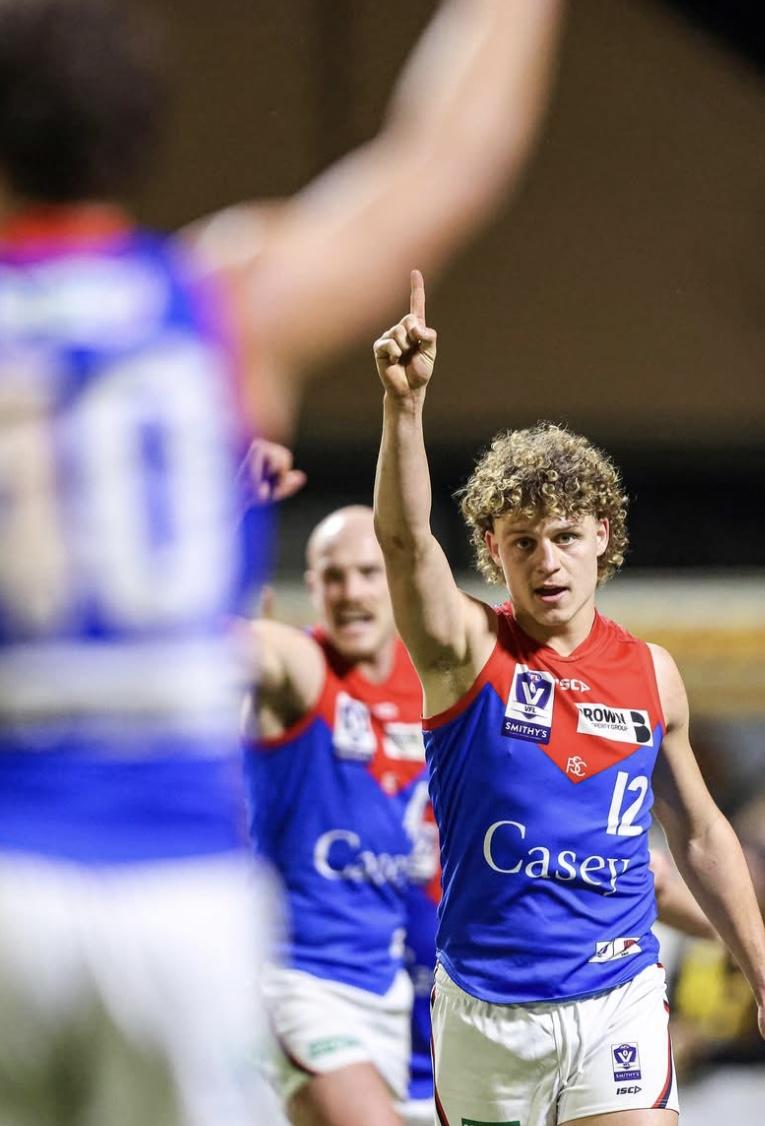
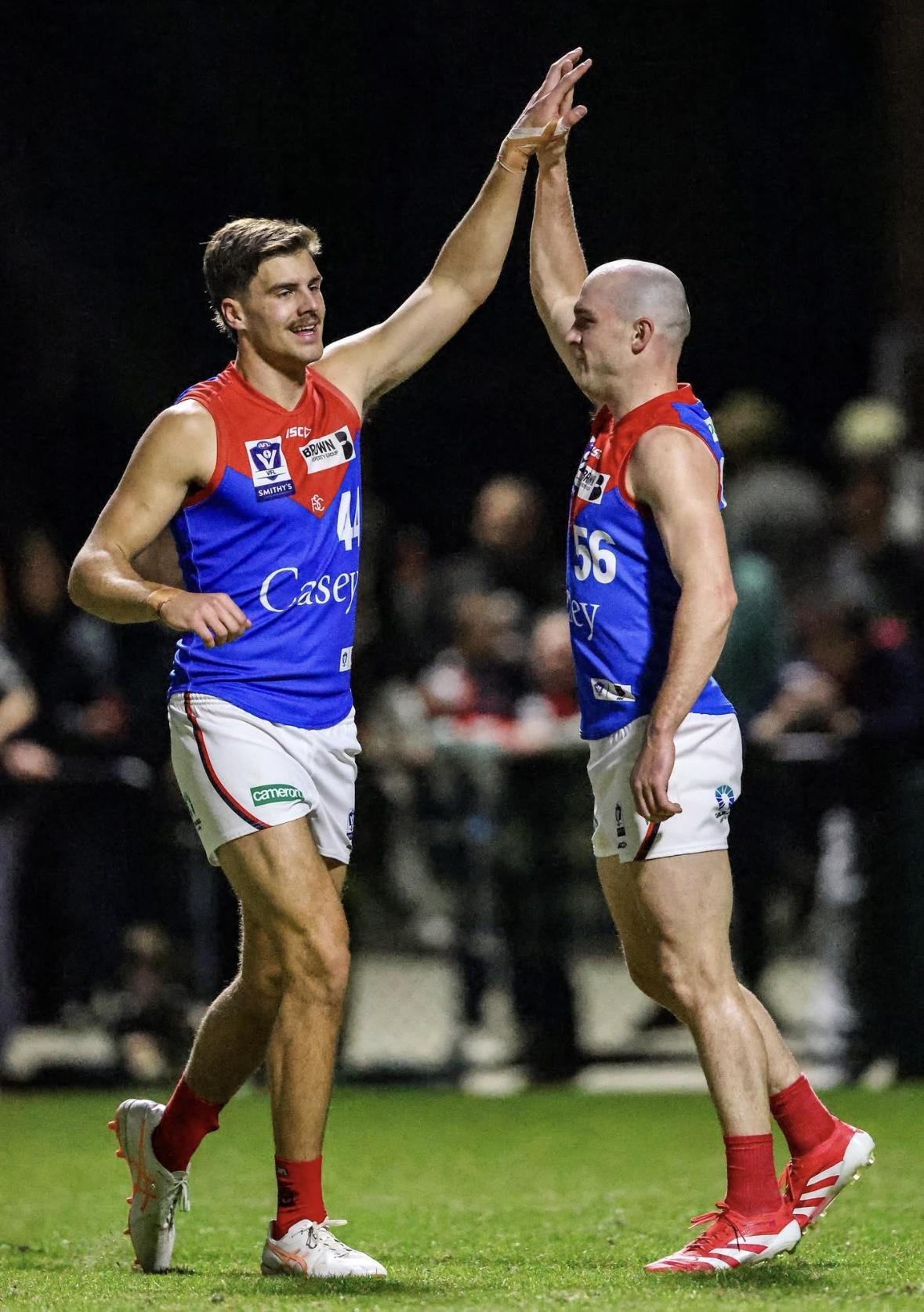
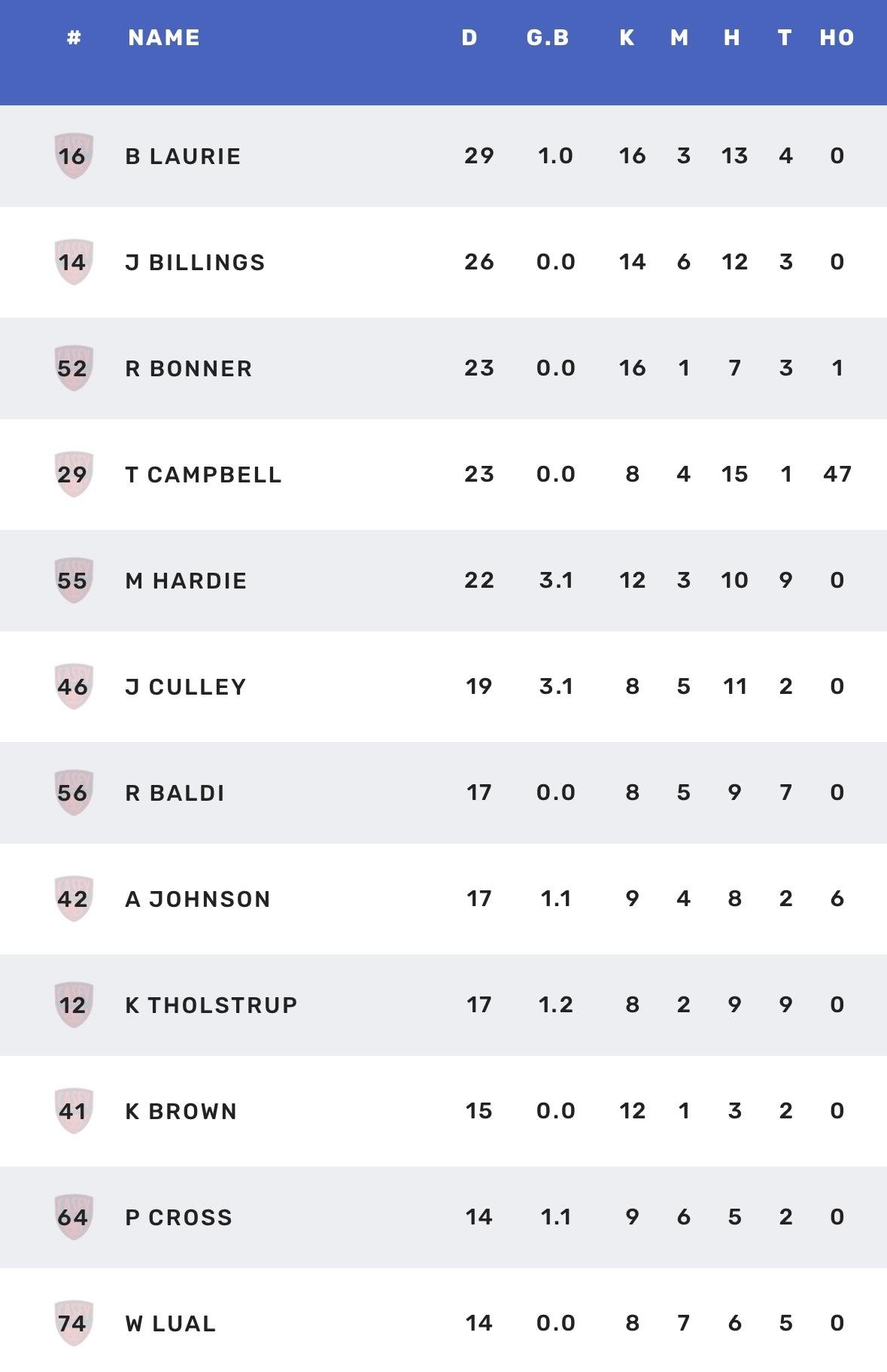
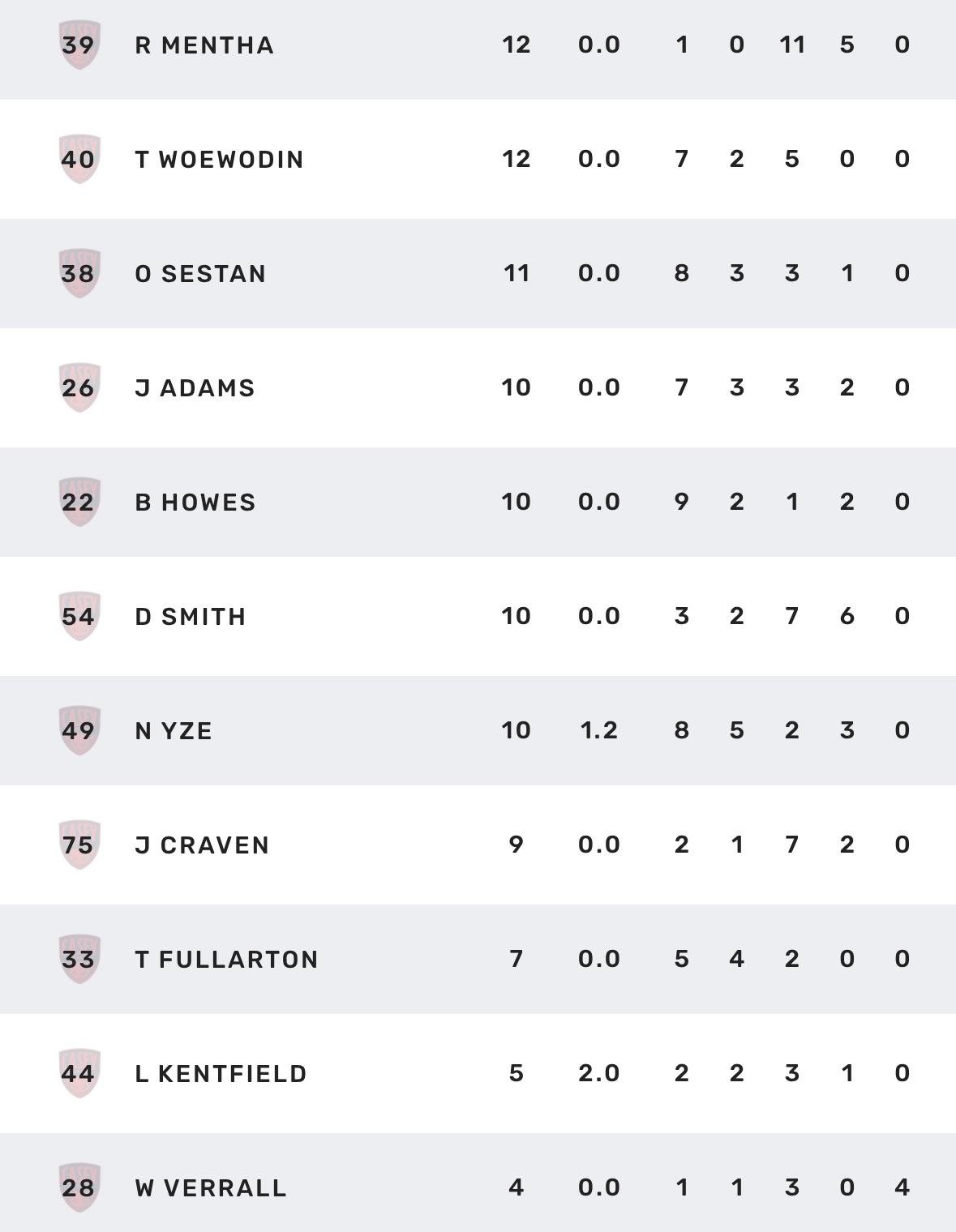
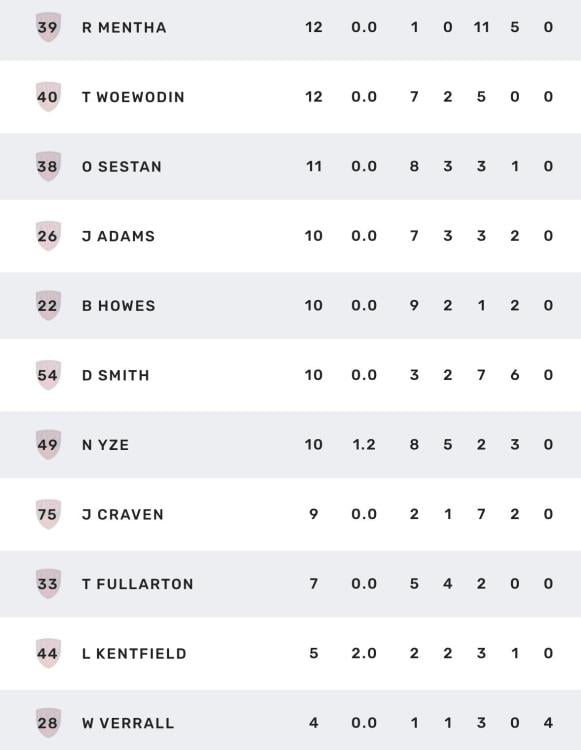
 The late-season run of Casey wins was broken in their first semifinal against Frankston in a heartbreaking end at Kinetic Stadium on Saturday night that in many respects reflected their entire season . When they were bad, they committed all of the football transgressions, including poor disposal, indiscipline, an inability to exert pressure, and some terrible decision-making, as exemplified by the period in the game when they conceded nine unanswered goals from early in the second quarter until halfway through the third term. You rarely win when you do this. When they were good, they formed an exciting combination, capable of playing thrilling, winning football. On this occasion, however, the Demons were unable to demonstrate enough of the latter, and although they mounted a comeback to trail by less than a goal in the game's final moments, they were unable to secure victory and advance to a preliminary final playoff. The game opened as an armwrestle with Casey settling down to hold a six-point lead at the first break. The Dolphins were coming off a thrashing in their qualifying final and looked to be more motivated than they were last week against the top-of-the-ladder Bulldogs. However, when the quick thinking Jai Culley got boot to ball and slotted the first goal of the second term, the Demons looked to be on their way. However, it was not to be and the game changed dramatically. Things turned around quickly with the Dolphins exerting their dominance over the game. It seemed as if they could not miss in front of goal as their purple patch saw them skipping away to a seven goal lead by halfway through the third quarter. https://streamable.com/l/ra879k/mp4.mp4 And while Casey turned the tide and nearly won in the end, Frankston’s second half haul of eight goals from nine scoring shots was decisive. There was talk in the crowd that some of the 15 Melbourne-listed players had already been notified that they were not on the required list for 2026. If this is true, then it was a poor move by the club because it appeared that a number of players were particularly uninterested on the night. One of those who did play his heart out was former West Coast Eagle Culley who finished with 19 disposals, five marks and three timely goals. Tom Campbell was also strong both in the ruck where he amassed 47 hitouts and around the ground with 23 touches including nine clearances and four marks. The main beneficiaries of his prowess were Bailey Laurie with 29 disposals, six clearances and a goal and Jack Billings (26 touches) and Koltyn Tholstrup also had his moments. Mitch Hardie was a strong contributor in the comeback up forward with his three goals while Riley Bonner and Riley Baldi were solid contributors on the night. Unfortunately, there were too few who matched the desperation of the home team and there were far too many defensive failures to enable the team to proceed into next week. The free kick count of 23 to 12 in favour of the home side was also telling as was the poor conversion near goal. A testament to Frankston’s accuracy for goal is that they went inside 50 on 45 occasions for their 16 goals. Casey had 15 more entries for their 13 goals … and sadly, that is in many ways the story of the two Demon outfits in 2025. CASEY DEMONS 3.2.20 4.5.29 8.9.57 13.12.90 FRANKSTON 2.2.14 8.4.52 13.5.83 16.5.101 GOALS CASEY DEMONS Culley Hardie 3 Kentfield 2 Cross Laurie Tholstrup Yze FRANKSTON Ellison Mynott 4 Jones 2 Blamires Grant Hamill Hipwell Johnson BEST CASEY DEMONS Laurie Culley Johnson Hardie Baldi Campbell FRANKSTON Hipwell Voss Blamires Lloyd Ellison Barlow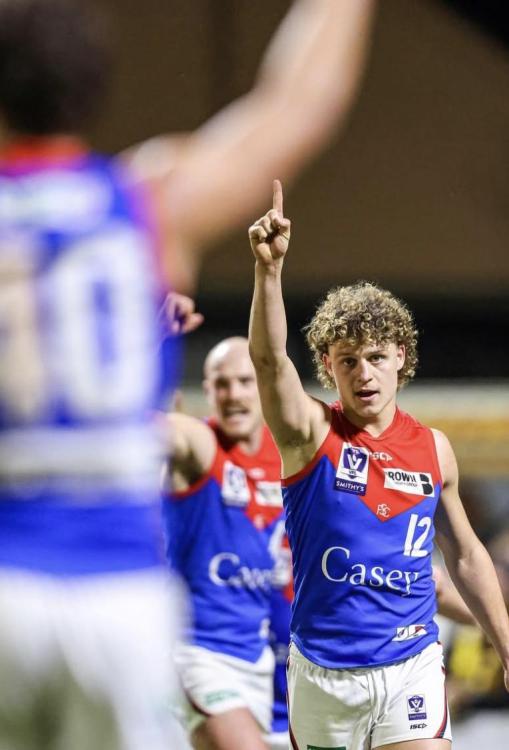
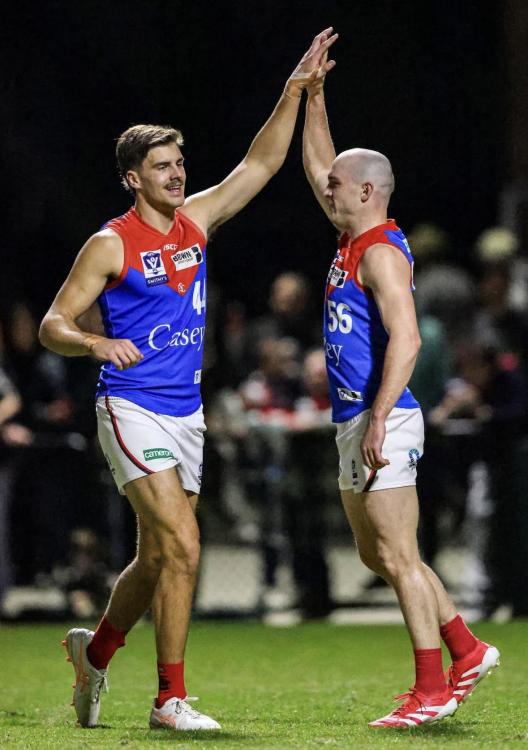 BROKEN by KC from Casey The late-season run of Casey wins was broken in their first semifinal against Frankston in a heartbreaking end at Kinetic Stadium on Saturday night that in many respects reflected their entire season . When they were bad, they committed all of the football transgressions, including poor disposal, indiscipline, an inability to exert pressure, and some terrible decision-making, as exemplified by the period in the game when they conceded nine unanswered goals from early in the second quarter until halfway through the third term. You rarely win when you do this. When they were good, they formed an exciting combination, capable of playing thrilling, winning football. On this occasion, however, the Demons were unable to demonstrate enough of the latter, and although they mounted a comeback to trail by less than a goal in the game's final moments, they were unable to secure victory and advance to a preliminary final playoff. The game opened as an armwrestle with Casey settling down to hold a six-point lead at the first break. The Dolphins were coming off a thrashing in their qualifying final and looked to be more motivated than they were last week against the top-of-the-ladder Bulldogs. However, when the quick thinking Jai Culley got boot to ball and slotted the first goal of the second term, the Demons looked to be on their way. However, it was not to be and the game changed dramatically. Things turned around quickly with the Dolphins exerting their dominance over the game. It seemed as if they could not miss in front of goal as their purple patch saw them skipping away to a seven goal lead by halfway through the third quarter. And while Casey turned the tide and nearly won in the end, Frankston’s second half haul of eight goals from nine scoring shots was decisive. There was talk in the crowd that some of the 15 Melbourne-listed players had already been notified that they were not on the required list for 2026. If this is true, then it was a poor move by the club because it appeared that a number of players were particularly uninterested on the night. One of those who did play his heart out was former West Coast Eagle Culley who finished with 19 disposals, five marks and three timely goals. Tom Campbell was also strong both in the ruck where he amassed 47 hitouts and around the ground with 23 touches including nine clearances and four marks. The main beneficiaries of his prowess were Bailey Laurie with 29 disposals, six clearances and a goal and Jack Billings (26 touches) and Koltyn Tholstrup also had his moments. Mitch Hardie was a strong contributor in the comeback up forward with his three goals while Riley Bonner and Riley Baldi were solid contributors on the night. Unfortunately, there were too few who matched the desperation of the home team and there were far too many defensive failures to enable the team to proceed into next week. The free kick count of 23 to 12 in favour of the home side was also telling as was the poor conversion near goal. A testament to Frankston’s accuracy for goal is that they went inside 50 on 45 occasions for their 16 goals. Casey had 15 more entries for their 13 goals … and sadly, that is in many ways the story of the two Demon outfits in 2025. CASEY DEMONS 3.2.20 4.5.29 8.9.57 13.12.90 FRANKSTON 2.2.14 8.4.52 13.5.83 16.5.101 GOALS CASEY DEMONS Culley Hardie 3 Kentfield 2 Cross Laurie Tholstrup Yze FRANKSTON Ellison Mynott 4 Jones 2 Blamires Grant Hamill Hipwell Johnson BEST CASEY DEMONS Laurie Culley Johnson Hardie Baldi Campbell FRANKSTON Hipwell Voss Blamires Lloyd Ellison Barlow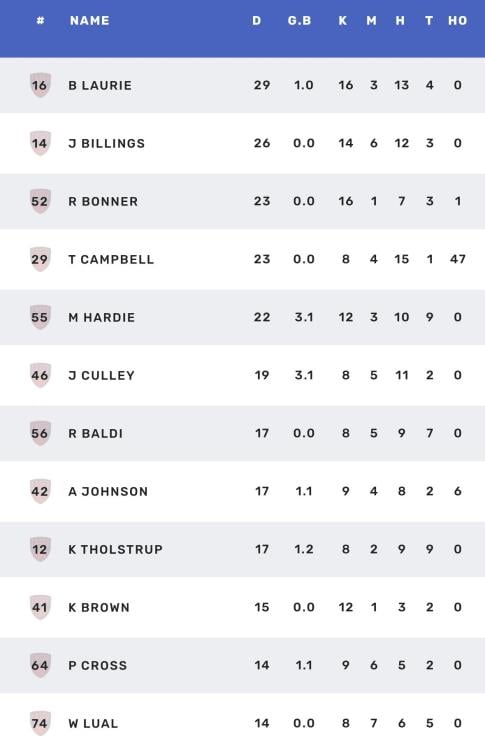
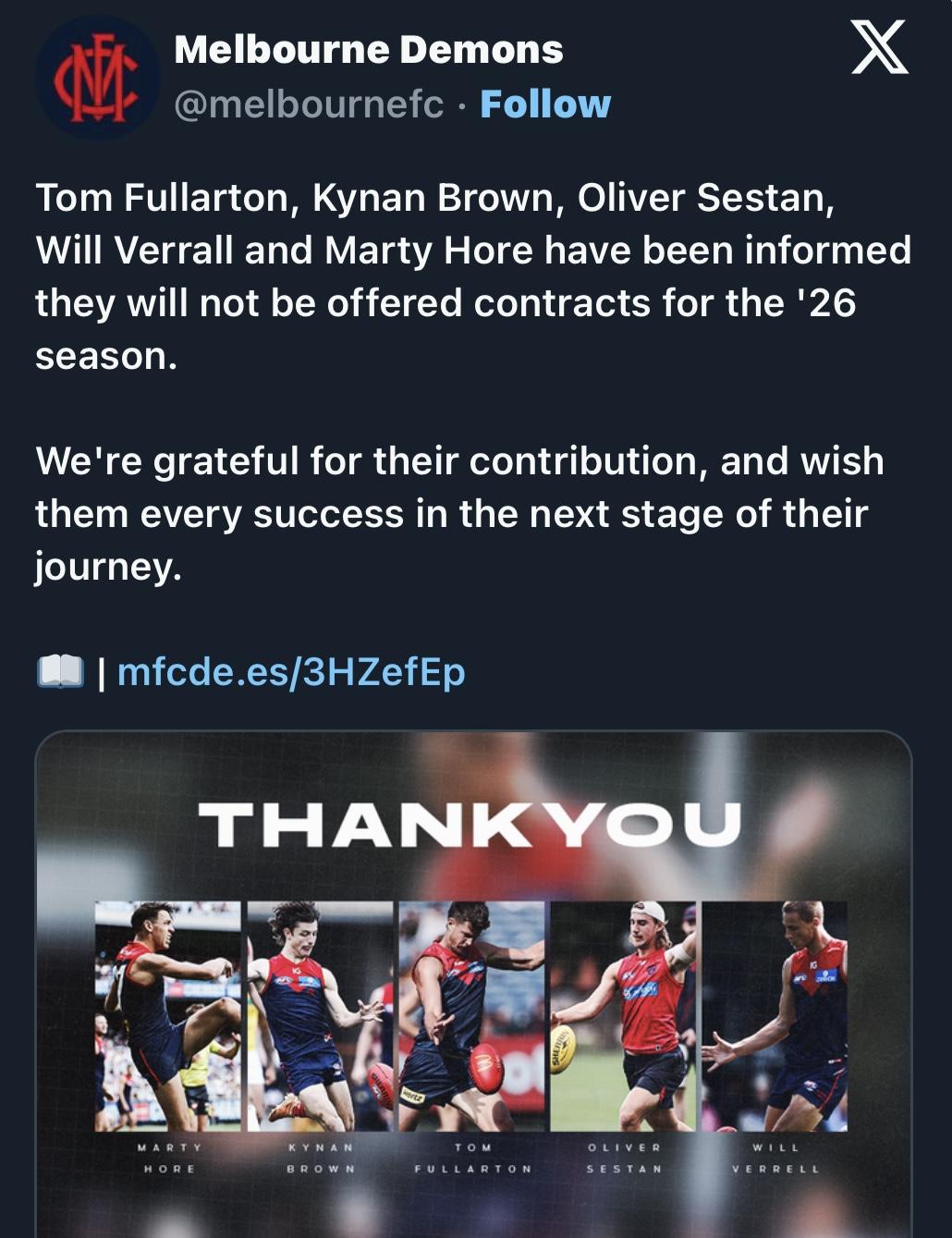
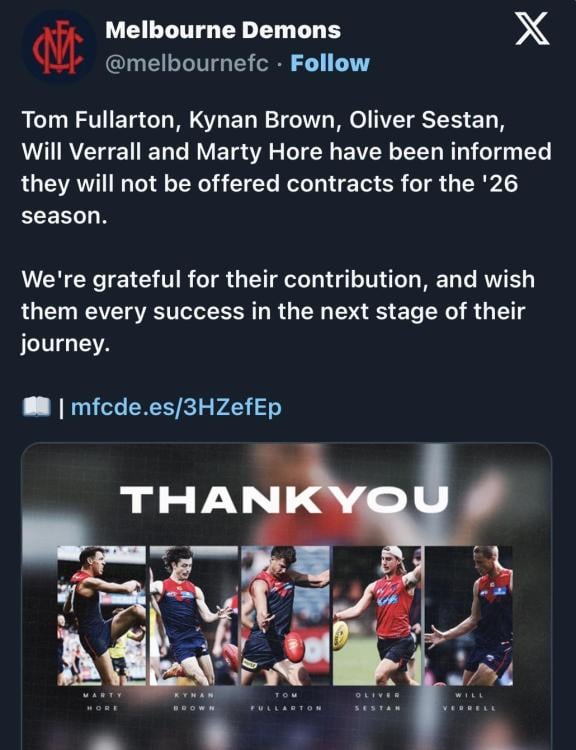
 Round four kicks off early Saturday afternoon at Casey Fields, as the mighty Narrm host the winless Richmond Tigers in the second week of Indigenous Round celebrations. With ideal footy conditions forecast—20 degrees, overcast skies, and a gentle breeze — expect a fast-paced contest. Narrm enters with momentum and a dangerous forward line, while Richmond is still searching for its first win. With key injuries on both sides and pride on the line, this clash promises plenty. The Match-up Narrm has won its three matches to sit second on the ladder and the next four weeks (Tigers, Power, Eagles, Suns) are all winnable games. Whereas the Tigers have lost their three games, they have been competitive in parts but lacking in confidence. The trusted goal shooters Brennan, Greiser and Yassir have a total of six goals only for the season. In contrast Narrm’s equivalents Hore, Zanker and Bannan have registered 13 goals and demon aerialist Tayla Harris kicked four rippers against the Saints in round 2. Ryan Ferguson is winless in three attempts against Narrm, but the losing margins have narrowed (28, 16, 13) — a trend he’ll hope to flip on Saturday. Mon Conti is Richmond’s genuine playmaker, a top 3 star of the competition. Shelley Heath will likely be assigned a run-with role hopefully nullifying Mon and recording a high tackle count. Last time tall left-footed midfielder Ellie McKenzie proved a tough competitor and the ruck battle of Loz Pearce and Georgia Campbell v Poppy Kelly and Montana McKinnon should be very interesting. With several key players sidelined, Coach Mick Stinear faces pressure to maintain momentum after last week’s gritty win over the Pies. There are only a few fit listed players available to draw on this week, so expect a top-up name on the team sheet when it’s announced (probably as emergency). Narrm starts firm favourites ($1.11). Let’s hope it’s four from four for both teams 😉. Selection this week Frustratingly, the oversized rehab group isn’t losing weight with a third of the list unavailable. Liv Purcell has undergone surgery this week after rupturing an ACL (her other knee) and begins the year long grind of rehab. Stay strong Liv. Former Coates Talent League Girls star (38 goals, 14 games played) and 2023 Draft Pick 5, Alyssia Pisano, has so far struggled to insert herself in AFLW and with just three touches last week has been omitted. Fingers are crossed for an injury-free training week and a midfield boost via a fully recovered and healthy Shelley Heath. Meggs’ musings Kate Sheehan, Head of Women’s Football at Richmond since 2017, was bitterly disappointed that the Tigers lost gun midfielder Eilish Sheerin to the Premiers North Melbourne in 2024. The loss is hurting. Richmond made the finals last year but have lost their opening three games against Swans, Bulldogs and Bombers. Narrm’s key injuries are to backs and mids; the forward group is healthy and extremely dangerous. Tayla Harris is flying. Eden Zanker is racking up marks and possessions both forward and mid while Kate Hore’s knack for goals, setting up her teammates and on field leadership is first class. Faith is building that defensive majestrix Maeve Chaplin, supported by the return of Gaby Colvin, and the spirited young tyros Molly O’Hehir (3 games), Laela Ebert (3), Jemma Rigoni (1), Ry Wotherspoon (11) and Saraid Taylor (6), will get the job done. And if Hanksy, Heater, Fitzsimon, Hore et al can win enough contested ball expect Narrm to score and score well at the Field of Dreams. Go Dees! Tip: Narrm by 24 points THE GAME Round 4: Narrm v Richmond 🗓 Saturday 6 September 2025 🕐 12:35pm (AEST) 📍 Casey Fields, Melbourne – Wurundjeri/Boon Wurrung HEAD TO HEAD HEAD TO HEAD Overall: Narrm 3 wins | Richmond 0 wins At Casey Fields: Narrm 2 wins | Richmond 0 wins Coaches: Stinear 3 wins | Ferguson 0 wins MEDIA COVERAGE 📺 7, 7Plus, Foxtel, Kayo 📱 AFL Live Official App THE LAST TIME THEY MET 📅 Season 9, Round 8 – 19 October 2024 📍 Casey Fields Melbourne 8.3 (51) defeated Richmond 5.8 (38) GOALS Melbourne: Bannan 4, Gall 2, Zanker, Hanks Richmond: Greiser 3, Sheerin, McKenzie BEST Melbourne: Bannan, Hore, Hanks, Heath, Purcell Richmond: Sheerin, Conti, McKenzie, Greiser, Kelly Crowd: 2,026 at Casey Fields The Demons Season 9 revival continued defeating the Tigers by 13 points to make it four wins on the trot keeping their slim finals hopes alive. While everyone was celebrating Banno’s 4 majors, it’s worth noting former Tiger Saraid Taylor made a fine debut in the red and blue. Mick Stinear commented that once Melbourne started sticking tackles and getting the ball outside to our runners we got on top. Purcell, replete with face mask and Heathy who laid 14 tackles reducing the elite output of keeping the superstar Mon Conti, were our best along with Hanks, Hore and Bannan. Caitlin Greiser kicked 3 late Richmond goals which helped window dress their final losing margin. THIS WEEK’S TEAMS MELBOURNE FB [28] Saraid Taylor [32] Gabrielle Colvin HB [11] Molly O'Hehir [19] Laela Ebert [13] Maeve Chaplin C [22] Eliza McNamara [5] Tyla Hanks [4] Paxy Paxman HF [24] Megan Fitzsimon [6] Alyssa Bannan [7] Tayla Harris FF [29] Eden Zanker [9] Georgia Gall FOL [15] Lauren Pearce [30] Shelley Heath [10] Kate Hore I/C [1] Georgia Campbell [12] Ryleigh Wotherspoon [20] Maggie Mahony [33] Lily Johnson [43] Jemma Rigoni EMG [3] Alyssia Pisano [14] Amelia Dethridge [35] Mekah Morrissey* IN Gabrielle Colvin OUT Alyssia Pisano (omitted) *Top-up player RICHMOND FB [16] Laura McClelland [15] Rebecca Miller HB [6] Jodie Hicks [28] Gabby Seymour [20] Beth Lynch C [35] Maddie Shevlin [11] Isabel Bacon [30] Ally Dallaway HF [25] Sierra Grieves [5] Paige Scott [7] Sarah Hosking FF [10] Montana McKinnon [9] Caitlin Greiser FOL [14] Poppy Kelly [4] Monique Conti [22] Ellie McKenzie I/C [17] Katelyn Cox [18] Libby Graham [24] Charli Wicksteed [33] Mackenzie Ford [12] Lauren Brazzale EMG [38] Lulu Beatty [2] Emelia Yassir [1] Grace Egan IN Rebecca Miller, Sarah Hosking, Montana McKinnon, Lauren Brazzale OUT Kate Dempsey (managed), Katie Brennan (injured), Montana Beruldsen, Emelia Yassir (omitted) Injury List: Round 4 Melbourne Gab Colvin — knee / 1 week Denby Taylor foot — / 3 weeks Tahlia Gillard — knee / 4 - 6 weeks Sarah Lampard — calf / 4 - 8 weeks Grace Beasley — knee / 7 - 9 weeks Sinéad Goldrick — shoulder / TBC Blaithin Mackin — knee / 9 - 11 weeks Jacinta Hose — knee / Inactive Aimee Mackin — knee / Inactive Olivia Purcell — knee / Inactive Richmond Katie Brennan — knee / Test Sarah Hosking — hamstring / Test Montana McKinnon — knee / Test Rebecca Miller — general soreness / Test Tessa Lavey — hamstring / 4 - 6 weeks Charley Ryan — knee / Season Zoe Hargreaves — knee / SeasonPart 1: Looking Ahead Recruiting decisions made in recent years by Melbourne's list management team have left the club with plenty of work to do in the upcoming trade, free agency, and draft period. That might not be such a bad thing because the decisions in question have left the club in a good position going forward with the drafting of several high-calibre youngsters, including Caleb Windsor, Koltyn Tholstrup, Harvey Langford, and Xavier Lindsay, all of whom have demonstrated potential to become long-term players for the club. On the debit side is the fact that the cost incurred to secure such exceptional talents, combined with some uninspiring trades, further exacerbated by the decline in the team’s poor on-field performance and its declining external profile, has resulted in a significant depletion of draft picks and player trade stock, essential components in a successful trading and drafting process. The list managers were aware last year of the high end Next Generation Talent that was likely to be available to a number of clubs in the first round of the draft and that this would clog up the system and make things tough for some clubs involved who already had little draft currency. One projected draft day scenario suggests that up to ten NGAs might be picked in the first round of the opening night of the draft. That's problematic for Melbourne has as its first selection, a pick that comes early in the second round and might end up somewhere in the thirties! For the Demons, they have NGA talent Toby Sinnema, a wingman from Dandenong Stingrays and father son nomination, high leaping Kalani White a near-200cm utility who boasts great flexibility and who could play ruck or in a key position, on the horizon. While neither are expected to be taken in the opening round of the draft, the club’s recruiters will have to keep in mind their cost in draft points should a nomination come for them at some stage. There are two other factors that fans are keeping an eye on as we enter the business end of the AFL season and approach the trade and free agency period when no doubt there will be plenty of jostling for players and trade picks. The Demons have yet to appoint their new coach and, whoever that might be, his views would have to be considered on major list management decisions. The other factor is the continuing participation of the Casey Demons in the VFL finals series. Some players know their fate but others are fighting to retain list spots. It’s still very much up in the air for quite a few of them. In the meantime, we do know that veterans Tom McDonald and Jake Melksham have had their contracts renewed for a further year and the only guaranteed new face for 2026 is 194cm college basketballer Oscar Berry who has committed to joining the club as a Category B rookie. He has yet to be formally added to the list so the situation remains as follows:- PRIMARY LIST: — Jed Adams Jack Billings Jake Bowey Tom Campbell Kade Chandler Tom Fullarton Bayley Fritsch Max Gawn Blake Howes Matthew Jefferson Aidan Johnson Ed Langdon Harvey Langford Bailey Laurie Jake Lever Xavier Lindsay Tom McDonald Judd McVee Steven May Jake Melksham Clayton Oliver Christian Petracca Harrison Petty Kysaiah Kropinyeri Pickett Trent Rivers Christian Salem Harry Sharp Charlie Spargo Tom Sparrow Koltyn Tholstrup Daniel Turner Jacob van Rooyen Jack Viney Caleb Windsor Taj Woewodin ROOKIE LIST: CATEGORY A Kynan Brown Jai Culley Jack Henderson Marty Hore Luker Kentfield Oliver Sestan Will Verrell ROOKIE LIST: CATEGORY B Ricky Mentha Jnr INACTIVE LIST: Shane McAdam (Primary) Andy Moniz-Wakefield (Category A Rookie) Part 2: The First Delistings I thought it might be worthwhile adding to the picture, given the events of the past week that followed Casey's elimination final defeat, which saw it bow out of the VFL finals race. With the season having now concluded for the entire Melbourne Football Club list of players, it was time to initiate the process of change, the first steps of which were handled with a degree of clumsiness in my view. On Tuesday, in the early afternoon of the day of the club’s best and fairest gala event, the initial delistings were announced. The five players who were informed that they would not be offered new contracts for 2026 were Tom Fullarton, Kynan Brown, Oliver Sestan, Will Verrall and Marty Hore. It seems that all five had were informed during their exit meetings prior to the VFL final, in which all but the injured Hore participated. With the exception of Brown, the others performed below expectations in that game. The announcement on that day was certainly conducive to the enjoyment of what was their final celebration at the club but what made it worse was that later that night, at the best and fairest count, when the club’s General Manager of AFL Football Performance Alan Richardson came up on stage to announce the departures, the graphic on screen included another delisted player, Jack Billings, who was farewelled along with the others. Apparently, it was a mutual decision by both the club and the player to part ways, but it seemed a strange way of doing things. The club faithful at the club’s night of nights were certainly left in a state of confusion. On the following day, premiership Demon Charlie Spargo told the club that he was leaving Melbourne to join North Melbourne, the club where his father Paul played 81 games, as an unrestricted free agent. This left Judd McVee and Taj Woewodin, both Western Australians, as the club’s only uncontracted players. We extend our sincerest gratitude and best wishes to departing players for their future endeavors, acknowledging their dedicated service to the club. Further changes are forthcoming, but our list configuration going forward is looking a little like this as the AFL finals series progresses toward its culmination:- PRIMARY LIST: — Jed Adams Jake Bowey Tom Campbell Kade Chandler Bayley Fritsch Max Gawn Blake Howes Matthew Jefferson Aidan Johnson Ed Langdon Harvey Langford Bailey Laurie Jake Lever Xavier Lindsay Tom McDonald Shane McAdam Judd McVee Steven May Jake Melksham Clayton Oliver Christian Petracca Harrison Petty Kysaiah Kropinyeri Pickett Trent Rivers Christian Salem Harry Sharp Tom Sparrow Koltyn Tholstrup Daniel Turner Jacob van Rooyen Jack Viney Caleb Windsor Taj Woewodin ROOKIE LIST: CATEGORY A Jai Culley Jack Henderson Luker Kentfield Andy Moniz-Wakefield ROOKIE LIST: CATEGORY B Oscar Berry Ricky Mentha Jnr
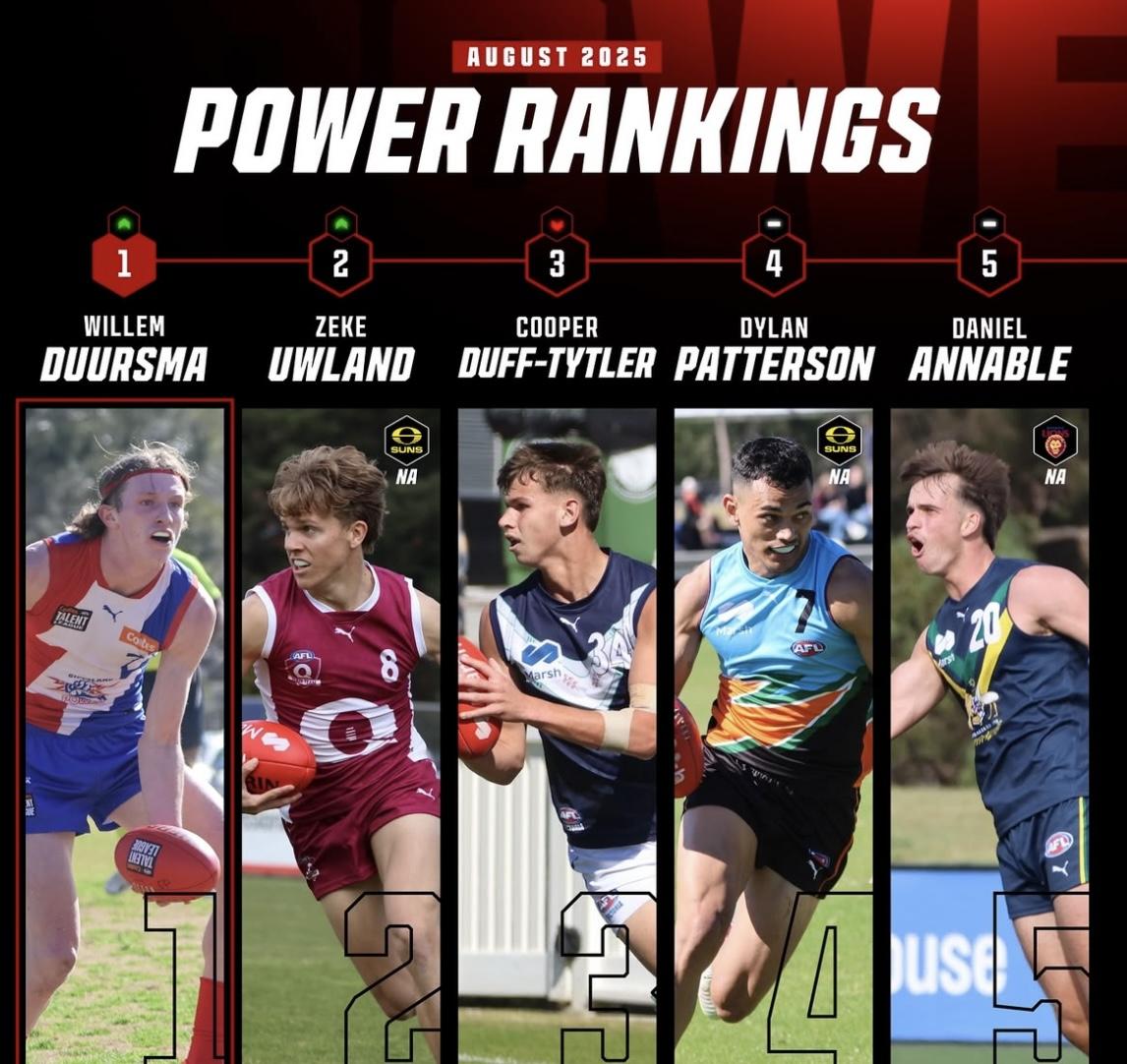
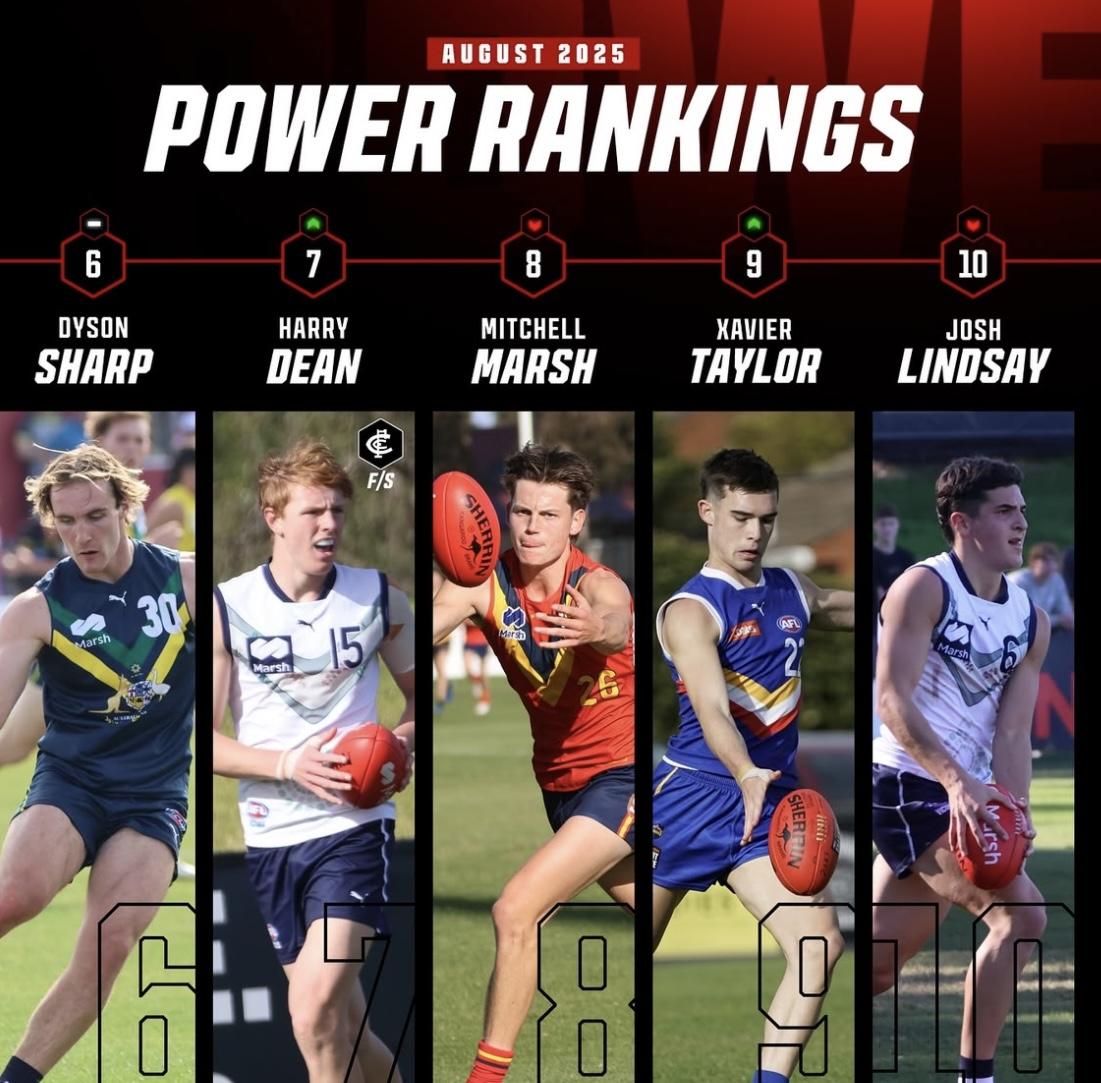
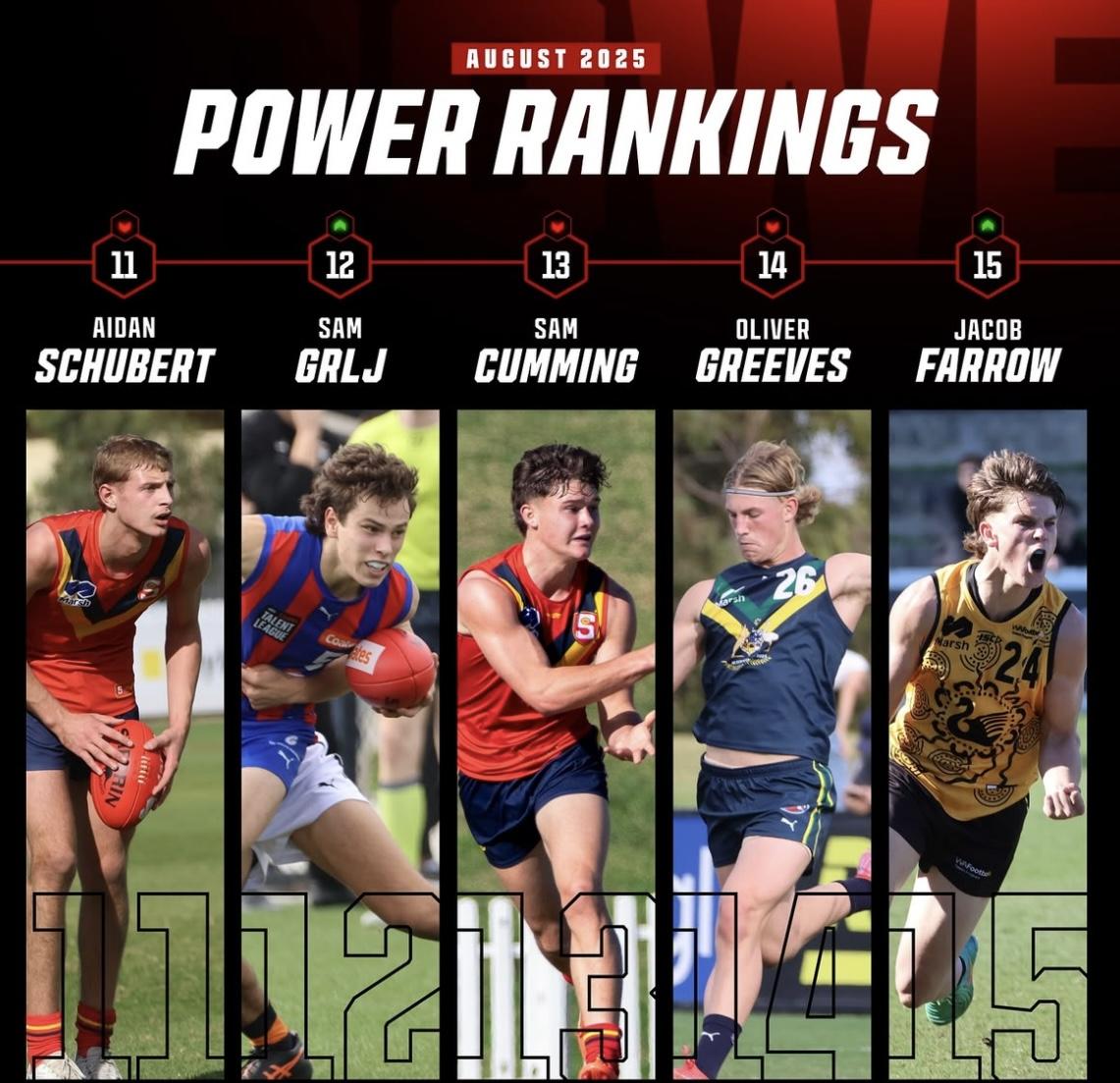
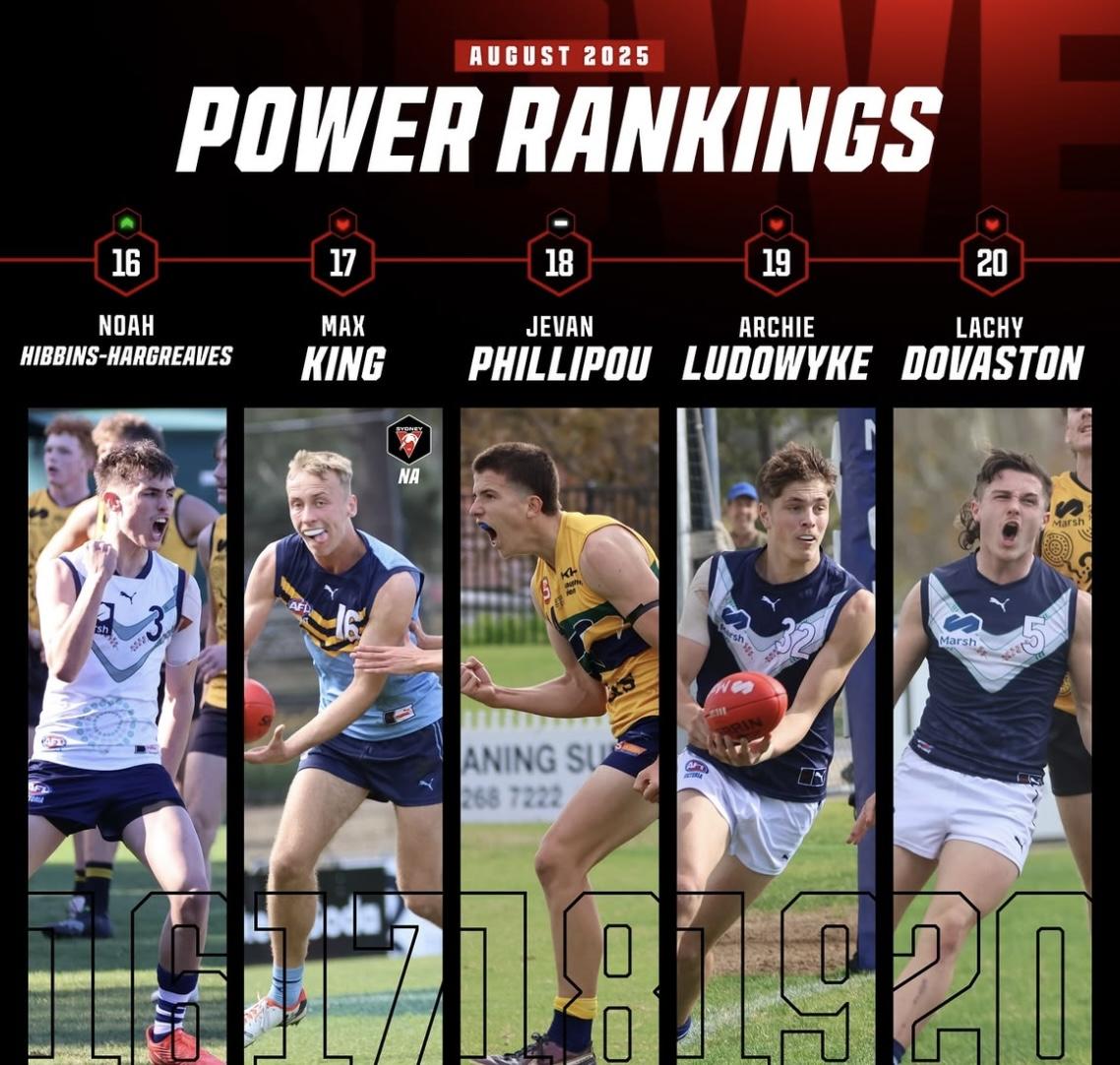
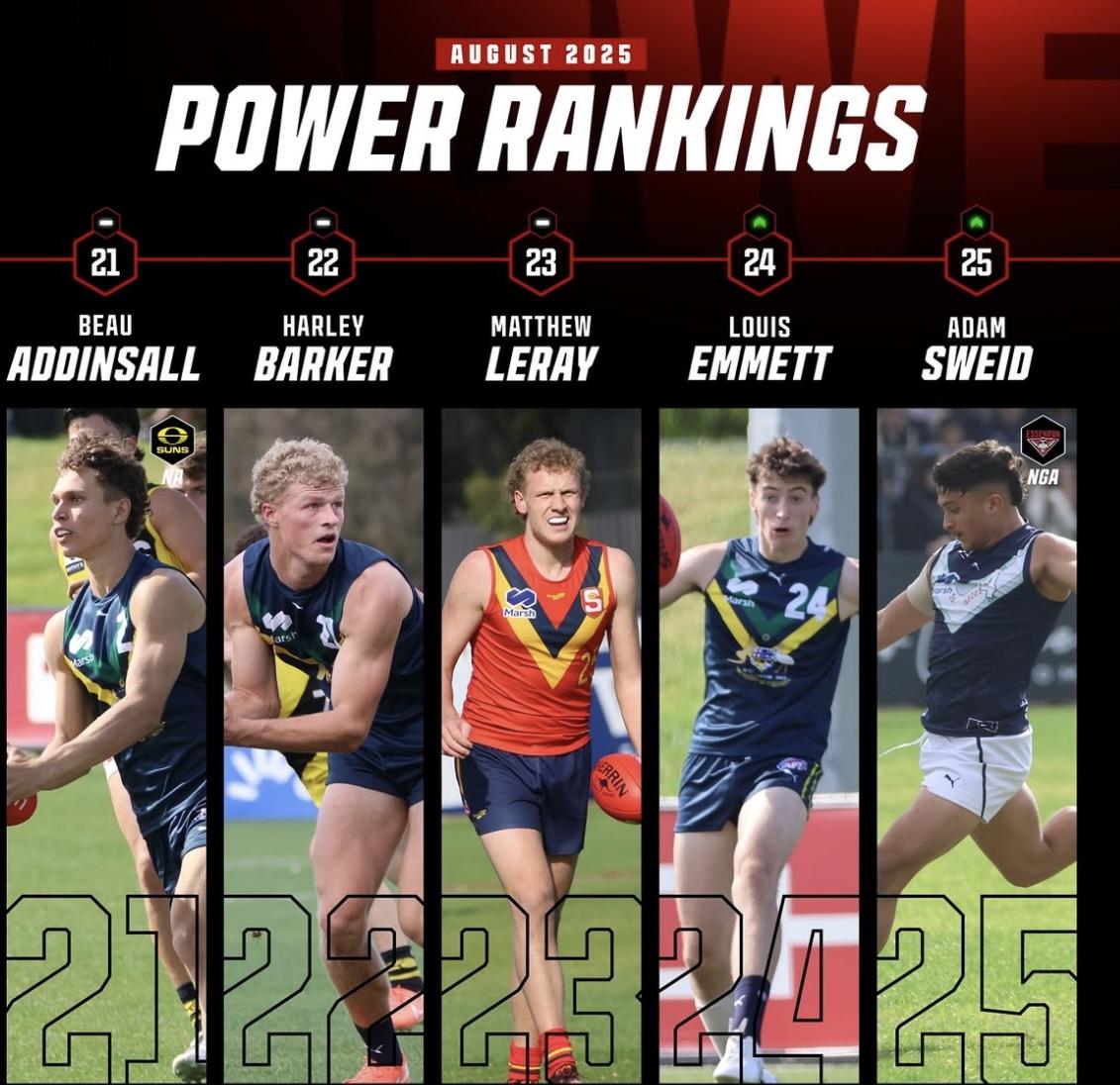
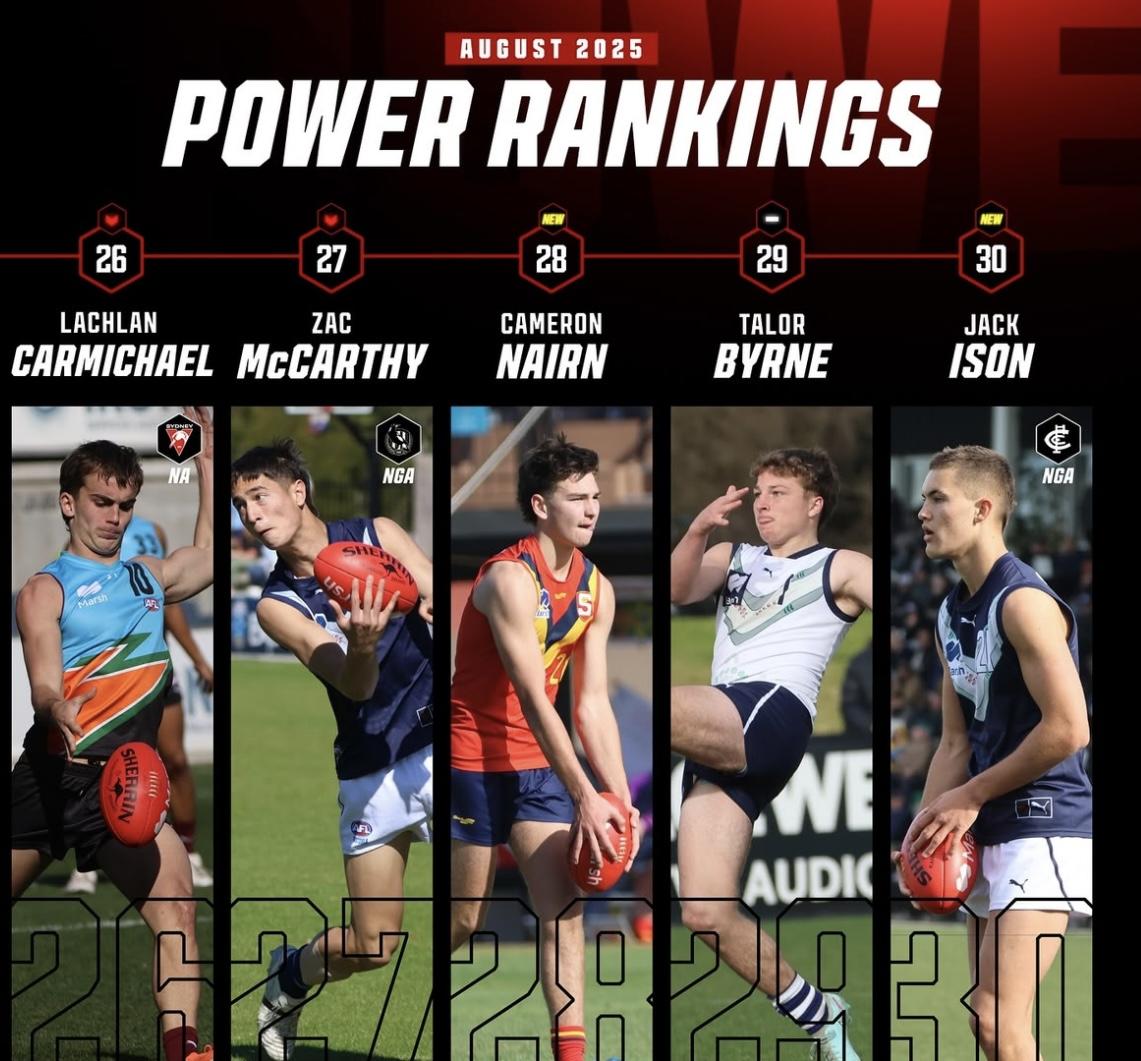
 Clayton Oliver has revealed he wants to remain at Melbourne next season, insisting he would like to repay the club and his teammates including skipper Max Gawn for helping him “sort my shit out”. The Demons won’t make any firm decisions on the future of several of its high-profile contracted players with trade currency until a new coach is appointed before grand final day. But while Oliver is uncertain about what that might mean for him heading into next month’s trade period, he indicated his preference was to stick with Melbourne, where he still has five years remaining on a deal worth more than $1.2m per season. And he paid tribute to sacked coach Simon Goodwin, stressing that he owes his AFL career to his former mentor, as he vowed to do everything he can to return to his peak performance after a personally challenging past three seasons. “I would love to stay at Melbourne, but whatever happens happens,” Oliver told this masthead at the Moonee Valley Racing Club’s Spring Launch. “I’m in a good place now. “I’m loyal … I love the club, they’ve done everything for me. “I love my teammates and I love the fans who’ve always been good to me. I want to stay, so fingers crossed.” Oliver, 28, is one of Melbourne’s most decorated players, winning four best and fairests in his first seven seasons before personal and off-field issues saw his form decline in recent years. He has been part of trade speculation across the past two off-seasons – with Adelaide expressing interest in him at the end of 2023 and he met with Geelong players after the Cats made a strong pitch to him before last year’s trade period when the Demons actively looked to off-load him for a time before changing their mind. It is uncertain yet as to whether Melbourne would seek to trade Oliver, which would be difficult given his lucrative paycheck until the end of 2030, or retain him. But Oliver stressed he could not thank the club enough for helping him get through the tough times, and even though he was shattered by Goodwin’s sacking last month, he made it clear he wants to buy into the road ahead for the Demons. “Goody was great,” Oliver said. “He did everything for me.” “I owe my whole career to him … (I) won four best and fairests, two coaches (association) awards and we won a premiership (2021). “I stuffed up a few times in my career, but he always had my back and the whole club has always looked after me. I owe so much to Goody and Gawy, and Melbourne.” Asked about the potential of Nathan Buckley taking over as the club’s new coach, Oliver said: “I don’t really care who gets the job …” “The culture of the Dees has copped a bit of a hiding (in the media), but we’re not that bad. “We weren’t too far away. We’ll get back there again.” Oliver struggled for fitness and form in 2023 and 2024 and was again modest by his own lofty standards this year. But he started to show a glimpse of better form again across the last six weeks, where he had four 100-plus ranking point games in that time. “I think I was slowly getting back there, not last year (2024, when he struggled), but this year was a bit better,” he said. “I’ll be back.”Apparently it wasn't only against the Demons that season. Seemed they had an in-joke going on at the time. Immature yes. Should that preclude him from being a senior coach now 15 year later. Not at all.SEN newsbreaker Tom Morris thinks that the vacant Melbourne coaching job is Nathan Buckley’s if he wants it. The former Collingwood coach has long been considered a frontrunner for the role after Simon Goodwin’s sacking, and Buckley himself has confirmed he’s going through the process as the Demons narrow down their shortlist of candidates. While it’s believed that all of Brendon Lade, Hayden Skipworth, Steven King and James Kelly are also speaking to the Demons, Morris says the hot seat already has Buckley’s name on it if he tells the club he wants the job. “I keep saying the same thing, if Buckley wants it, it's his,” Morris said on SEN Breakfast. “What has been underestimated, though, people have been saying, ‘Well, what are these other assistant coaches doing?’. “I think it actually bodes well for Brendon Lade, who I know Alan Richardson really rates, if he comes second in this race. “Yes, I am saying it (with a degree of certainty). If Buckley wants it, it’s his and I haven’t wavered from that view.” While Morris is strong in his belief, Melbourne great Garry Lyon’s understanding is quite different after speaking to key people at the club. Lyon believes that the race is still wide open to the half dozen candidates and that a decision hasn’t already been made. “He said definitively that the decision has been made,” Lyon said. “My understanding is that is not the case, and the messaging coming out of Melbourne is that is 100 per cent not the case. “Now, Tom might be proven to be right in time, I don't know, but my understanding right now this second, is that is not the case. A decision hasn't been made. “The process is to unfold, and they've shortlisted, I understand it to be somewhere in the vicinity of half a dozen applicants, and the process starts now. “I will tell you this, Nathan Buckley doesn't think that's the case… he said last night that he's 100 per cent in for the process.” Lyon is also concerned for the other candidates if Morris’ report is to be believed. With the club putting together a panel of key club figures Brad Green, Steve Smith, Paul Guerra and Alan Richardson as well as Jobe Watson, Frank Ponissi and Meahan Callaghan to pick the next coach, Lyon is certain that Melbourne haven’t made an early call with so many voices set to offer their input. “You know how much time I've got for Tom…. but if people believe that, or people around the people who are in for these jobs start to believe that, then they get questions on the back of it… ‘Why would I be putting my hand up if this decision's already been made?’,” Lyon said. “The Melbourne Football Club are definitive in saying that that is not the case. “I've got messages in the last 10 minutes that's saying that is categorically untrue. So, make of that what you will.” The Demons hope to make their appointment ahead of the 2025 AFL Grand Final on September 27.Rookie me Central - Top 30 power rankings (going in reverse)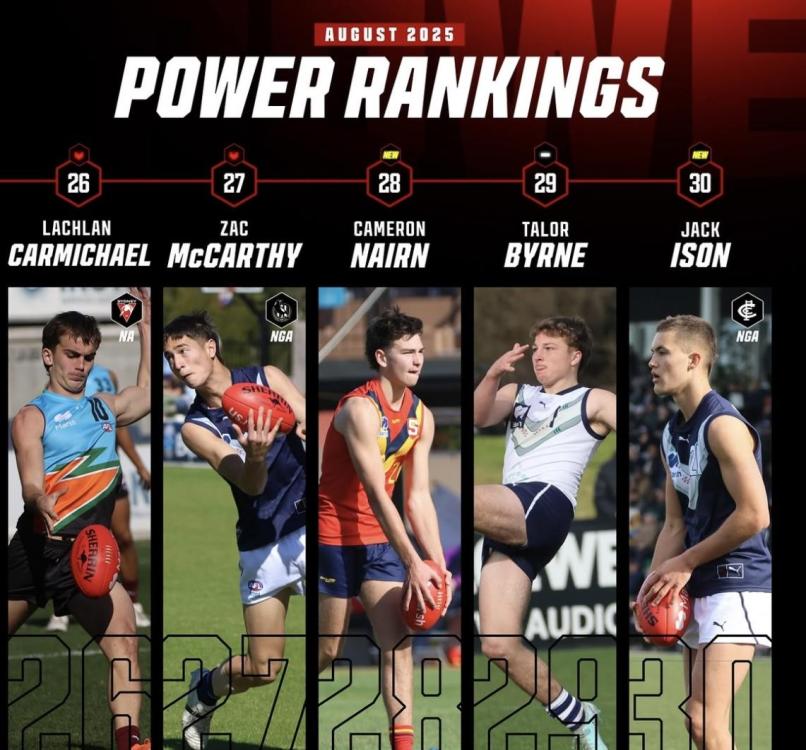
Account
Navigation
Search
Configure browser push notifications
Chrome (Android)
- Tap the lock icon next to the address bar.
- Tap Permissions → Notifications.
- Adjust your preference.
Chrome (Desktop)
- Click the padlock icon in the address bar.
- Select Site settings.
- Find Notifications and adjust your preference.
Safari (iOS 16.4+)
- Ensure the site is installed via Add to Home Screen.
- Open Settings App → Notifications.
- Find your app name and adjust your preference.
Safari (macOS)
- Go to Safari → Preferences.
- Click the Websites tab.
- Select Notifications in the sidebar.
- Find this website and adjust your preference.
Edge (Android)
- Tap the lock icon next to the address bar.
- Tap Permissions.
- Find Notifications and adjust your preference.
Edge (Desktop)
- Click the padlock icon in the address bar.
- Click Permissions for this site.
- Find Notifications and adjust your preference.
Firefox (Android)
- Go to Settings → Site permissions.
- Tap Notifications.
- Find this site in the list and adjust your preference.
Firefox (Desktop)
- Open Firefox Settings.
- Search for Notifications.
- Find this site in the list and adjust your preference.