Skip to content
View in the app

A better way to browse. Learn more.

Demonland

A full-screen app on your home screen with push notifications, badges and more.

To install this app on iOS and iPadOS
  1. Tap the Share icon in Safari
  2. Scroll the menu and tap Add to Home Screen.
  3. Tap Add in the top-right corner.
To install this app on Android
  1. Tap the 3-dot menu (⋮) in the top-right corner of the browser.
  2. Tap Add to Home screen or Install app.
  3. Confirm by tapping Install.

Help and maybe a quick tour?

Featured Replies

Hi guys and girls,


Please delete if its in the wrong place!

Firstly, can someone let me know if there is an APP at all for the site? Its a small bug bear of mine having to log into the website on our phones thats all.

And secondly, can we get email notifications when we get messages or if someone replies to your thread? Im sure we can switch it on but im just unsure!!


Kinda glad to be back with no responsibility as well!! GO DEES!!!:mad::mad::mad:

Edited by Tracca

 
  • Author

sorry the title didnt work!

hey buddy. No app at the moment. May I ask why you do not like logging in to websites on your phone? Aren't you also logged in on an app which is on your phone? Just curious.

You can check your notification settings here. http://demonland.com/forums/notifications/options/

Oh and welcome back.

Why did you give up the Demonology gig?


Must say I share dawi's view on the use of apps on the mobile phone.

It just seems that smart phones are set up for apps and where you go through the web you seem to have more lag, page set up issues etc that are not there with a well designed app.

That being said websites are far more powerful and readable than apps when it comes to using a desktop/laptop

Oh the problems of the first world

Keep up the good work on Demonland..... love it

The tradional "app" is a thing of the past.

Responsive web based apps are the industry standard that adjust to the device you are using.

Edited by Steve Lattimer


Archived

This topic is now archived and is closed to further replies.

Featured Content

  • REPORT: Carlton

    The text messages started flooding in shortly after quarter time. One read: “Is Melbourne even at the ground?” Moments later, as Carlton’s Elijah Hollands kicked the first goal of the second term, the Blues held a commanding 43-point lead. By then, the Demons’ only score was a behind kicked by Brody Mihocek nearly five minutes into the game. Ironically, Mihocek would also register the last minor score of the day after the game took a dramatic turnaround. 

      • Haha
      • Like
    • 4 replies
  • POSTGAME: Carlton

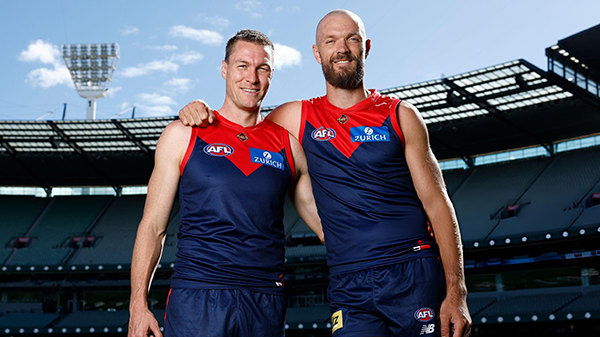
    The Demons snatched Victory form the Jaws of Defeat as they clawed their way back from 43 points down to win by 23 points in Max Gawn and Tom McDonald's 250th matches at the MCG. Never in Doubt!!!

      • Clap
      • Love
    • 517 replies
  • PODCAST: Carlton

    The Demonland Podcast will air LIVE on TUESDAY, 31st March @ 8:00pm. Join Binman, George & I as we dissect the Dees miraculous 66 point turnaround win against the Blues at the G.

      • Haha
    • 41 replies
  • VOTES: Carlton

    The Milestone Man Max Gawn is currently leading the Demonland Player of the Year Award from Jack Steele, Jacob van Rooyen & Christian Salem. Your votes please for the Demons come from way behind win against the Blues. 6, 5, 4, 3, 2, & 1.

      • Like
    • 80 replies
  • GAMEDAY: Carlton

    It’s Game Day and the Demons are back at the MCG for a big occasion, celebrating the 250-game milestones of Premiership pair Max Gawn and Tom McDonald, while rookie Paddy Cross gets his first taste of AFL football against the Blues. What are you hoping to see from the Dees today?

    • 585 replies
  • NON-MFC: Round 03

    Round 3 of the 2026 AFL Premiership Season kicks off on tonight. Follow along and discuss all the big games not involving the Dees. Who are you tipping this week and what are the best results for the Demons?

    • 339 replies

Account

Navigation

Search

Search

Configure browser push notifications

Chrome (Android)
  1. Tap the lock icon next to the address bar.
  2. Tap Permissions → Notifications.
  3. Adjust your preference.
Chrome (Desktop)
  1. Click the padlock icon in the address bar.
  2. Select Site settings.
  3. Find Notifications and adjust your preference.