





Demonland
Primary Administrators
-
Joined
-
Last visited
Everything posted by Demonland
-
Who are you tipping and what are the best results for the Dees?
-
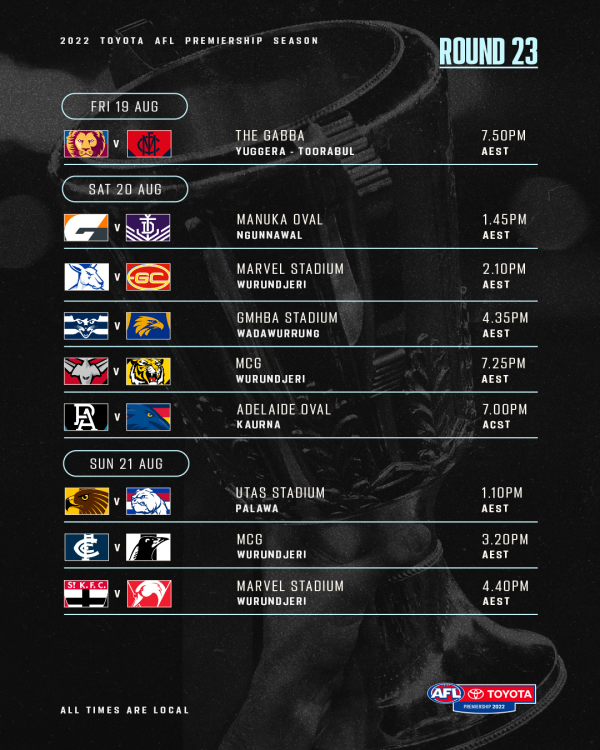
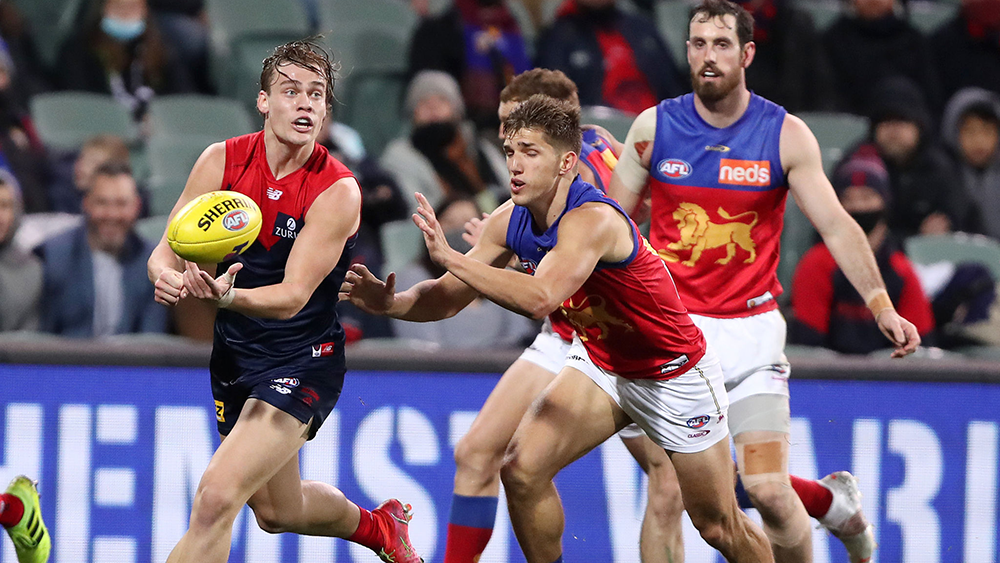
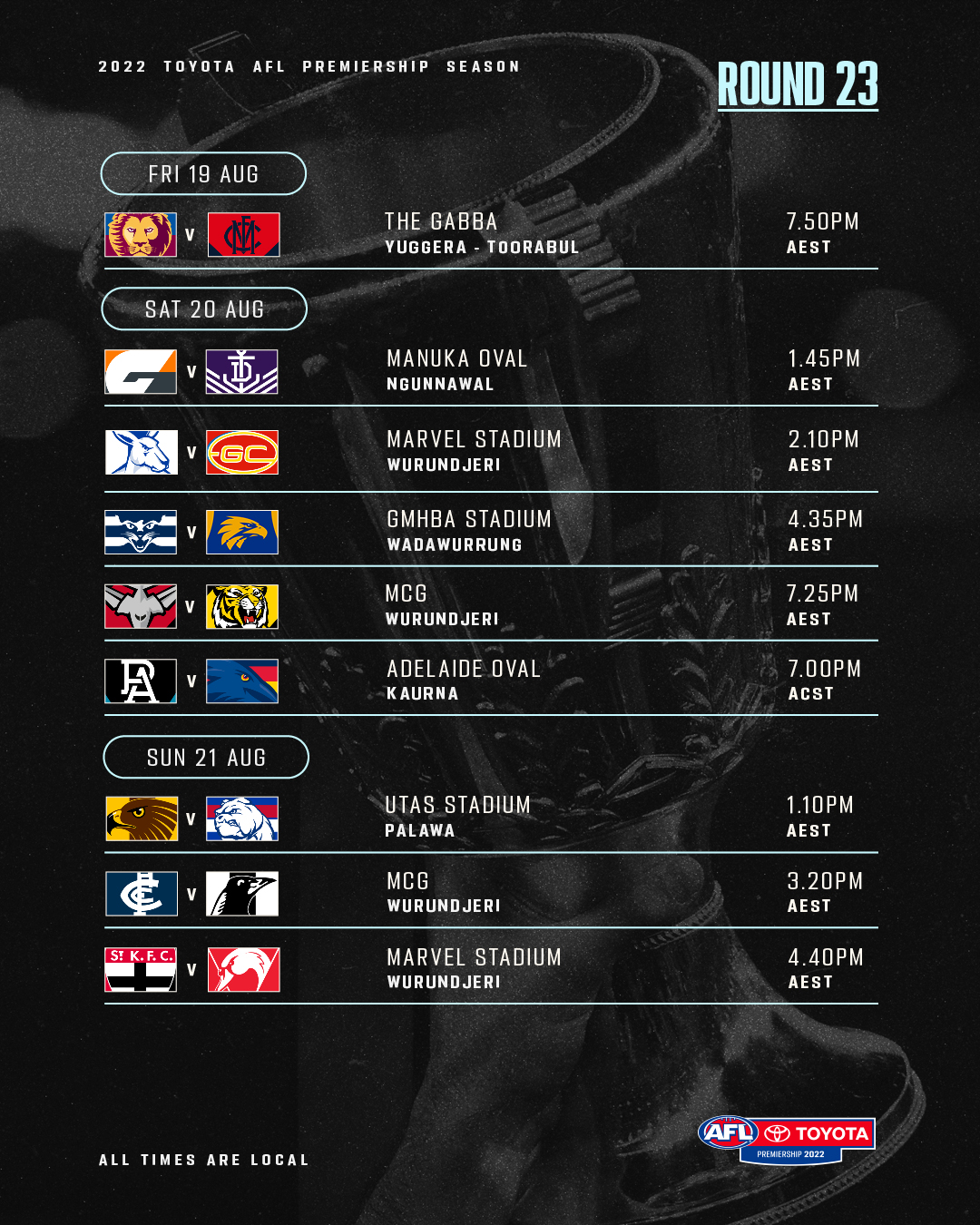
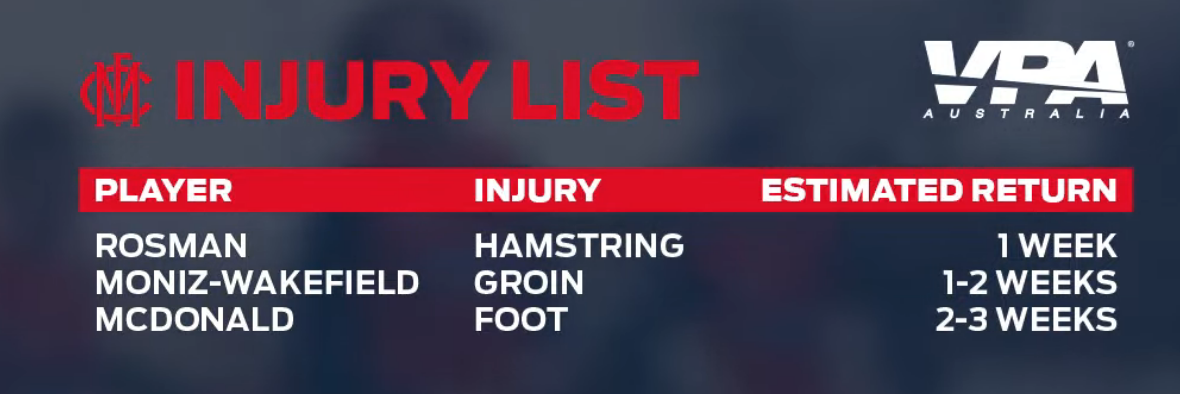
Coming Soon (Actually I'll be flying at the time this is posted so I'll update this top post once I land).Friday evening will see a watershed event in the Melbourne Football Club’s quest for back to back premierships. A loss will almost certainly see the team plummet out of the top four and most likely set up a difficult encounter with the Tigers but a win will leave the team safely within the top four for the second successive season. The concern is that the team has barely been at the top of its game over recent months with only two high class performances since its 17 game winning streak ended in late May; the outlier games being against Brisbane in Round 15 and Fremantle in Round 20. Last week’s effort when it squeaked home with fifteen seconds to spare was its first against a Victorian team since its win over wooden spoon favourite North Melbourne. The Lions’ form has been nothing to write home about either — they’ve dropped their fair share of matches recently and were unimpressive in beating the Saints in their last outing. A little over a month ago, they lost to Essendon at their home fortress, the Gabba. It’s a little surprising therefore that they’re favoured by the bookmakers to win a game against a team that has been fancied by them all season. In any event, neither side is in sparkling form and this leads me to the view that this is really an unpredictable contest — the outcome of which could well be decided by which club turns up to play on the night. And if that’s the case then I’m swayed into thinking that the team more likely to finish inside the top four at the end round is Melbourne. The reason is that the Demons have the advantage of the factor that has also played a role in its fall from outright leader of the pack to a potential finish outside the top four. That factor is that the club has had to contend with a particularly tough draw in the second half of the season that has seen it come up against top eight teams nearly every week over that period. This means that the Demons have been subjected to high levels of pressure and intensity on a weekly basis which is the perfect preparation for any team on the cusp of a finals series. That has certainly not been the case with the Brisbane Lions (or a couple of the other more highly fancied contenders like Geelong who seem to come up against bottom teams who are itching to see the season’s end). The other aspects that see the Demons as more likely to win is the tremendous midfield led by Clayton Oliver, Christian Petracca and Jack Viney but with some powerful backup and the strong mature leadership of Max Gwan with Viney as his lieutenant. Then there’s the uber strong defence with great leadership from cool-headed Jake Lever, Steven May and Christian Salem. If the forwards stand up tall this week and exert maximum pressure, they should see their way into a Qualifying Final, probably against Sydney, either in Sydney or at home. Melbourne by 25 points. THE GAME Brisbane Lions v Melbourne at Gabba, Friday 19 August, 2022 at 7.20pm HEAD TO HEAD * Overall: Brisbane Lions 22 wins Melbourne 28 wins At The Gabba Brisbane 14 wins, Melbourne 8 wins Last Five Meetings: Brisbane Lions 1 win Melbourne 4 wins The Coaches: Fagan 2 wins Goodwin 6 wins * does not include Brisbane Bears or Fitzroy games MEDIA TV live and on demand on Kayo and live on Foxtel. Check your local guides. Radio - check your local guides. LAST TIME THEY MET Melbourne 16.21.117 defeated Brisbane Lions 7.11.53 at The MCG, Round 15, 2022 The Demons responded to three consecutive defeats in the best way possible - by coming out full of intensity and venom. The midfield dominated and Luke Jackson played his best game for the season in the absence of skipper Max Gawn. THE TEAMS BRISBANE LIONS B: D.Gardiner 27 J.Payne 40 D.Rich 10 HB: B.Starcevich 37 H.Andrews 31 K.Coleman 18 C: Z.Bailey 33 D.Zorko 15 H.McCluggage 6 HF: C.Rayner 16 E.Hipwood 30 L.McCarthy 11 F: D.McStay 25 J.Daniher 3 C.Cameron 23 Foll: O.McInerney 46 L.Neale 9 J.Berry 7 I/C: N.Answerth 43 J.Lyons 17 R.Mathieson 36 J.Prior 20 Sub: M.Robinson 5 Emerg: D.Fort 32 R.Lester 35 K.Lohmann 1 In: M.Robinson Out: R.Lester (omitted) MELBOURNE B: H.Petty 35 J.Lever 8 J.Bowey 17 HB: T.Rivers 24 S.May 1 M.Hibberd 14 C: J.Melksham 18 C.Oliver 13 E.Langdon 15 HF: T.Sparrow 32 B.Brown 50 B.Fritsch 31 F: A.Neal-Bullen 30 L.Jackson 6 K.Pickett 36 Foll: M.Gawn 11 J.Viney 7 C.Petracca 5 I/C: A.Brayshaw 10 J.Harmes 4 J.Hunt 29 C.Spargo 9 Sub: J.Jordon 23 Emerg: T.Bedford 12 J.Smith 44 In: J.Bowey Out: C.Salem (groin soreness) Injury List: Round 23 Fraser Rosman - Hamstring | 1 Week Andy Moniz-Wakefield - Groin | 1-2 weeks Tom McDonald - Foot | 2-3 Weeks
 I think he marked it outside the line anyway but i think the actual free was because he played on outside the line which players do all the time.I don't believe it does. I use radio.co to stream.This is from TikTok so I hope it doesn't break some of you boomers but the content should make you happy.I hope we're not 10 goals down at this stage 🤪I will take a photo of my set up when I get home. We used to use Skype but the audio coming from the other hosts was horrible. We now use zencaster and the audio coming from it is pretty good.This is the only known photo of us. We do the podcast remotely. We now use video which makes it easier to give visual cues if someone wants to say something. We have met up a number of times the latest being at last friday's Captain's Run.Thank you to @Dee Zephyr , @ElDiablo14, @Deeoldfart, @kongwacker, @Kelpien, @raDeelaide, @RedsoxMan, @At the break of Gawn, @Wells 11, @Lefty, @pewpewpew, @John Demonic, @Stu, @Vipercrunch, @Doug Reemer, @spirit of norm smith Thank you to @george_on_the_outer & @binman And thank you for listening.I hope this is the case because if we play interstate I want to go and won't be able to if there is no pre-finals bye.It's the stuff of nightmares.We'll be LIVE in 15 minutes. Listen & Chat LIVE: https://demonland.com/podcast Call: 03 9016 3666 Skype: Demonland31How shattered are these sad sacks that the Dees won?Trust me you don't want that. In fact I have a pretty bad headache and there would be zero chance of me doing the podcast tonight in that case.Great question. I would love you to pose this one for next week show too.Great. We'll most likely do a Finals Preview next week and that type of questions probably can be posed about a few of the contenders.I'm just putting together our running sheet and I really like this question but do you want to pose it again next week. I'm not sure if the AFL are doing the pre-finals bye but this would be a great question for then. Please post it next week.






Account
Navigation
Search
Configure browser push notifications
Chrome (Android)
- Tap the lock icon next to the address bar.
- Tap Permissions → Notifications.
- Adjust your preference.
Chrome (Desktop)
- Click the padlock icon in the address bar.
- Select Site settings.
- Find Notifications and adjust your preference.
Safari (iOS 16.4+)
- Ensure the site is installed via Add to Home Screen.
- Open Settings App → Notifications.
- Find your app name and adjust your preference.
Safari (macOS)
- Go to Safari → Preferences.
- Click the Websites tab.
- Select Notifications in the sidebar.
- Find this website and adjust your preference.
Edge (Android)
- Tap the lock icon next to the address bar.
- Tap Permissions.
- Find Notifications and adjust your preference.
Edge (Desktop)
- Click the padlock icon in the address bar.
- Click Permissions for this site.
- Find Notifications and adjust your preference.
Firefox (Android)
- Go to Settings → Site permissions.
- Tap Notifications.
- Find this site in the list and adjust your preference.
Firefox (Desktop)
- Open Firefox Settings.
- Search for Notifications.
- Find this site in the list and adjust your preference.