





whatwhat say what
-
Joined
-
Last visited
Posts posted by whatwhat say what
-
-
-
-
 1
1
-
-
27 minutes ago, binman said: i was a big byron fan, but koz went past him a long time ago.
byron should have been close to a 250+ game player if not for a litany of suspensions, both for on- and off-field reasons
as it was he played over 200 and won 2 premierships, including a norm smith
he played in all three zones and excelled in them all
kozi is a superstar, but byron was a terrific player for a long time too
-
3
-
-
-
1 minute ago, Demon Jack said: Maybe our best and most reliable defender so far this year?
Wasn't expecting him to be a best 22 lock this season but here we are.
lever would like a word, i would think
without an ankle niggle he's been back to his best in 2026
-
2
-
-
17 minutes ago, Redleg said: Bowey played half the game for Casey.
Will need a full game at least before being readied AFL you would think.
i personally don't think so
you don't waste yr best players in the vfl
if he's got enough run in his legs, straight back into seniors
-
3
-
 1
1
-
 1
1
-
-
-
15 minutes ago, old dee said: We will see next weekend how flash we are. L
we've already beaten the two time reigning premiers
we're playing good footy
-
3
-
-
-
 1
1
-
-
8 hours ago, Adam The God said: I was disappointed with the crowd. I might be wrong, but I believe it's the first time the ANZAC Day Eve game has had less than 70k...
Given where the tigs are in 2026, I still think they turn up in good numbers
-
3
-
 1
1
-
-
-
-
10 minutes ago, DiscoStu17 said: Kayo really didn’t want to pay for overtime rates today did they?
Not sure what other people have seen, but I have at least 2X random ad insertion, 4X test patterns, commentary dropout/then random crowd noise insertion, 4Xwhole picture changing to weekly lines.
Pretty impressive day really. And it’s not over yet. I wonder if the AFL has penalties added to the contract?
dazn and the saudi pif just looking for further incentive to charge more for subscriptions
"in order to provide a better service we are increasing our prices and eliminating password sharing"
-
 1
1
-
-
-
-
-
11 minutes ago, binman said: D9nt draftees get a minimum 2 year contract?
rookies only one guaranteed, i thought?
38 minutes ago, DeeSpencer said: I really think he’s playing at the wrong end.
Just let him cause havoc with tackling forward.
it'd be interesting to see but i think he benefits by the ball coming towards and his first instinct being to defend then create offensive ball movement, rather than presenting towards the ball carrier
completely different roles obviously
-
1
-
-
excellent win
11.14.80 to 7.11.53
best on for casey i'd go amw, bonner, mcdonald, cross, sruk, and either henderson or bowey, the latter of whom was on theoretically reduced minutes but looked a class above
final stats:
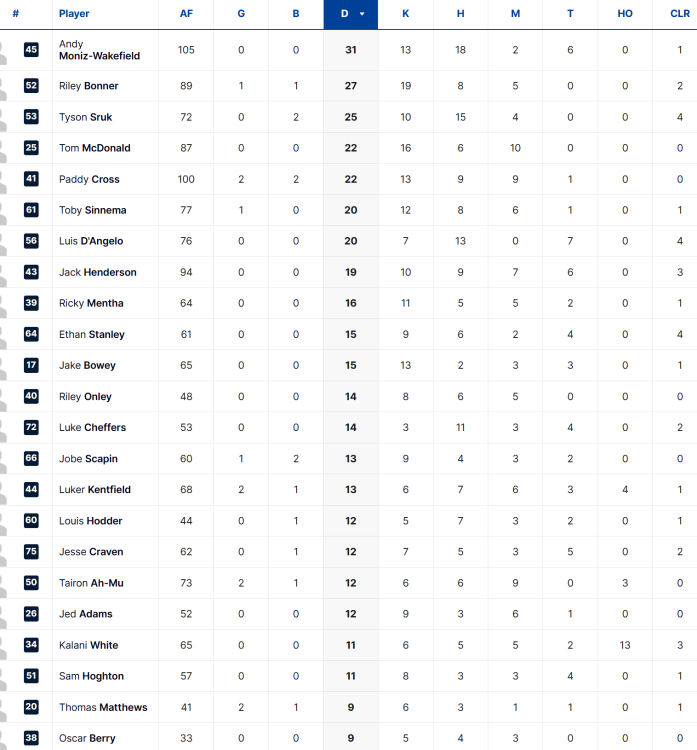
-
1
-
2
-
-
-
3
-
-
Edited by whatwhat say what
matthews, who has been very quiet today, kicks his second and casey are now home
11.13.79 to 7.11.53 at the 25 min mark
-
1
-
-
-
1
-
-
poor finishing keeping the tigs' chances alive as hodder misses another set shot, then sruk blazes long and wide
19 the diff at the 21 min mark
-
1
-
-
paddy cross misses a set shot from directly in front of goal
he's had a good game apart from a couple of blemishes on the scoreboard
-
1
-
-

2026 Possible Targets/Player Movement
in Melbourne Demons
weitering is one of the best key defenders in the competition - i would be very surprised if the baggers were willing to let him go; he's one of the few genuine a-grade players
if he was to leave the baggers you'd imagine he'd command significant trade collateral and a fair chunk of salary cap
he would certainly be in high demand if he wanted to leave them